> ## Documentation Index
> Fetch the complete documentation index at: https://docs.daily.co/llms.txt
> Use this file to discover all available pages before exploring further.
# November 23, 2020
> The latest updates to Daily's real-time audio and video APIs.
# November 23, 2020 🦃
 ## Dashboard
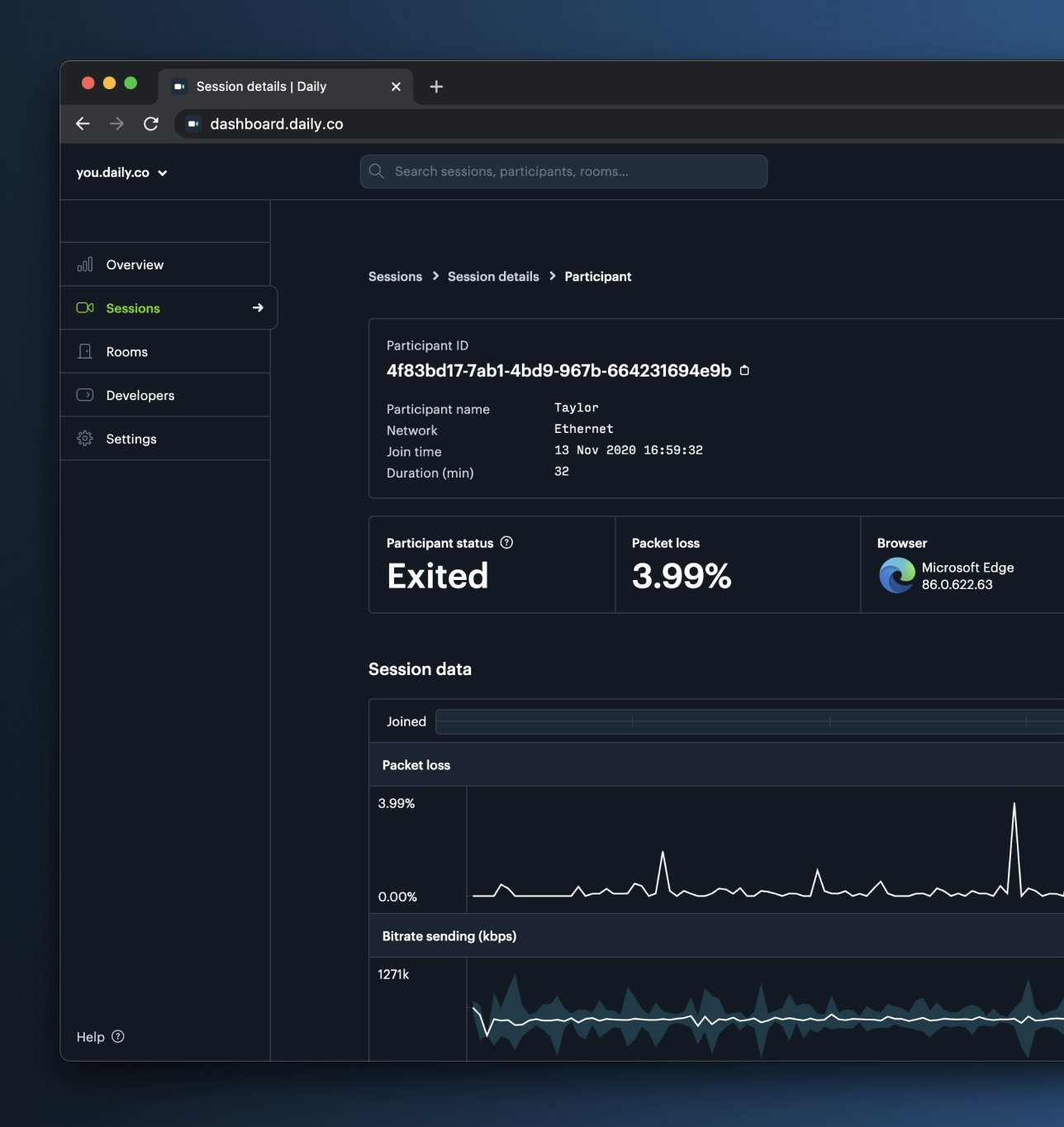
As you may have noticed, the dashboard is now available in **Dark Mode**. If you visit [Settings](https://dashboard.daily.co/settings) you can set this explicitly, or it'll default to match your global system settings.
In the Sessions view for each participant will also see a timeline that visualizes four groups of events:
* Errors
* Connection mode changes (P2P, SFU switches)
* User actions (mic, cam, screenshare on/off)
* Users joining, leaving, reconnecting
This is a direct response to customer questions around how to best make use of the [logs and metrics](https://www.daily.co/blog/the-logs-endpoint-and-beyond/) data. It is meant to be a better entry point into diagnosing call issues.
## Dashboard
As you may have noticed, the dashboard is now available in **Dark Mode**. If you visit [Settings](https://dashboard.daily.co/settings) you can set this explicitly, or it'll default to match your global system settings.
In the Sessions view for each participant will also see a timeline that visualizes four groups of events:
* Errors
* Connection mode changes (P2P, SFU switches)
* User actions (mic, cam, screenshare on/off)
* Users joining, leaving, reconnecting
This is a direct response to customer questions around how to best make use of the [logs and metrics](https://www.daily.co/blog/the-logs-endpoint-and-beyond/) data. It is meant to be a better entry point into diagnosing call issues.
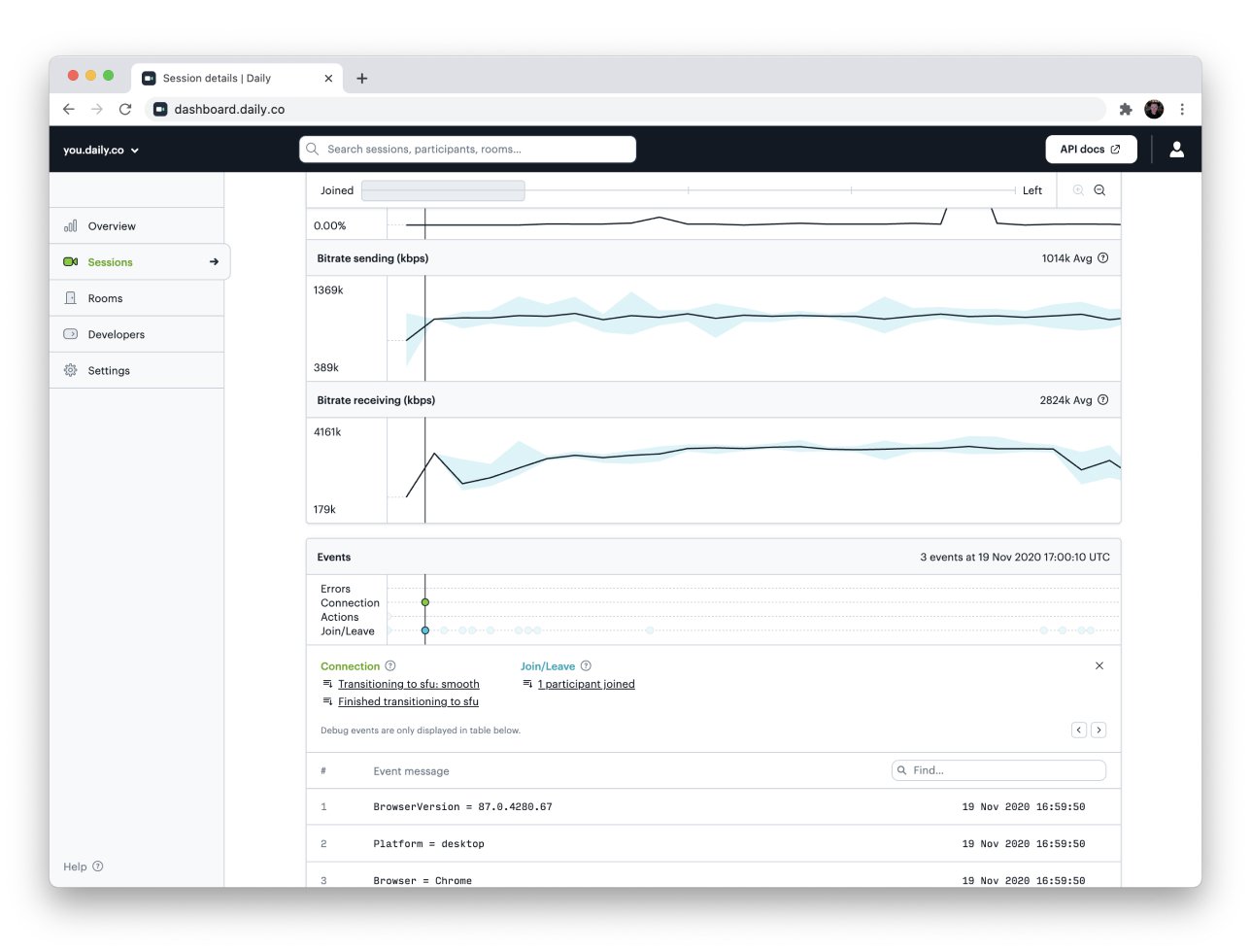 *The event timeline view*
Next, we have put in place a data retention policy for logs and metrics according to your [plan](https://www.daily.co/pricing) type:
* Free: 1 day
* Launch: 3 days
* Scale: 21 days
* Custom options for enterprise plans
In addition, we:
* 📈 Improved the metrics plotting for longer meetings, making it easier to see and interact with call metrics data
* ⚛️ Now display logs and metrics for React Native clients
## Core Call Experience
* 🖥 Removed the 2 screenshare limit in call object mode
## API
* 🎁 Added new `/presence` [endpoint](/reference/rest-api/presence)
## Libraries
`react-native-daily-js 0.3.0` now supports logs and metrics. You can view them in your [Dashboard](https://dashboard.daily.co). `daily-js` now includes several improvements to support features in `react-native-daily-js`.
* `daily-js` `0.9.995` - [Release Notes](https://github.com/daily-co/daily-js/releases/tag/daily-js-2020-11-02-0.9.995)
* `daily-js` `0.9.994` - [Release Notes](https://github.com/daily-co/daily-js/releases/tag/daily-js-2020-10-19-0.9.994)
* `react-native-daily-js` `0.3.0` - [Release Notes](https://github.com/daily-co/react-native-daily-js/releases/tag/react-native-daily-js-2020-11-16-0.3.0)
* `react-native-daily-js` `0.2.0` - [Release Notes](https://github.com/daily-co/react-native-daily-js/releases/tag/react-native-daily-js-2020-11-02-0.2.0)
## Demos
* [Daily Screenshare - Chrome Extension](https://github.com/daily-demos/screenshare-chrome-ext)
* [Fullscreen prebuitl UI w/Netlify backend](https://github.com/daily-demos/prebuilt-and-serverless)
## New blog posts
*The event timeline view*
Next, we have put in place a data retention policy for logs and metrics according to your [plan](https://www.daily.co/pricing) type:
* Free: 1 day
* Launch: 3 days
* Scale: 21 days
* Custom options for enterprise plans
In addition, we:
* 📈 Improved the metrics plotting for longer meetings, making it easier to see and interact with call metrics data
* ⚛️ Now display logs and metrics for React Native clients
## Core Call Experience
* 🖥 Removed the 2 screenshare limit in call object mode
## API
* 🎁 Added new `/presence` [endpoint](/reference/rest-api/presence)
## Libraries
`react-native-daily-js 0.3.0` now supports logs and metrics. You can view them in your [Dashboard](https://dashboard.daily.co). `daily-js` now includes several improvements to support features in `react-native-daily-js`.
* `daily-js` `0.9.995` - [Release Notes](https://github.com/daily-co/daily-js/releases/tag/daily-js-2020-11-02-0.9.995)
* `daily-js` `0.9.994` - [Release Notes](https://github.com/daily-co/daily-js/releases/tag/daily-js-2020-10-19-0.9.994)
* `react-native-daily-js` `0.3.0` - [Release Notes](https://github.com/daily-co/react-native-daily-js/releases/tag/react-native-daily-js-2020-11-16-0.3.0)
* `react-native-daily-js` `0.2.0` - [Release Notes](https://github.com/daily-co/react-native-daily-js/releases/tag/react-native-daily-js-2020-11-02-0.2.0)
## Demos
* [Daily Screenshare - Chrome Extension](https://github.com/daily-demos/screenshare-chrome-ext)
* [Fullscreen prebuitl UI w/Netlify backend](https://github.com/daily-demos/prebuilt-and-serverless)
## New blog posts