> ## Documentation Index
> Fetch the complete documentation index at: https://docs.daily.co/llms.txt
> Use this file to discover all available pages before exploring further.
# Handling device permissions
> Learn about common device permission errors and best practices for handling camera and microphone access in Daily applications.
Accessing media input devices — cams, mics, and screens — can involve many and sometimes conflicting permission layers. Browsers, operating systems, devices, and participants are all factors that can complicate whether audio or video is shared or blocked as intended.
This guide covers common media device errors and how to help participants resolve them, plus general best practices for handling media devices in your app.
## Common media device errors
Daily accesses participant media input devices through the browser's [`MediaDevices`](https://developer.mozilla.org/en-US/docs/Web/API/MediaDevices) interface. The interface's [`getUserMedia()`](https://developer.mozilla.org/en-US/docs/Web/API/MediaDevices/getUserMedia) method prompts the user for device permissions and creates a [`MediaStream`](https://developer.mozilla.org/en-US/docs/Web/API/MediaStream) with the corresponding tracks if permission is granted.
If something goes wrong, the browser throws an [exception](https://developer.mozilla.org/en-US/docs/Web/API/MediaDevices/getUserMedia#exceptions) and Daily emits a [`camera-error`](/reference/daily-js/events/settings-events#camera-error) event. Browsers are inconsistent in their implementations of these exceptions for any given root issue — for example, if there is no camera plugged in, Chrome and Firefox throw a `NotFoundError`, but Safari throws an `OverconstrainedError`. Daily normalizes these inconsistencies so the same underlying issue generates the same error type regardless of browser or OS. The most common device errors are detailed below. For full details on all error categories, see the [`camera-error` reference](/reference/daily-js/events/settings-events#camera-error).
### Device in use
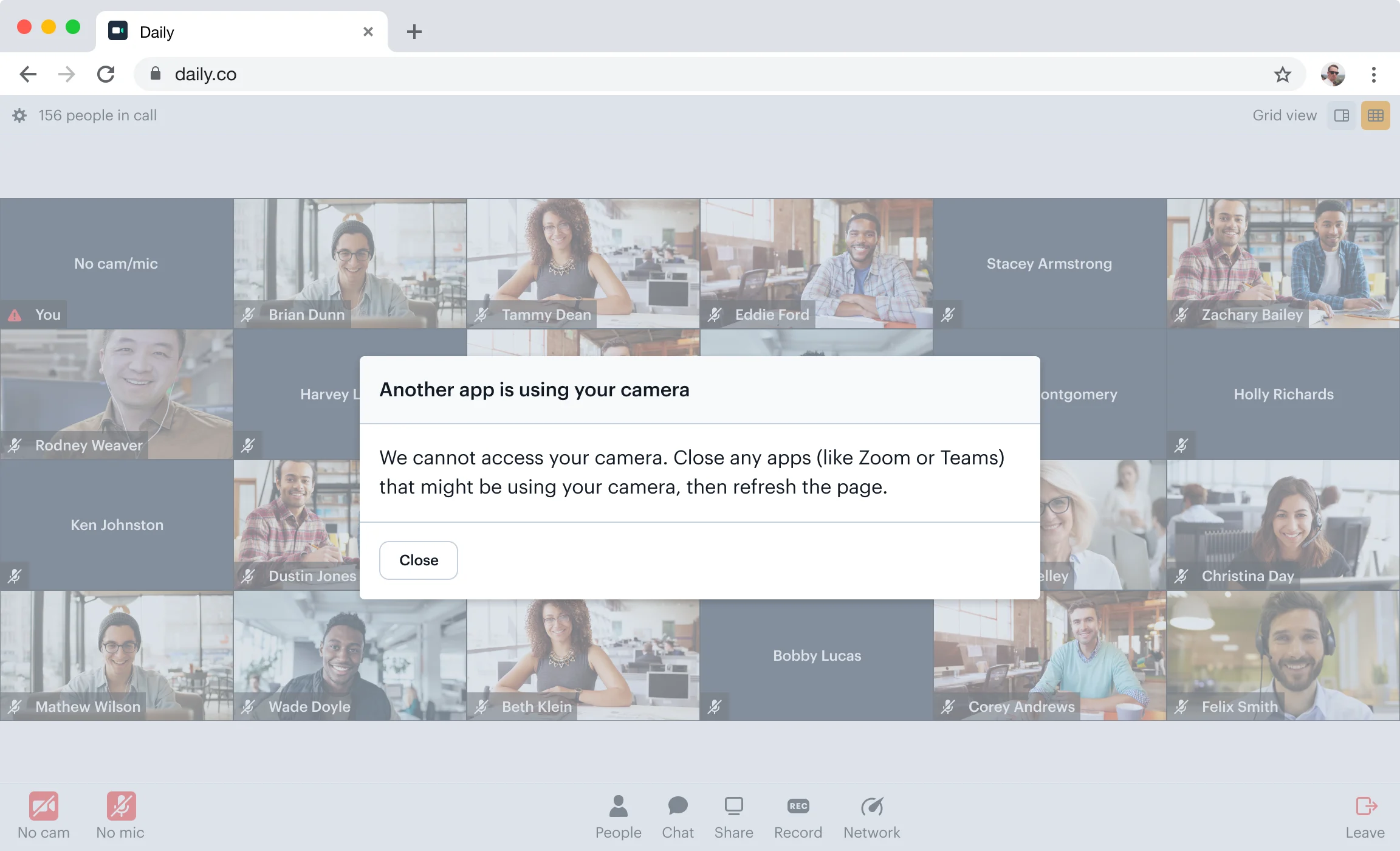
Most common on Windows when another app is using the participant's camera.
The `camera-error` event's `error.type` will be `cam-in-use`, `mic-in-use`, or `cam-mic-in-use`:
```json theme={null}
{
"action": "camera-error",
"error": {
"type": "cam-in-use",
"msg": "Camera in use by another application."
},
"errorMsg": { "errorMsg": "not allowed" },
"callClientId": "17225364729060.9442072768918943"
}
```
Alert the participant that another application is using their device and ask them to quit it and reload the call.
 ### Permissions denied
Happens when the call hasn't been granted access to the participant's device — either the participant clicked "Block" in the browser permissions prompt, or the browser hasn't been granted access in OS settings. This is one of the most common `getUserMedia()` errors.
The `camera-error` event's `error.type` will be `'permissions'`. The `error.blockedBy` field indicates whether the block came from the user or the OS, and `error.blockedMedia` indicates which media is blocked:
```json theme={null}
{
"action": "camera-error",
"error": {
"type": "permissions",
"msg": "Permissions denied by user.",
"blockedBy": "user",
"blockedMedia": ["video", "audio"]
},
"errorMsg": { "errorMsg": "not allowed" },
"callClientId": "17225364729060.9442072768918943"
}
```
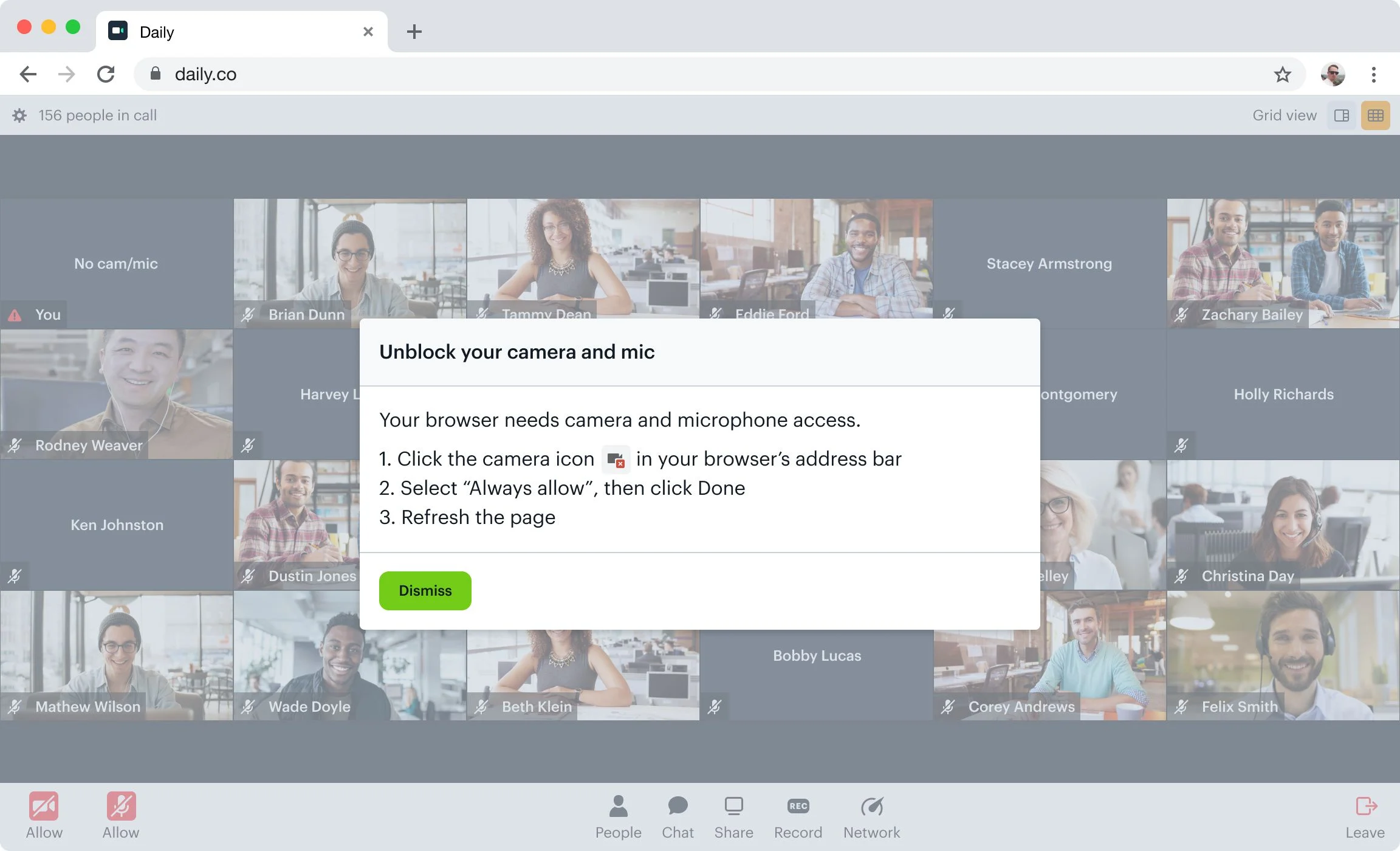
Whether the participant blocked access intentionally or by accident, the call UI should reflect that the device is blocked. Daily Prebuilt, for example, displays media icons in red with "Allow" underneath. When clicked, the participant sees instructions for how to unblock their devices.
### Permissions denied
Happens when the call hasn't been granted access to the participant's device — either the participant clicked "Block" in the browser permissions prompt, or the browser hasn't been granted access in OS settings. This is one of the most common `getUserMedia()` errors.
The `camera-error` event's `error.type` will be `'permissions'`. The `error.blockedBy` field indicates whether the block came from the user or the OS, and `error.blockedMedia` indicates which media is blocked:
```json theme={null}
{
"action": "camera-error",
"error": {
"type": "permissions",
"msg": "Permissions denied by user.",
"blockedBy": "user",
"blockedMedia": ["video", "audio"]
},
"errorMsg": { "errorMsg": "not allowed" },
"callClientId": "17225364729060.9442072768918943"
}
```
Whether the participant blocked access intentionally or by accident, the call UI should reflect that the device is blocked. Daily Prebuilt, for example, displays media icons in red with "Allow" underneath. When clicked, the participant sees instructions for how to unblock their devices.
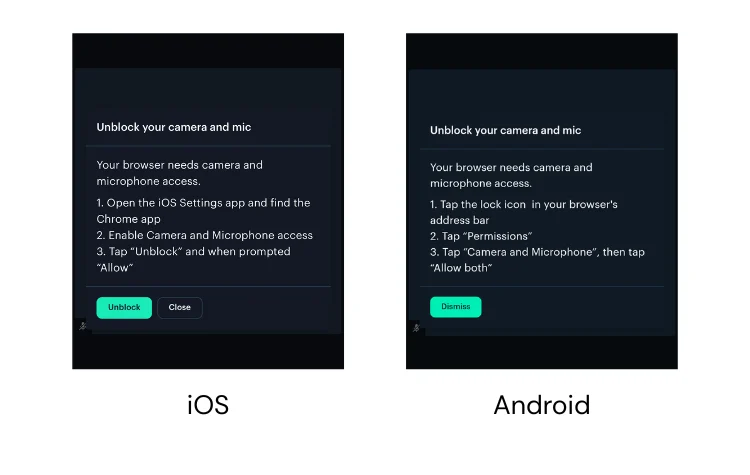
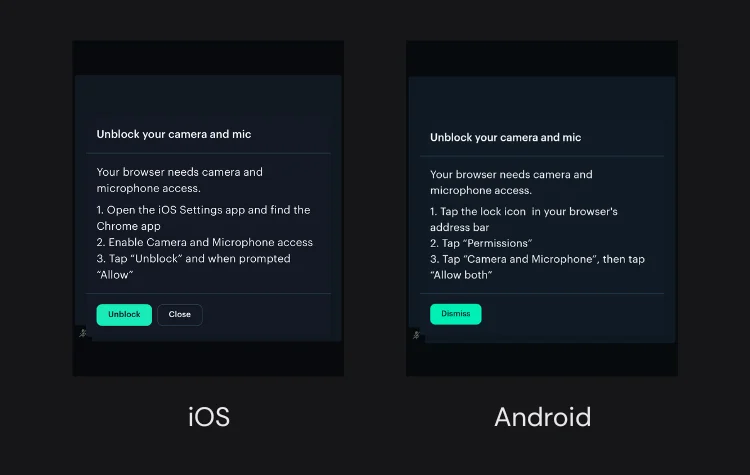
 How to unblock a device depends on the device's manufacturer and the participant's browser. On some devices like iOS, a page refresh is enough to re-trigger the browser permission prompt. On others like some Android phones, participants may need to go into device settings to allow camera and microphone permissions. Testing on multiple devices and browsers is recommended.
### No available devices
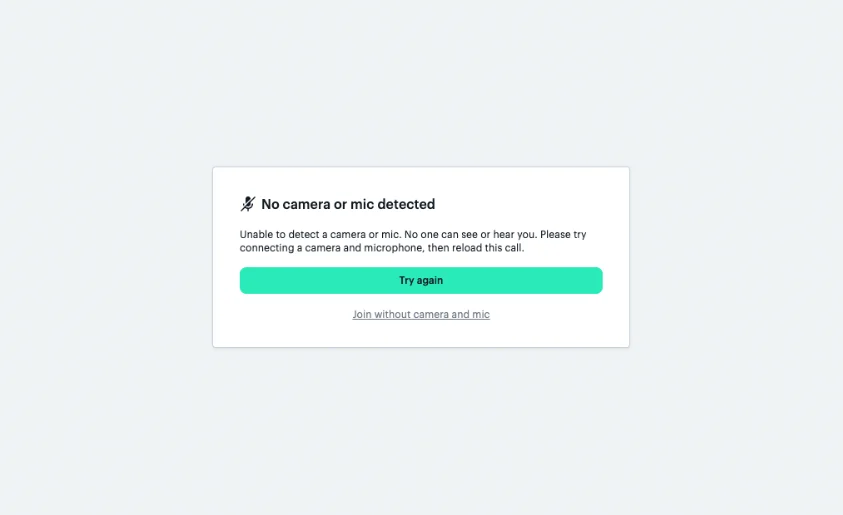
If the browser can't find any input devices for a given media type, the `camera-error` event's `error.type` will be `"not-found"`, with an `error.missingMedia` field detailing which devices were not found:
```json theme={null}
{
"action": "camera-error",
"error": {
"type": "not-found",
"msg": "No device found.",
"missingMedia": ["video"]
},
"errorMsg": { "errorMsg": "devices error" },
"callClientId": "17225364729060.9442072768918943"
}
```
Prompt the participant to check their devices and reload the call.
How to unblock a device depends on the device's manufacturer and the participant's browser. On some devices like iOS, a page refresh is enough to re-trigger the browser permission prompt. On others like some Android phones, participants may need to go into device settings to allow camera and microphone permissions. Testing on multiple devices and browsers is recommended.
### No available devices
If the browser can't find any input devices for a given media type, the `camera-error` event's `error.type` will be `"not-found"`, with an `error.missingMedia` field detailing which devices were not found:
```json theme={null}
{
"action": "camera-error",
"error": {
"type": "not-found",
"msg": "No device found.",
"missingMedia": ["video"]
},
"errorMsg": { "errorMsg": "devices error" },
"callClientId": "17225364729060.9442072768918943"
}
```
Prompt the participant to check their devices and reload the call.
 ## Best practices for handling media devices
### Device Permission Prompts
In daily-js, permissions prompts will be triggered whenever media is first requested, typically on `startCamera()` or `join()`. By default, if the camera is enabled, daily-js will prompt for permission for both the camera and microphone, regardless of whether the microphone is enabled. This ensures a smoother user experience by reducing the number of prompts the participant sees. However, if the participant joins/startsCamera with only the mic enabled, the browser will only prompt for microphone access. This avoids the camera light turning on before the participant explicitly enables the camera, which can be a jarring experience. To change these default behaviors, see [`alwaysIncludeMicInPermissionPrompt`](/reference/daily-js/types/daily-call-options#param-always-include-mic-in-permission-prompt) and [`alwaysIncludeCamInPermissionPrompt`](/reference/daily-js/types/daily-call-options#param-always-include-cam-in-permission-prompt).
### Adjust instructions based on browser and device
Device manufacturers and browsers don't always handle device permissions the same way. For example, the steps to re-allow access after a permissions error differ by OS, device, and browser. For the best experience, your call UI should show device-specific instructions.
## Best practices for handling media devices
### Device Permission Prompts
In daily-js, permissions prompts will be triggered whenever media is first requested, typically on `startCamera()` or `join()`. By default, if the camera is enabled, daily-js will prompt for permission for both the camera and microphone, regardless of whether the microphone is enabled. This ensures a smoother user experience by reducing the number of prompts the participant sees. However, if the participant joins/startsCamera with only the mic enabled, the browser will only prompt for microphone access. This avoids the camera light turning on before the participant explicitly enables the camera, which can be a jarring experience. To change these default behaviors, see [`alwaysIncludeMicInPermissionPrompt`](/reference/daily-js/types/daily-call-options#param-always-include-mic-in-permission-prompt) and [`alwaysIncludeCamInPermissionPrompt`](/reference/daily-js/types/daily-call-options#param-always-include-cam-in-permission-prompt).
### Adjust instructions based on browser and device
Device manufacturers and browsers don't always handle device permissions the same way. For example, the steps to re-allow access after a permissions error differ by OS, device, and browser. For the best experience, your call UI should show device-specific instructions.
 ### Create a pre-call lobby for device setup
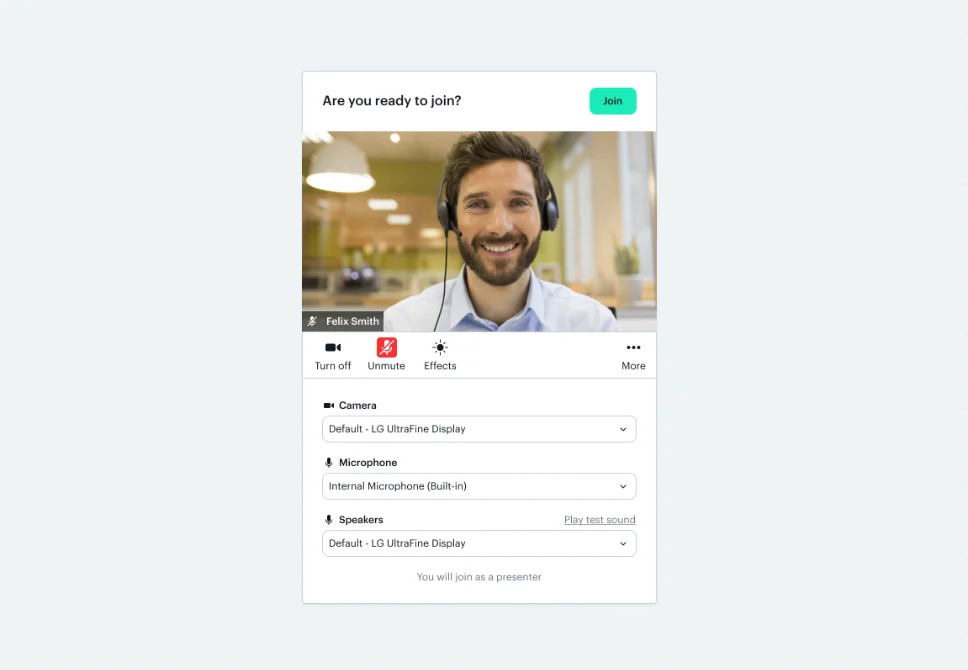
A test call page, lobby, or "green room" where participants can set up their devices before joining gives them a safe space to read and respond to permission prompts, configure their devices, and resolve any mistakes before going live.
To enable Daily Prebuilt's prejoin UI, set the [`enable_prejoin_ui`](/reference/rest-api/rooms/update-room#body-properties-enable-people-ui) property to `true` at the room or domain level.
### Create a pre-call lobby for device setup
A test call page, lobby, or "green room" where participants can set up their devices before joining gives them a safe space to read and respond to permission prompts, configure their devices, and resolve any mistakes before going live.
To enable Daily Prebuilt's prejoin UI, set the [`enable_prejoin_ui`](/reference/rest-api/rooms/update-room#body-properties-enable-people-ui) property to `true` at the room or domain level.
 For custom apps, [`startCamera()`](/reference/daily-js/instance-methods/start-camera) is a good starting point for building a lobby — it requests device access and starts the camera before the participant joins the call.
To give participants visual confirmation that their microphone is working, call [`startLocalAudioLevelObserver()`](/reference/daily-js/instance-methods/start-local-audio-level-observer) after `startCamera()`. Daily will then emit [`local-audio-level`](/reference/daily-js/events/media-events#local-audio-level) events at a regular interval with a volume value between `0` and `1`, which you can use to drive a mic activity indicator in your lobby UI:
```javascript theme={null}
await call.startCamera();
await call.startLocalAudioLevelObserver(500); // interval in ms
call.on('local-audio-level', ({ audioLevel }) => {
updateMicIndicator(audioLevel); // e.g. animate a level meter
});
```
Call [`stopLocalAudioLevelObserver()`](/reference/daily-js/instance-methods/stop-local-audio-level-observer) when the participant enters the call or leaves the lobby.
### iOS development and device permissions
Media device [permission requests](https://developer.apple.com/documentation/avfoundation/avcapturedevice/1624584-requestaccess) are async when using [AVFoundation](https://developer.apple.com/av-foundation/), Apple's audiovisual framework. The completion handler for these requests is called on an arbitrary dispatch queue.
These permissions should never be blocked, as that can lead to deadlocks. An API that was designed to be synchronous and blocking may need to be made async with a callback when adapted for iOS.
For custom apps, [`startCamera()`](/reference/daily-js/instance-methods/start-camera) is a good starting point for building a lobby — it requests device access and starts the camera before the participant joins the call.
To give participants visual confirmation that their microphone is working, call [`startLocalAudioLevelObserver()`](/reference/daily-js/instance-methods/start-local-audio-level-observer) after `startCamera()`. Daily will then emit [`local-audio-level`](/reference/daily-js/events/media-events#local-audio-level) events at a regular interval with a volume value between `0` and `1`, which you can use to drive a mic activity indicator in your lobby UI:
```javascript theme={null}
await call.startCamera();
await call.startLocalAudioLevelObserver(500); // interval in ms
call.on('local-audio-level', ({ audioLevel }) => {
updateMicIndicator(audioLevel); // e.g. animate a level meter
});
```
Call [`stopLocalAudioLevelObserver()`](/reference/daily-js/instance-methods/stop-local-audio-level-observer) when the participant enters the call or leaves the lobby.
### iOS development and device permissions
Media device [permission requests](https://developer.apple.com/documentation/avfoundation/avcapturedevice/1624584-requestaccess) are async when using [AVFoundation](https://developer.apple.com/av-foundation/), Apple's audiovisual framework. The completion handler for these requests is called on an arbitrary dispatch queue.
These permissions should never be blocked, as that can lead to deadlocks. An API that was designed to be synchronous and blocking may need to be made async with a callback when adapted for iOS.