> ## Documentation Index
> Fetch the complete documentation index at: https://docs.daily.co/llms.txt
> Use this file to discover all available pages before exploring further.
# Telnyx
> Send inbound calls from Telnyx SIP Trunking to your Daily SIP trunk.
Route inbound calls from a Telnyx number to your Daily
[SIP trunk](/docs/guides/features/dial-in-dial-out/sip-trunk). Telnyx delivers inbound calls through a **SIP
Connection**; point that connection at your Daily trunk host and assign your number to it.
## Prerequisites
* A Daily SIP trunk — note its `sip_uri` from the
[create call](/docs/guides/features/dial-in-dial-out/sip-trunk#create-a-trunk), for example
`sip:examplecorp-supporttelnyx.siptrunk.sip-us.daily.co`.
* A Telnyx account with a phone number.
## Configure the connection
In the [Telnyx Mission Control Portal](https://portal.telnyx.com), open **SIP Trunking** from the side menu
and click **+ Create SIP Connection**.
Under **Details**, set **Name** to something memorable (for example `examplecorp-support`) and pick **FQDN**
as the **Type** — the option recommended for SIP devices that route inbound calls to FQDNs. Click **Create**.
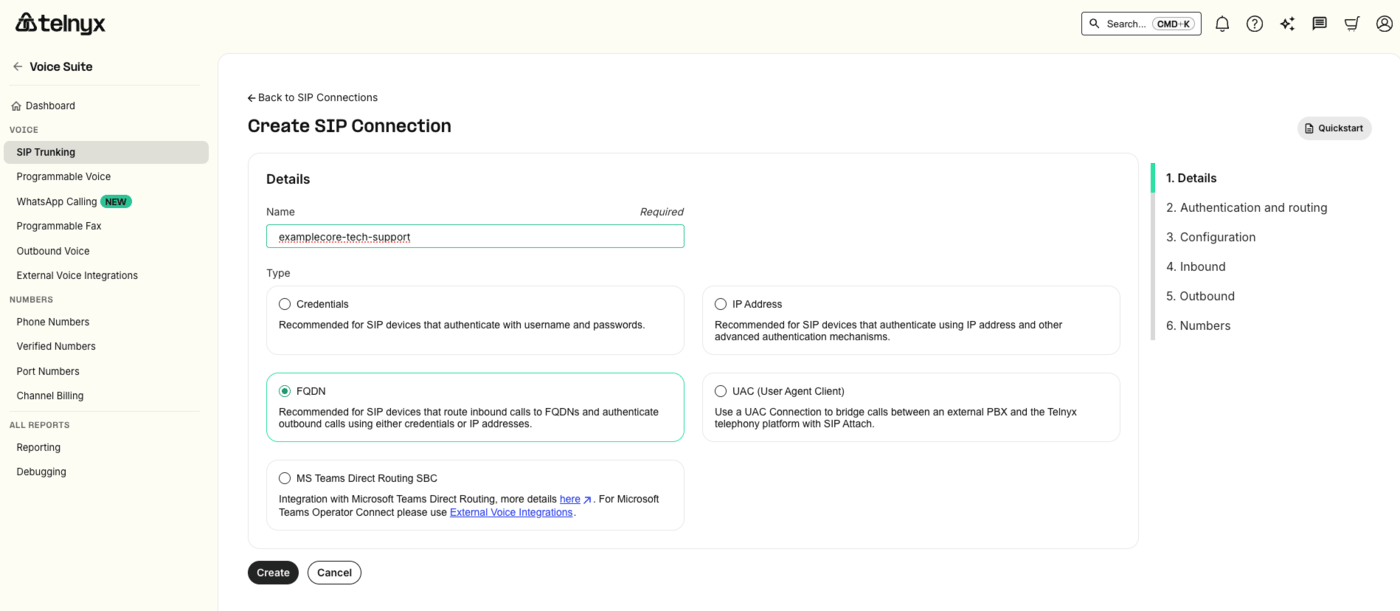 Telnyx opens a six-step wizard. You only need **1. Details**, **2. Authentication and routing**, and
**6. Numbers** — Configuration, Inbound, and Outbound can stay at their defaults for inbound-only routing to
Daily.
On **2. Authentication and routing**, find the **FQDNs** panel and click **+ Add FQDN**. In the dialog:
* **DNS record type** — `A`, which is what you want for a plain hostname. (`SRV` is there if you'd rather
point at an SRV record.)
* **FQDN** — the host from your `sip_uri`, with no `sip:` scheme and no user part:
`examplecorp-supporttelnyx.siptrunk.sip-us.daily.co`. Telnyx fills the user part with the dialed number;
Daily routes on the host label and ignores it either way.
* **Port** — `5060` for UDP/TCP, or `5061` for TLS.
Telnyx opens a six-step wizard. You only need **1. Details**, **2. Authentication and routing**, and
**6. Numbers** — Configuration, Inbound, and Outbound can stay at their defaults for inbound-only routing to
Daily.
On **2. Authentication and routing**, find the **FQDNs** panel and click **+ Add FQDN**. In the dialog:
* **DNS record type** — `A`, which is what you want for a plain hostname. (`SRV` is there if you'd rather
point at an SRV record.)
* **FQDN** — the host from your `sip_uri`, with no `sip:` scheme and no user part:
`examplecorp-supporttelnyx.siptrunk.sip-us.daily.co`. Telnyx fills the user part with the dialed number;
Daily routes on the host label and ignores it either way.
* **Port** — `5060` for UDP/TCP, or `5061` for TLS.
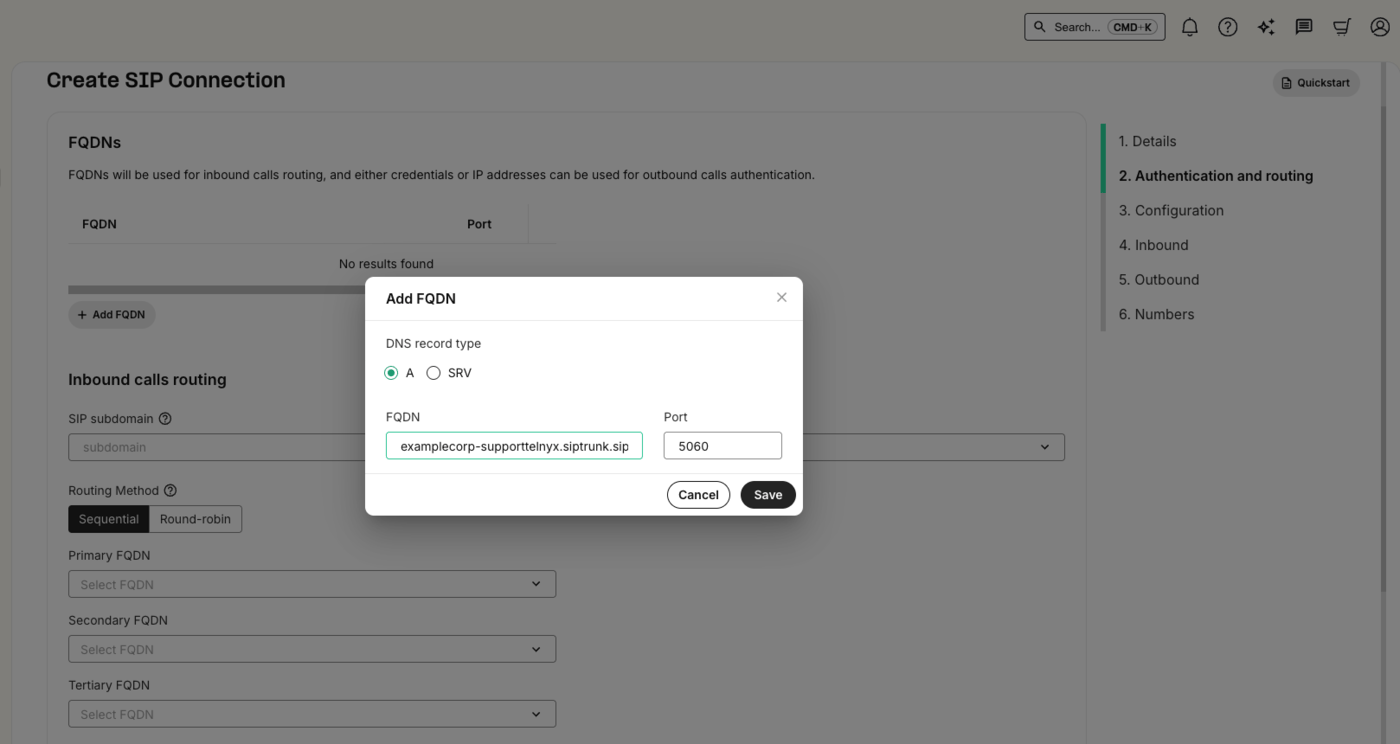 Click **Save**. The FQDN appears in the panel's table, and Telnyx will resolve it to route inbound calls on
this connection to Daily.
Click **Save**. The FQDN appears in the panel's table, and Telnyx will resolve it to route inbound calls on
this connection to Daily.
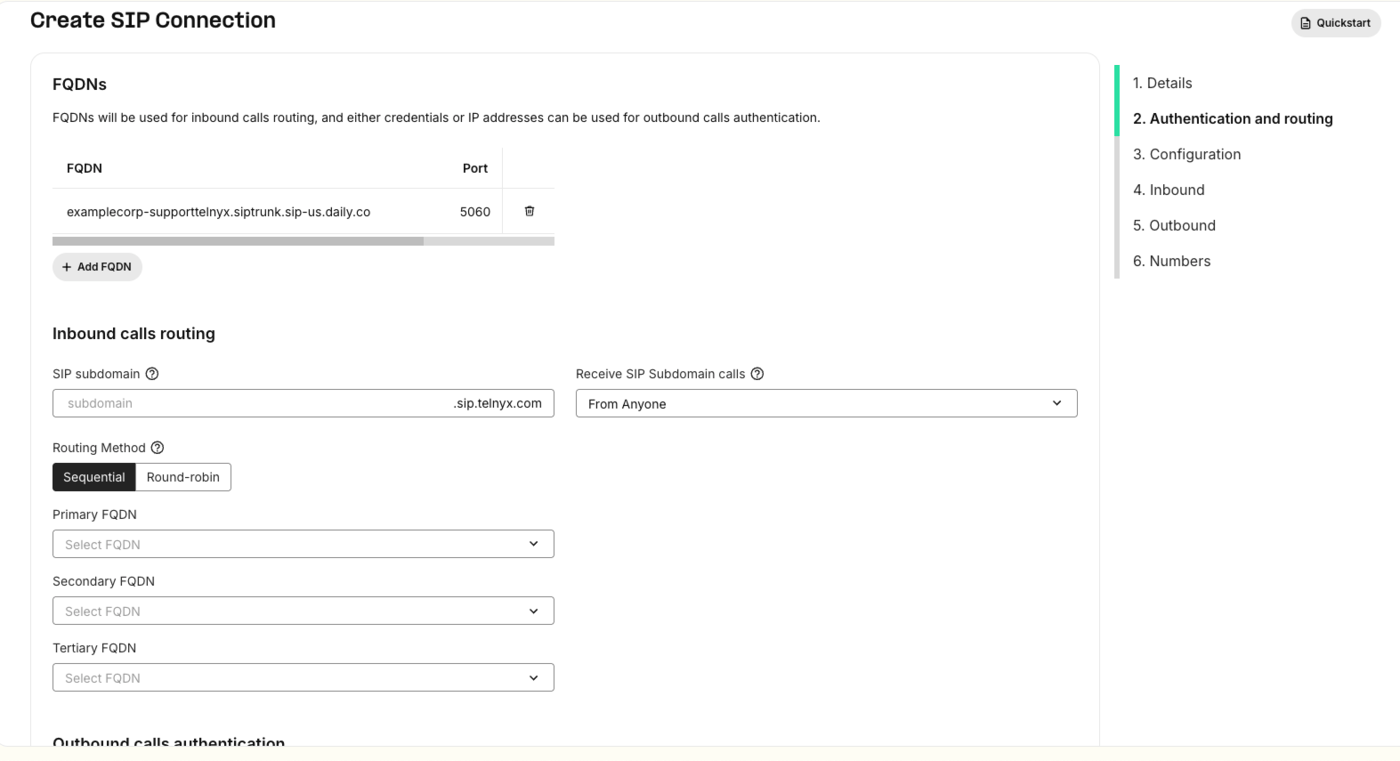 The **Inbound calls routing** fields below the table — Routing Method and the Primary / Secondary / Tertiary
FQDN selectors — order multiple FQDNs. With a single FQDN you can leave them as they are.
To use encrypted media, enable SRTP on the connection and set the port to **5061** with TLS. SDES carries the
media key in the SDP body, so SRTP is only worth having alongside TLS signaling. Plain RTP on 5060 works too.
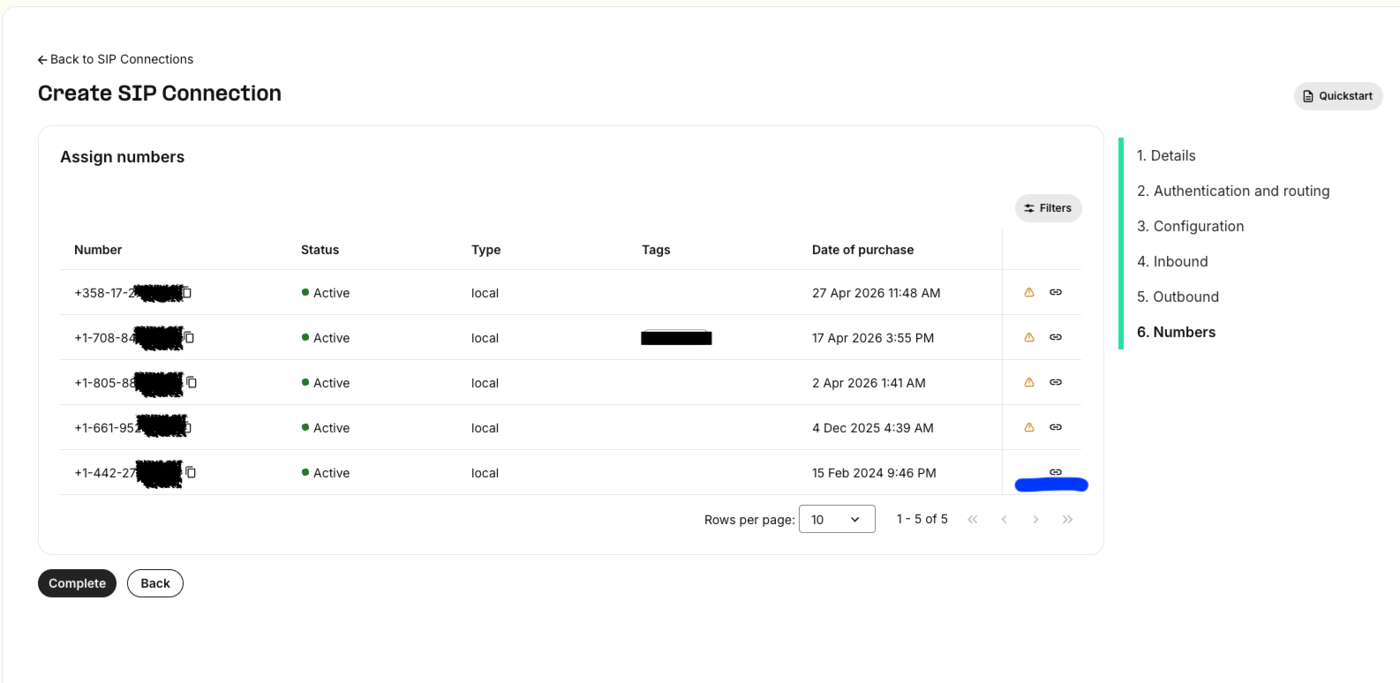
On **6. Numbers**, the **Assign numbers** table lists the numbers on your account. Use the link action on the
number that should route to Daily, then click **Complete**. A number delivers inbound calls to whichever
connection it is assigned to.
The **Inbound calls routing** fields below the table — Routing Method and the Primary / Secondary / Tertiary
FQDN selectors — order multiple FQDNs. With a single FQDN you can leave them as they are.
To use encrypted media, enable SRTP on the connection and set the port to **5061** with TLS. SDES carries the
media key in the SDP body, so SRTP is only worth having alongside TLS signaling. Plain RTP on 5060 works too.
On **6. Numbers**, the **Assign numbers** table lists the numbers on your account. Use the link action on the
number that should route to Daily, then click **Complete**. A number delivers inbound calls to whichever
connection it is assigned to.
 Add Telnyx's published signaling IP ranges to the Daily trunk's `trunk_config.allowed_ips` so it accepts calls
from Telnyx and nobody else — see [Securing the trunk](#securing-the-trunk) below.
## Securing the trunk
Telnyx sends SIP signaling from a small set of **static anycast IPs**, published per SIP region — a primary
and a secondary. They are independent of the FQDN you configured: the FQDN is where Telnyx *sends* calls, these
are what it sends them *from*. For the US region (`sip.telnyx.com`):
```bash theme={null}
curl --request PUT \
--url https://api.daily.co/v1/sip-trunk/$TRUNK_ID \
--header 'Authorization: Bearer $DAILY_API_KEY' \
--header 'Content-Type: application/json' \
--data '{
"trunk_config": {
"allowed_ips": ["192.76.120.10", "64.16.250.10"]
}
}'
```
Two host entries, and nothing else is needed. If your connection uses another SIP region, swap in that
region's pair:
| SIP region | FQDN | Signaling IPs |
| ----------- | ------------------- | ------------------------------------ |
| US | `sip.telnyx.com` | `192.76.120.10`, `64.16.250.10` |
| Europe | `sip.telnyx.eu` | `185.246.41.140`, `185.246.41.141` |
| Australia | `sip.telnyx.com.au` | `103.115.244.145`, `103.115.244.146` |
| Canada | `sip.telnyx.ca` | `192.76.120.31`, `64.16.250.13` |
| Middle East | `sip.telnyx.me` | `185.246.42.128`, `185.246.42.129` |
Don't allowlist Telnyx's **media** ranges here — blocks like `64.16.224.0/19`, `36.255.198.128/25` and
`50.114.144.0/21` carry RTP, not signaling. Daily's allowlist is checked against the source of the INVITE, so
media ranges add nothing and only widen what you accept.
Telnyx's addresses change from time to time, so confirm them against
[sip.telnyx.com](https://sip.telnyx.com/) before you go live.
## Pass caller context (optional)
Telnyx can send custom `X-*` SIP headers on the INVITE. Daily forwards them verbatim in the notification's
`call.sipHeaders` (up to 32 headers), so you can map the call to your business context:
```json theme={null}
"sipHeaders": { "X-Account-Id": "acct_42", "X-Department": "billing" }
```
## Test
Call your Telnyx number. Your backend receives the `sip_trunk.incoming` webhook while you hear ringback; once it
responds 2xx you are connected to the Daily room.
A real notification from a Telnyx-originated call looks like this:
```json theme={null}
{
"event": "sip_trunk.incoming",
"trunk": {
"id": "855c9f1a-733c-4097-9bf0-35f905a8688f",
"description": "my support trunk",
"trunk_name": "supporttelnyx"
},
"room": {
"name": "7YYuwnCSFvZc5tHVUP7A",
"url": "https://examplecorp.daily.co/7YYuwnCSFvZc5tHVUP7A",
"exp": 1788367277
},
"call": {
"sipCallIdHeader": "a7df745c-a8d6-4ee3-b39c-23260c16c0e2",
"From": "sip:15551234567@sip.telnyx.com",
"To": "sip:15550001111@examplecorp-supporttelnyx.siptrunk.sip-us.daily.co:5060",
"requestUri": "sip:15550001111@examplecorp-supporttelnyx.siptrunk.sip-us.daily.co:5060",
"sourceIp": "192.76.120.10",
"fromDomain": "sip.telnyx.com",
"fromDisplayName": "15551234567",
"pAssertedIdentity": "\"15551234567\"",
"sipHeaders": {}
},
"domain": "examplecorp",
"timestamp": 1788363677507
}
```
A few things to note from a Telnyx call specifically:
* **`sourceIp` is `192.76.120.10`**, the US region's primary signaling IP from the allowlist above — a quick
way to confirm which Telnyx region served the call.
* **`To` and `requestUri` carry the `:5060` port**, because that's the port set on the FQDN entry in step 2. A
TLS connection on 5061 shows up the same way.
* **`pAssertedIdentity` carries a `verstat` parameter** — `TN-Validation-Passed` is Telnyx's STIR/SHAKEN
attestation result for the caller.
* **`pAssertedIdentity` keeps the quoting from the SIP header**, so it arrives as
`"15551234567"` including the quote characters — it is the raw header value. `fromDisplayName`
is unquoted, so you can show it to a user as-is.
* **`sipHeaders` is empty** unless your upstream attaches `X-*` headers to the INVITE.
## Troubleshooting
* **Call fails immediately, nothing reaches your webhook** — the source IP isn't in `allowed_ips`. Check the
signaling IP in the Telnyx call detail record against the list you configured.
* **`404` from Daily** — the FQDN doesn't match a trunk host. Re-copy the host from the `sip_uri` in the API
response rather than typing it, and make sure you left off the `sip:` scheme.
* **Call connects but there's no audio** — confirm your connection offers a codec Daily negotiates, and that it
reaches Daily on the port you configured (5060, or 5061 for TLS). If you enabled SRTP, the FQDN entry needs
5061/TLS rather than 5060.
For the full carrier-side reference, see Telnyx's
[SIP Trunking docs](https://developers.telnyx.com/docs/voice/sip-trunking).
Add Telnyx's published signaling IP ranges to the Daily trunk's `trunk_config.allowed_ips` so it accepts calls
from Telnyx and nobody else — see [Securing the trunk](#securing-the-trunk) below.
## Securing the trunk
Telnyx sends SIP signaling from a small set of **static anycast IPs**, published per SIP region — a primary
and a secondary. They are independent of the FQDN you configured: the FQDN is where Telnyx *sends* calls, these
are what it sends them *from*. For the US region (`sip.telnyx.com`):
```bash theme={null}
curl --request PUT \
--url https://api.daily.co/v1/sip-trunk/$TRUNK_ID \
--header 'Authorization: Bearer $DAILY_API_KEY' \
--header 'Content-Type: application/json' \
--data '{
"trunk_config": {
"allowed_ips": ["192.76.120.10", "64.16.250.10"]
}
}'
```
Two host entries, and nothing else is needed. If your connection uses another SIP region, swap in that
region's pair:
| SIP region | FQDN | Signaling IPs |
| ----------- | ------------------- | ------------------------------------ |
| US | `sip.telnyx.com` | `192.76.120.10`, `64.16.250.10` |
| Europe | `sip.telnyx.eu` | `185.246.41.140`, `185.246.41.141` |
| Australia | `sip.telnyx.com.au` | `103.115.244.145`, `103.115.244.146` |
| Canada | `sip.telnyx.ca` | `192.76.120.31`, `64.16.250.13` |
| Middle East | `sip.telnyx.me` | `185.246.42.128`, `185.246.42.129` |
Don't allowlist Telnyx's **media** ranges here — blocks like `64.16.224.0/19`, `36.255.198.128/25` and
`50.114.144.0/21` carry RTP, not signaling. Daily's allowlist is checked against the source of the INVITE, so
media ranges add nothing and only widen what you accept.
Telnyx's addresses change from time to time, so confirm them against
[sip.telnyx.com](https://sip.telnyx.com/) before you go live.
## Pass caller context (optional)
Telnyx can send custom `X-*` SIP headers on the INVITE. Daily forwards them verbatim in the notification's
`call.sipHeaders` (up to 32 headers), so you can map the call to your business context:
```json theme={null}
"sipHeaders": { "X-Account-Id": "acct_42", "X-Department": "billing" }
```
## Test
Call your Telnyx number. Your backend receives the `sip_trunk.incoming` webhook while you hear ringback; once it
responds 2xx you are connected to the Daily room.
A real notification from a Telnyx-originated call looks like this:
```json theme={null}
{
"event": "sip_trunk.incoming",
"trunk": {
"id": "855c9f1a-733c-4097-9bf0-35f905a8688f",
"description": "my support trunk",
"trunk_name": "supporttelnyx"
},
"room": {
"name": "7YYuwnCSFvZc5tHVUP7A",
"url": "https://examplecorp.daily.co/7YYuwnCSFvZc5tHVUP7A",
"exp": 1788367277
},
"call": {
"sipCallIdHeader": "a7df745c-a8d6-4ee3-b39c-23260c16c0e2",
"From": "sip:15551234567@sip.telnyx.com",
"To": "sip:15550001111@examplecorp-supporttelnyx.siptrunk.sip-us.daily.co:5060",
"requestUri": "sip:15550001111@examplecorp-supporttelnyx.siptrunk.sip-us.daily.co:5060",
"sourceIp": "192.76.120.10",
"fromDomain": "sip.telnyx.com",
"fromDisplayName": "15551234567",
"pAssertedIdentity": "\"15551234567\"",
"sipHeaders": {}
},
"domain": "examplecorp",
"timestamp": 1788363677507
}
```
A few things to note from a Telnyx call specifically:
* **`sourceIp` is `192.76.120.10`**, the US region's primary signaling IP from the allowlist above — a quick
way to confirm which Telnyx region served the call.
* **`To` and `requestUri` carry the `:5060` port**, because that's the port set on the FQDN entry in step 2. A
TLS connection on 5061 shows up the same way.
* **`pAssertedIdentity` carries a `verstat` parameter** — `TN-Validation-Passed` is Telnyx's STIR/SHAKEN
attestation result for the caller.
* **`pAssertedIdentity` keeps the quoting from the SIP header**, so it arrives as
`"15551234567"` including the quote characters — it is the raw header value. `fromDisplayName`
is unquoted, so you can show it to a user as-is.
* **`sipHeaders` is empty** unless your upstream attaches `X-*` headers to the INVITE.
## Troubleshooting
* **Call fails immediately, nothing reaches your webhook** — the source IP isn't in `allowed_ips`. Check the
signaling IP in the Telnyx call detail record against the list you configured.
* **`404` from Daily** — the FQDN doesn't match a trunk host. Re-copy the host from the `sip_uri` in the API
response rather than typing it, and make sure you left off the `sip:` scheme.
* **Call connects but there's no audio** — confirm your connection offers a codec Daily negotiates, and that it
reaches Daily on the port you configured (5060, or 5061 for TLS). If you enabled SRTP, the FQDN entry needs
5061/TLS rather than 5060.
For the full carrier-side reference, see Telnyx's
[SIP Trunking docs](https://developers.telnyx.com/docs/voice/sip-trunking).