> ## Documentation Index
> Fetch the complete documentation index at: https://docs.daily.co/llms.txt
> Use this file to discover all available pages before exploring further.
# Twilio
> Send inbound calls from Twilio Elastic SIP Trunking to your Daily SIP trunk.
Route inbound calls from a Twilio number to your Daily
[SIP trunk](/docs/guides/features/dial-in-dial-out/sip-trunk) using **Twilio Elastic SIP Trunking**. Twilio
delivers the call as a SIP INVITE (no registration), which is exactly what a Daily trunk accepts.
In Twilio's terminology this is **Origination** — calls that start on the PSTN and are sent out to your SIP
infrastructure. (Termination is the opposite direction, from your infrastructure to the PSTN; a Daily trunk is
inbound only, so you never configure it.)
## Prerequisites
* A Daily SIP trunk — note its `sip_uri` from the
[create call](/docs/guides/features/dial-in-dial-out/sip-trunk#create-a-trunk), for example
`sip:examplecorp-supporttwilio.siptrunk.sip-us.daily.co`.
* A Twilio account with a phone number and **Elastic SIP Trunking** enabled.
## Configure the trunk
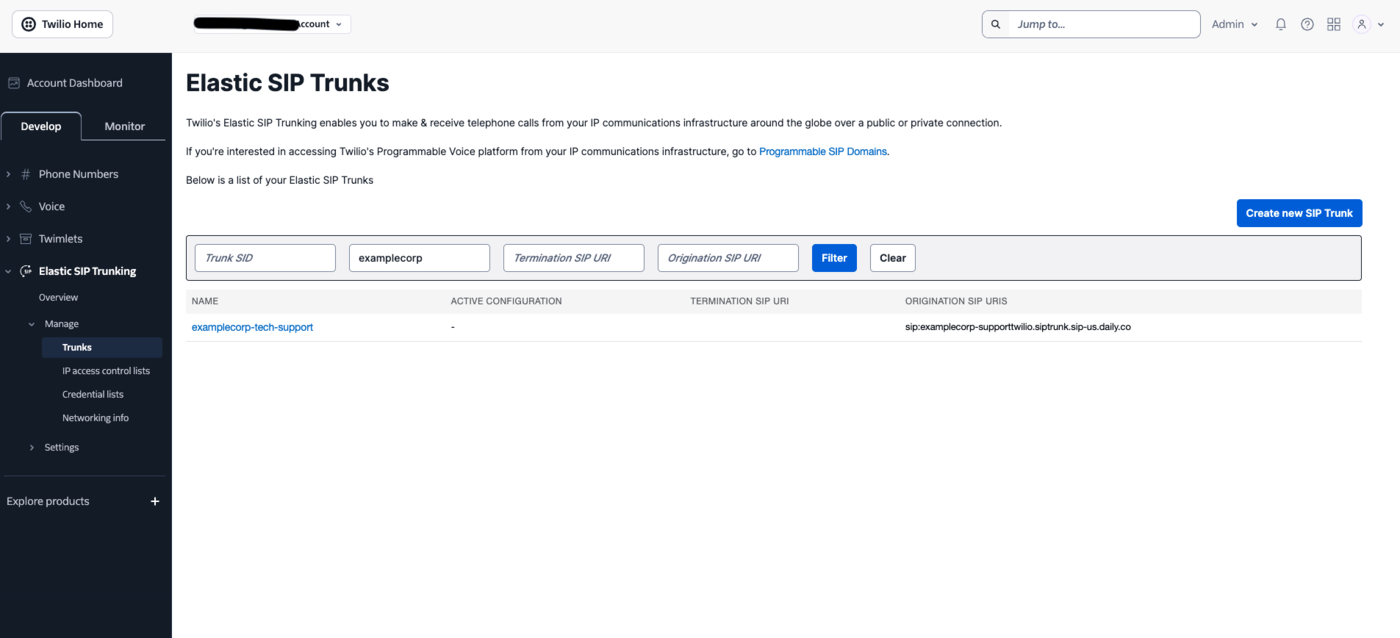
In the [Twilio Console](https://console.twilio.com), open **Elastic SIP Trunking → Manage → Trunks** and click
**Create new SIP Trunk**. Give it a friendly name (for example `examplecorp-support`) and save. The trunk opens
with a side menu of **General**, **Termination**, **Origination**, and **Numbers**.
 On **General**, **Secure Trunking** is supported — turn it on if you want encrypted signaling and media. Twilio
enforces TLS signaling and SRTP media together under that one setting, and with it enabled "any non-encrypted
calls will be rejected", so you must point Origination at port **5061** with `transport=tls` in step 2. Leaving
it off is fine too: the call then runs as plain SIP with unencrypted RTP. Either way, admission is handled by
the IP allowlist in step 4.
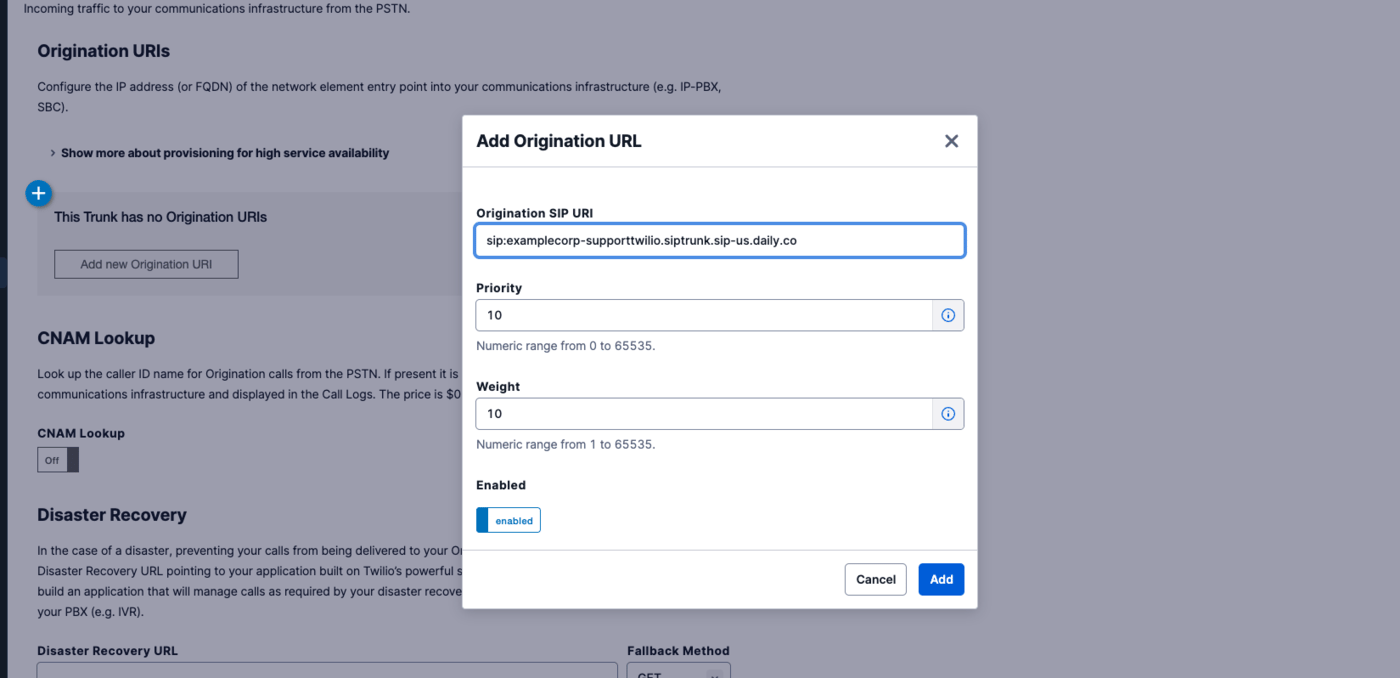
Open **Origination** and, under **Origination URIs**, click **Add new Origination URI**. Fill in the
**Add Origination URL** dialog:
* **Origination SIP URI** — your Daily `sip_uri`, host only:
`sip:examplecorp-supporttwilio.siptrunk.sip-us.daily.co`. Leave the user part off and let Twilio populate it
with the dialed number. Daily routes on the **host label** and ignores the user part entirely, so a custom
user part buys you nothing — and it changes Twilio's behaviour, moving the dialed number into a SIP
`Diversion` header instead.
* **Priority** — prefilled `10`; the range is `0`–`65535` and the *lowest* number is tried first.
* **Weight** — prefilled `10`; the range is `1`–`65535`, and a higher number takes more of the load between
equal-priority URIs.
* **Enabled** — leave it enabled.
On **General**, **Secure Trunking** is supported — turn it on if you want encrypted signaling and media. Twilio
enforces TLS signaling and SRTP media together under that one setting, and with it enabled "any non-encrypted
calls will be rejected", so you must point Origination at port **5061** with `transport=tls` in step 2. Leaving
it off is fine too: the call then runs as plain SIP with unencrypted RTP. Either way, admission is handled by
the IP allowlist in step 4.
Open **Origination** and, under **Origination URIs**, click **Add new Origination URI**. Fill in the
**Add Origination URL** dialog:
* **Origination SIP URI** — your Daily `sip_uri`, host only:
`sip:examplecorp-supporttwilio.siptrunk.sip-us.daily.co`. Leave the user part off and let Twilio populate it
with the dialed number. Daily routes on the **host label** and ignores the user part entirely, so a custom
user part buys you nothing — and it changes Twilio's behaviour, moving the dialed number into a SIP
`Diversion` header instead.
* **Priority** — prefilled `10`; the range is `0`–`65535` and the *lowest* number is tried first.
* **Weight** — prefilled `10`; the range is `1`–`65535`, and a higher number takes more of the load between
equal-priority URIs.
* **Enabled** — leave it enabled.
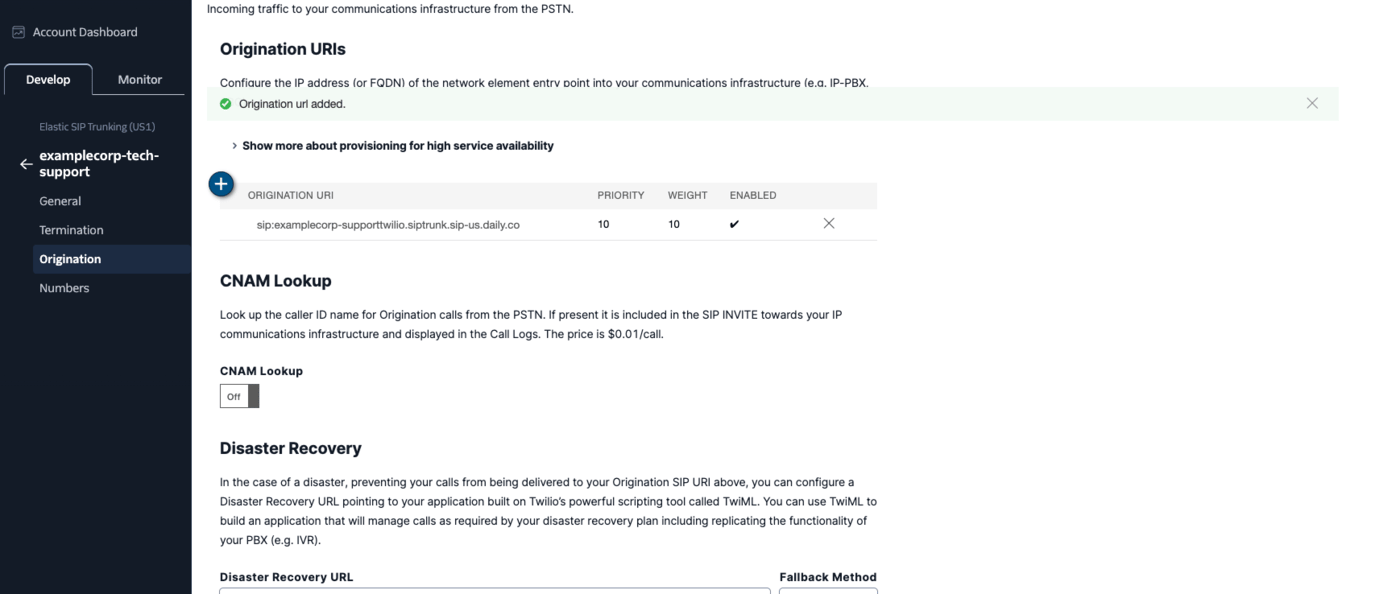
 Click **Add**. The URI appears in the Origination URIs table with its priority, weight, and enabled tick.
 A trunk accepts up to ten Origination URIs; one is enough unless you want failover.
To send signaling over TLS, append the transport parameter and use port 5061 —
`sip:examplecorp-supporttwilio.siptrunk.sip-us.daily.co:5061;transport=tls`. Twilio defaults to UDP, and also
supports `transport=tcp`. Daily accepts UDP and TCP on 5060 and TLS on 5061. If you enabled Secure Trunking in
step 1, this TLS form is required rather than optional.
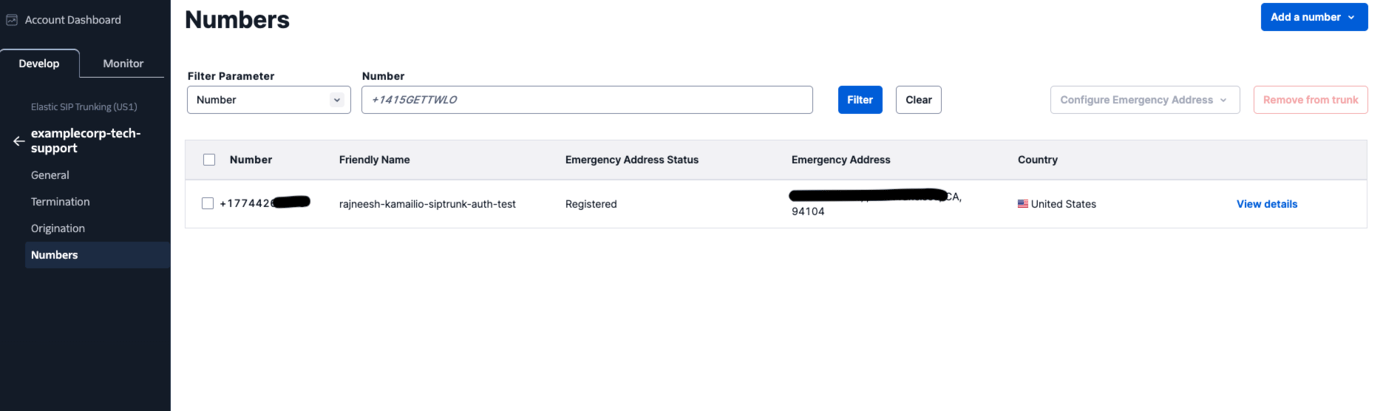
Open **Numbers** and use **Add a number** to attach the Twilio number that should route to Daily — the menu
lets you pick an existing number or buy a new one. Attached numbers are listed with their friendly name and
emergency-address status.
A trunk accepts up to ten Origination URIs; one is enough unless you want failover.
To send signaling over TLS, append the transport parameter and use port 5061 —
`sip:examplecorp-supporttwilio.siptrunk.sip-us.daily.co:5061;transport=tls`. Twilio defaults to UDP, and also
supports `transport=tcp`. Daily accepts UDP and TCP on 5060 and TLS on 5061. If you enabled Secure Trunking in
step 1, this TLS form is required rather than optional.
Open **Numbers** and use **Add a number** to attach the Twilio number that should route to Daily — the menu
lets you pick an existing number or buy a new one. Attached numbers are listed with their friendly name and
emergency-address status.
 Add Twilio's signaling IP ranges to the Daily trunk's `trunk_config.allowed_ips` so it accepts calls from
Twilio and nobody else — see [Securing the trunk](#securing-the-trunk) below.
## Securing the trunk
Secure a Twilio trunk with Daily's **IP allowlist**. Twilio's Credential Lists authenticate *Termination*
traffic — calls your infrastructure sends **to** Twilio — so they don't apply here; Twilio does not present
digest credentials on the Origination calls it sends to you.
Twilio signals from a small, published set of ranges per edge location. Add every edge you route through:
```bash theme={null}
curl --request PUT \
--url https://api.daily.co/v1/sip-trunk/$TRUNK_ID \
--header 'Authorization: Bearer $DAILY_API_KEY' \
--header 'Content-Type: application/json' \
--data '{
"trunk_config": {
"allowed_ips": [
"54.172.60.0/30",
"54.244.51.0/30",
"54.171.127.192/30",
"35.156.191.128/30",
"54.65.63.192/30",
"54.169.127.128/30",
"54.252.254.64/30",
"177.71.206.192/30"
]
}
}'
```
Those are Twilio's eight signaling gateways — North America Virginia and Oregon, Europe Ireland and Frankfurt,
Asia-Pacific Tokyo, Singapore and Sydney, and South America São Paulo — all eight of which fit inside Daily's
25-entry limit. Twilio advises being ready to accept signaling from any of them, so allowlisting the full set
is the safe default; trim it only if you are certain which edge serves your traffic. Check
[Twilio's SIP trunking IP addresses](https://www.twilio.com/docs/sip-trunking/ip-addresses) for the current
list before you go live.
Entries must be IPv4 addresses or **canonical** CIDR blocks — the address has to be the network address, so
`54.172.60.0/30`, not `54.172.60.1/30`.
## Pass caller context (optional)
Twilio can attach custom SIP headers prefixed `X-` to the INVITE — for example via a TwiML `` dial or
trunk settings. Daily forwards them verbatim in the notification's `call.sipHeaders` (up to 32 headers), so you
can map the call to your business context:
```json theme={null}
"sipHeaders": { "X-Account-Id": "acct_42", "X-Department": "billing" }
```
## Test
Call your Twilio number. Your backend receives the `sip_trunk.incoming` webhook while you hear ringback; once it
responds 2xx you are connected to the Daily room.
A real notification from a Twilio-originated call looks like this:
```json theme={null}
{
"event": "sip_trunk.incoming",
"trunk": {
"id": "6abf683d-dbcd-43a4-837d-e9317a34c0d6",
"description": "my support sip trunk",
"trunk_name": "supporttwilio"
},
"room": {
"name": "uX9j9s9H1ii0VXhy5S1c",
"url": "https://examplecorp.daily.co/uX9j9s9H1ii0VXhy5S1c",
"exp": 1788366155
},
"call": {
"sipCallIdHeader": "063ce834018bb00b9707efacb209cc42@0.0.0.0",
"From": "sip:+15551234567@pstn.twilio.com:5060;isup-oli=00;pstn-params=9084810000",
"To": "sip:+15550001111@examplecorp-supporttwilio.siptrunk.sip-us.daily.co",
"requestUri": "sip:+15550001111@examplecorp-supporttwilio.siptrunk.sip-us.daily.co",
"sourceIp": "54.172.60.2",
"fromDomain": "pstn.twilio.com",
"fromDisplayName": "+15551234567",
"diversion": ";reason=unconditional",
"pAssertedIdentity": "\"+15551234567\" ",
"sipHeaders": {
"X-Twilio-VerStat": "TN-Validation-Passed-A",
"X-Twilio-AccountSid": "ACxxxxxxxxxxxxxxxxxxxxxxxxxxxxxxxx",
"X-Twilio-CallSid": "CAxxxxxxxxxxxxxxxxxxxxxxxxxxxxxxxx"
}
},
"domain": "examplecorp",
"timestamp": 1788362555722
}
```
A few things to note from a Twilio call specifically:
* **`sourceIp` falls inside `54.172.60.0/30`**, the North America Virginia range from the allowlist above — a
quick way to confirm which edge served the call.
* **Twilio attaches its own `X-Twilio-*` headers** without any configuration: `X-Twilio-CallSid` correlates the
Daily room back to a Twilio call record, and `X-Twilio-VerStat` carries the STIR/SHAKEN attestation result.
Any headers you add yourself arrive alongside them.
* **`diversion` is populated for a forwarded call**, here with `reason=unconditional`.
* **`pAssertedIdentity` keeps the quoting from the SIP header**, so it arrives as
`"+15551234567" ` including the quote characters — it is the raw header value. `fromDisplayName`
is unquoted, so you can show it to a user as-is.
* **`sipCallIdHeader` is not a stable host-qualified id** — Twilio's carries `@0.0.0.0`. Treat it as an
opaque string.
## Troubleshooting
* **Call fails immediately, nothing reaches your webhook** — the source IP isn't in `allowed_ips`. Check which
edge Twilio actually used against its
[published ranges](https://www.twilio.com/docs/sip-trunking/ip-addresses), and remember the ranges are `/30`,
not whole `/24`s.
* **`404` from Daily** — the Origination URI host doesn't match a trunk. Re-copy the `sip_uri` from the API
response rather than typing it.
* **Secure Trunking is on and the call never arrives** — Twilio rejects non-encrypted calls under that
setting, so the Origination URI has to use `:5061;transport=tls` (see step 1). Turning Secure Trunking on
while Origination still points at 5060/UDP is the usual cause.
* **Call connects but there's no audio** — confirm Twilio offers a codec Daily negotiates. With Secure
Trunking on, also confirm signaling is reaching Daily on 5061/TLS.
For the full carrier-side reference, see Twilio's
[Elastic SIP Trunking docs](https://www.twilio.com/docs/sip-trunking).
Add Twilio's signaling IP ranges to the Daily trunk's `trunk_config.allowed_ips` so it accepts calls from
Twilio and nobody else — see [Securing the trunk](#securing-the-trunk) below.
## Securing the trunk
Secure a Twilio trunk with Daily's **IP allowlist**. Twilio's Credential Lists authenticate *Termination*
traffic — calls your infrastructure sends **to** Twilio — so they don't apply here; Twilio does not present
digest credentials on the Origination calls it sends to you.
Twilio signals from a small, published set of ranges per edge location. Add every edge you route through:
```bash theme={null}
curl --request PUT \
--url https://api.daily.co/v1/sip-trunk/$TRUNK_ID \
--header 'Authorization: Bearer $DAILY_API_KEY' \
--header 'Content-Type: application/json' \
--data '{
"trunk_config": {
"allowed_ips": [
"54.172.60.0/30",
"54.244.51.0/30",
"54.171.127.192/30",
"35.156.191.128/30",
"54.65.63.192/30",
"54.169.127.128/30",
"54.252.254.64/30",
"177.71.206.192/30"
]
}
}'
```
Those are Twilio's eight signaling gateways — North America Virginia and Oregon, Europe Ireland and Frankfurt,
Asia-Pacific Tokyo, Singapore and Sydney, and South America São Paulo — all eight of which fit inside Daily's
25-entry limit. Twilio advises being ready to accept signaling from any of them, so allowlisting the full set
is the safe default; trim it only if you are certain which edge serves your traffic. Check
[Twilio's SIP trunking IP addresses](https://www.twilio.com/docs/sip-trunking/ip-addresses) for the current
list before you go live.
Entries must be IPv4 addresses or **canonical** CIDR blocks — the address has to be the network address, so
`54.172.60.0/30`, not `54.172.60.1/30`.
## Pass caller context (optional)
Twilio can attach custom SIP headers prefixed `X-` to the INVITE — for example via a TwiML `` dial or
trunk settings. Daily forwards them verbatim in the notification's `call.sipHeaders` (up to 32 headers), so you
can map the call to your business context:
```json theme={null}
"sipHeaders": { "X-Account-Id": "acct_42", "X-Department": "billing" }
```
## Test
Call your Twilio number. Your backend receives the `sip_trunk.incoming` webhook while you hear ringback; once it
responds 2xx you are connected to the Daily room.
A real notification from a Twilio-originated call looks like this:
```json theme={null}
{
"event": "sip_trunk.incoming",
"trunk": {
"id": "6abf683d-dbcd-43a4-837d-e9317a34c0d6",
"description": "my support sip trunk",
"trunk_name": "supporttwilio"
},
"room": {
"name": "uX9j9s9H1ii0VXhy5S1c",
"url": "https://examplecorp.daily.co/uX9j9s9H1ii0VXhy5S1c",
"exp": 1788366155
},
"call": {
"sipCallIdHeader": "063ce834018bb00b9707efacb209cc42@0.0.0.0",
"From": "sip:+15551234567@pstn.twilio.com:5060;isup-oli=00;pstn-params=9084810000",
"To": "sip:+15550001111@examplecorp-supporttwilio.siptrunk.sip-us.daily.co",
"requestUri": "sip:+15550001111@examplecorp-supporttwilio.siptrunk.sip-us.daily.co",
"sourceIp": "54.172.60.2",
"fromDomain": "pstn.twilio.com",
"fromDisplayName": "+15551234567",
"diversion": ";reason=unconditional",
"pAssertedIdentity": "\"+15551234567\" ",
"sipHeaders": {
"X-Twilio-VerStat": "TN-Validation-Passed-A",
"X-Twilio-AccountSid": "ACxxxxxxxxxxxxxxxxxxxxxxxxxxxxxxxx",
"X-Twilio-CallSid": "CAxxxxxxxxxxxxxxxxxxxxxxxxxxxxxxxx"
}
},
"domain": "examplecorp",
"timestamp": 1788362555722
}
```
A few things to note from a Twilio call specifically:
* **`sourceIp` falls inside `54.172.60.0/30`**, the North America Virginia range from the allowlist above — a
quick way to confirm which edge served the call.
* **Twilio attaches its own `X-Twilio-*` headers** without any configuration: `X-Twilio-CallSid` correlates the
Daily room back to a Twilio call record, and `X-Twilio-VerStat` carries the STIR/SHAKEN attestation result.
Any headers you add yourself arrive alongside them.
* **`diversion` is populated for a forwarded call**, here with `reason=unconditional`.
* **`pAssertedIdentity` keeps the quoting from the SIP header**, so it arrives as
`"+15551234567" ` including the quote characters — it is the raw header value. `fromDisplayName`
is unquoted, so you can show it to a user as-is.
* **`sipCallIdHeader` is not a stable host-qualified id** — Twilio's carries `@0.0.0.0`. Treat it as an
opaque string.
## Troubleshooting
* **Call fails immediately, nothing reaches your webhook** — the source IP isn't in `allowed_ips`. Check which
edge Twilio actually used against its
[published ranges](https://www.twilio.com/docs/sip-trunking/ip-addresses), and remember the ranges are `/30`,
not whole `/24`s.
* **`404` from Daily** — the Origination URI host doesn't match a trunk. Re-copy the `sip_uri` from the API
response rather than typing it.
* **Secure Trunking is on and the call never arrives** — Twilio rejects non-encrypted calls under that
setting, so the Origination URI has to use `:5061;transport=tls` (see step 1). Turning Secure Trunking on
while Origination still points at 5060/UDP is the usual cause.
* **Call connects but there's no audio** — confirm Twilio offers a codec Daily negotiates. With Secure
Trunking on, also confirm signaling is reaching Daily on 5061/TLS.
For the full carrier-side reference, see Twilio's
[Elastic SIP Trunking docs](https://www.twilio.com/docs/sip-trunking).