> ## Documentation Index
> Fetch the complete documentation index at: https://docs.daily.co/llms.txt
> Use this file to discover all available pages before exploring further.
# Vonage
> Send inbound calls from Vonage to your Daily SIP trunk.
Route inbound calls from a Vonage number to your Daily
[SIP trunk](/docs/guides/features/dial-in-dial-out/sip-trunk) using **Vonage SIP Trunking**. You point a trunk's
SIP URI at Daily and attach your numbers in the Vonage **SIP Dashboard** — no code required.
## Prerequisites
* A Daily SIP trunk — note its `sip_uri` from the
[create call](/docs/guides/features/dial-in-dial-out/sip-trunk#create-a-trunk), for example
`sip:examplecorp-supportvonage.siptrunk.sip-us.daily.co`.
* A Vonage account with a voice-enabled number.
## Configure the trunk
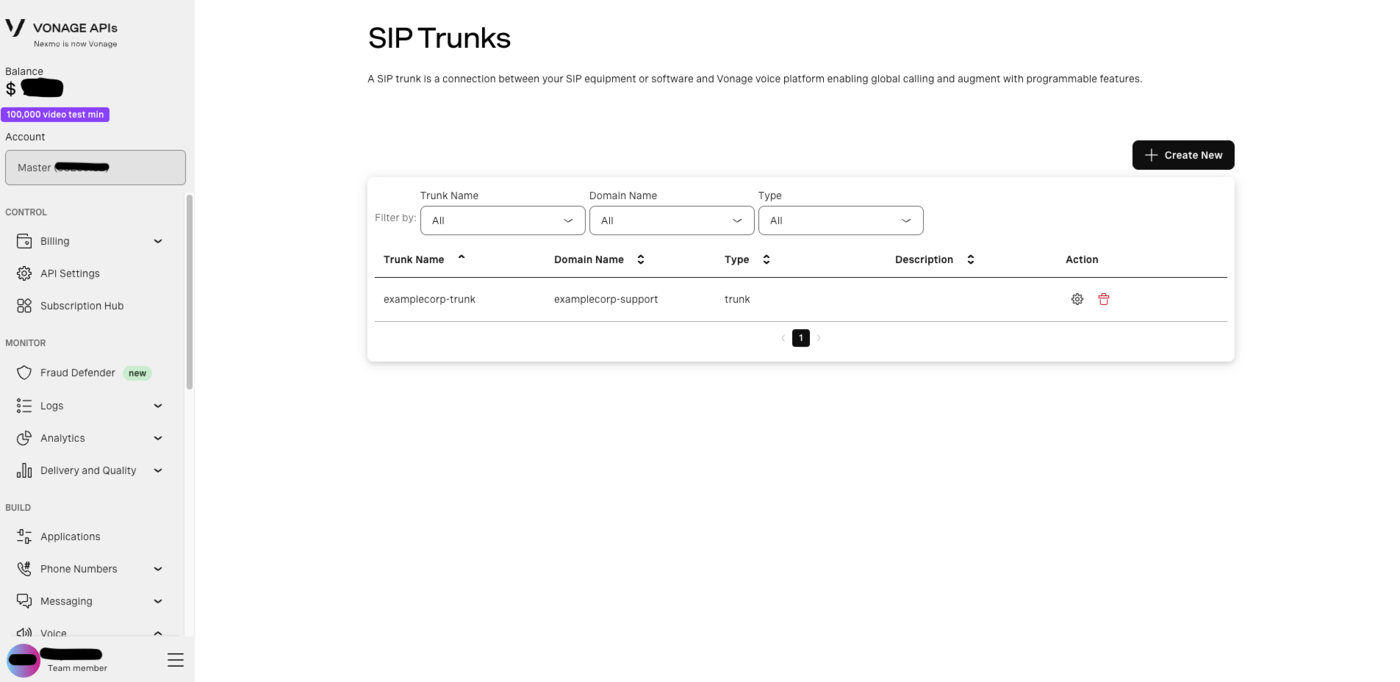
In the Vonage dashboard, open **Voice → SIP Trunks** and click **Create New**. Give the trunk a name and a
domain name; the trunk is where you configure inbound routing and link your numbers.
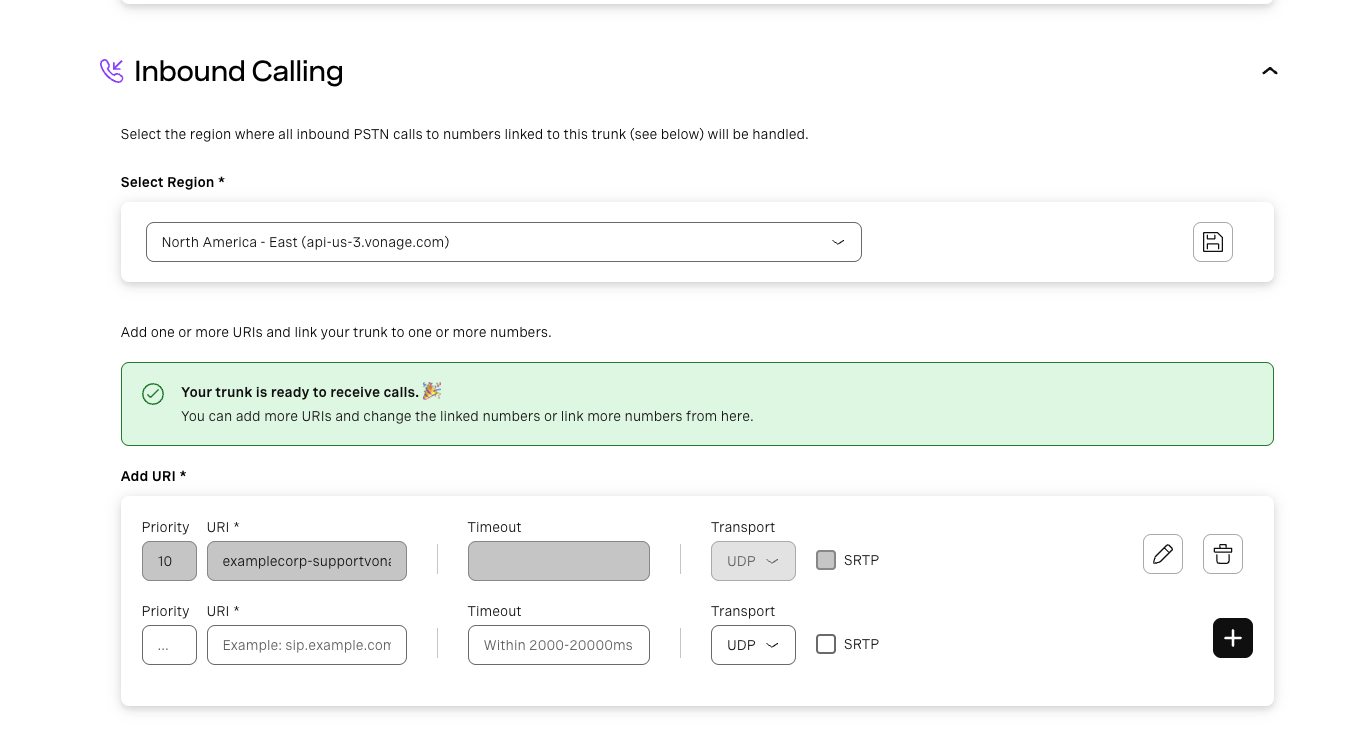
 Open the trunk's **Inbound Calling** section.
First, under **Select Region**, choose the region where all inbound PSTN calls to numbers linked to this trunk
will be handled. Pick a **US region** — Daily's trunk host is `sip-us`, so a US region keeps the call on the
shortest path. Save the region before adding URIs.
Then, under **Add URI**, add a row pointing at your Daily trunk host:
* **URI** — `examplecorp-supportvonage.siptrunk.sip-us.daily.co`. Host only, no `sip:` scheme and no user
part. Vonage places the dialed number in the user part of the request URI; Daily routes on the **host label**
and ignores it, so nothing on your side depends on its format.
* **Priority** — `10` is fine for a single destination. Lower is tried first when you have several.
* **Timeout** — optional, in milliseconds (2000–20000). The default is fine: Daily answers with `180 Ringing`
almost immediately, so no generous timeout is needed.
* **Transport** — `UDP` on port 5060, or `TCP`/`TLS` (TLS on port 5061). Daily accepts all three, so prefer
**TLS** for production signaling.
* **SRTP** — tick it if you want encrypted media. Vonage offers `AES_CM_128_HMAC_SHA1_80`, which Daily
negotiates. Vonage exposes this independently of the transport, so set **Transport** to `TLS` when you tick
it — SDES sends the media key in the SDP, and over UDP that key is in the clear. Left unticked, media is
plain RTP.
Click **+** to save the URI. Vonage confirms with *"Your trunk is ready to receive calls."*
Open the trunk's **Inbound Calling** section.
First, under **Select Region**, choose the region where all inbound PSTN calls to numbers linked to this trunk
will be handled. Pick a **US region** — Daily's trunk host is `sip-us`, so a US region keeps the call on the
shortest path. Save the region before adding URIs.
Then, under **Add URI**, add a row pointing at your Daily trunk host:
* **URI** — `examplecorp-supportvonage.siptrunk.sip-us.daily.co`. Host only, no `sip:` scheme and no user
part. Vonage places the dialed number in the user part of the request URI; Daily routes on the **host label**
and ignores it, so nothing on your side depends on its format.
* **Priority** — `10` is fine for a single destination. Lower is tried first when you have several.
* **Timeout** — optional, in milliseconds (2000–20000). The default is fine: Daily answers with `180 Ringing`
almost immediately, so no generous timeout is needed.
* **Transport** — `UDP` on port 5060, or `TCP`/`TLS` (TLS on port 5061). Daily accepts all three, so prefer
**TLS** for production signaling.
* **SRTP** — tick it if you want encrypted media. Vonage offers `AES_CM_128_HMAC_SHA1_80`, which Daily
negotiates. Vonage exposes this independently of the transport, so set **Transport** to `TLS` when you tick
it — SDES sends the media key in the SDP, and over UDP that key is in the clear. Left unticked, media is
plain RTP.
Click **+** to save the URI. Vonage confirms with *"Your trunk is ready to receive calls."*
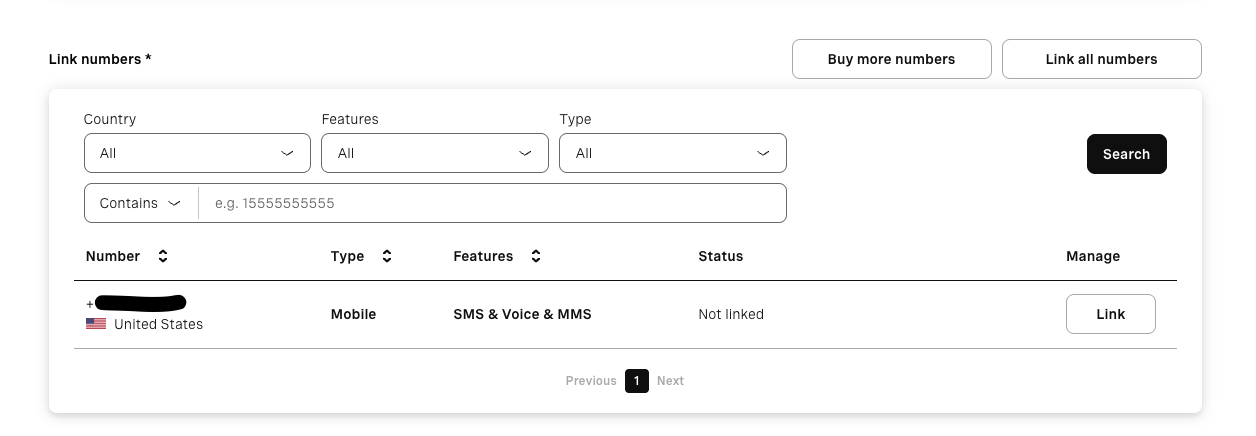
 Under **Link numbers**, find the Vonage number that should route to Daily and click **Link**. Its status
changes from *Not linked*, and inbound calls on that number now go to the SIP URI you configured.
Use **Buy more numbers** if you don't have a voice-enabled number yet, or **Link all numbers** to attach every
number on the account to this trunk.
Under **Link numbers**, find the Vonage number that should route to Daily and click **Link**. Its status
changes from *Not linked*, and inbound calls on that number now go to the SIP URI you configured.
Use **Buy more numbers** if you don't have a voice-enabled number yet, or **Link all numbers** to attach every
number on the account to this trunk.
 Add Vonage's published SIP signaling subnets to the Daily trunk's `trunk_config.allowed_ips` so it accepts
calls from Vonage and nobody else — see [Securing the trunk](#securing-the-trunk) below.
## Securing the trunk
Vonage signals from a pair of **Primary Subnets**. Allowlist those rather than individual addresses, so you
don't have to revisit the configuration when Vonage's infrastructure changes:
```bash theme={null}
curl --request PUT \
--url https://api.daily.co/v1/sip-trunk/$TRUNK_ID \
--header 'Authorization: Bearer $DAILY_API_KEY' \
--header 'Content-Type: application/json' \
--data '{
"trunk_config": {
"allowed_ips": ["216.147.0.0/18", "168.100.64.0/18"]
}
}'
```
Two entries, well inside Daily's 25-entry limit. You only need the **SIP signaling** subnets — Daily's
allowlist is checked against the source of the INVITE, not the media. Entries must be IPv4 addresses or
**canonical** CIDR blocks, meaning the address has to be the network address: `216.147.0.0/18`, not
`216.147.5.0/18`.
Vonage's ranges change from time to time, so confirm them against Vonage's
[IP allowlist guide](https://api.support.vonage.com/hc/en-us/articles/360035471331-Which-IP-addresses-should-I-allow-when-using-Communication-APIs-and-SIP-Trunking)
before you go live.
## Codecs
Vonage offers PCMA (G711a), PCMU (G711u), G722, iLBC, G729, and Speex16. By default a trunk room answers with
**one** codec — **PCMU** unless the trunk's `room_template.sip.codecs.audio` names `PCMA` or `G722` — so keep
that codec enabled on the Vonage side; an INVITE that omits it is rejected with `488` unless Daily has enabled
multi-codec negotiation for your domain. See the guide's
[Codecs](/docs/guides/features/dial-in-dial-out/sip-trunk#codecs) section.
## Pass caller context (optional)
Custom `X-*` headers on the INVITE come through verbatim in the notification's `call.sipHeaders` (up to 32
headers), so you can map the call to your business context:
```json theme={null}
"sipHeaders": { "X-Account-Id": "acct_42", "X-Department": "billing" }
```
## Test
Call your Vonage number. Your backend receives the `sip_trunk.incoming` webhook while you hear ringback; once it
responds 2xx you are connected to the Daily room. A real notification from a Vonage-originated call looks like
this:
```json theme={null}
{
"event": "sip_trunk.incoming",
"trunk": {
"id": "6edf339d-e0cd-46b0-bb9e-d327bbee88ef",
"description": "this is my first trunk",
"trunk_name": "supportvonage"
},
"room": {
"name": "Kw6s695OcGIKrU4JHcdi",
"url": "https://examplecorp.daily.co/Kw6s695OcGIKrU4JHcdi",
"exp": 1788421609
},
"call": {
"sipCallIdHeader": "1f94d95555c1fdc510d48bca18ea9608@sip.nexmo.com",
"From": "sip:15551234567@sip.nexmo.com",
"To": "sip:15550001111@examplecorp-supportvonage.siptrunk.sip-us.daily.co",
"requestUri": "sip:15550001111@examplecorp-supportvonage.siptrunk.sip-us.daily.co",
"sourceIp": "216.147.2.1",
"fromDomain": "sip.nexmo.com",
"fromDisplayName": "EXAMPLE CALLER CA",
"pAssertedIdentity": "\"EXAMPLE CALLER CA\" ",
"sipHeaders": {}
},
"domain": "examplecorp",
"timestamp": 1788418009894
}
```
A few things to note from a Vonage call specifically:
* **`sourceIp` falls inside `216.147.0.0/18`**, one of the Primary Subnets from the allowlist above — a quick
way to confirm the call arrived from Vonage's SIP infrastructure.
* **`sipCallIdHeader` and `fromDomain` carry `sip.nexmo.com`** — Vonage's SIP infrastructure still signs its
signaling as Nexmo. Use `fromDomain` if you want to branch on carrier.
* **`pAssertedIdentity` keeps the quoting from the SIP header**, so it arrives as
`"EXAMPLE CALLER CA" ` including the quote characters — it is the raw header value.
`fromDisplayName` is unquoted, so you can show it to a user as-is.
* **`sipHeaders` is empty** unless your upstream attaches `X-*` headers to the INVITE.
## Troubleshooting
* **Call fails immediately, nothing reaches your webhook** — the source IP isn't in `allowed_ips`. Compare the
signaling IP Vonage used against the Primary Subnets you configured.
* **`404` from Daily** — the SIP URI host doesn't match a trunk. Re-copy the host from the `sip_uri` in the API
response rather than typing it.
* **Call is rejected with `488`** — Vonage did not offer a codec the trunk room can negotiate (by default only
PCMU, or the one `room_template.sip.codecs.audio` names).
* **Call connects but there's no audio** — if the URI has SRTP ticked, check that its transport is `TLS` on 5061.
For the full carrier-side reference, see Vonage's
[SIP documentation](https://developer.vonage.com/en/sip/overview).
Add Vonage's published SIP signaling subnets to the Daily trunk's `trunk_config.allowed_ips` so it accepts
calls from Vonage and nobody else — see [Securing the trunk](#securing-the-trunk) below.
## Securing the trunk
Vonage signals from a pair of **Primary Subnets**. Allowlist those rather than individual addresses, so you
don't have to revisit the configuration when Vonage's infrastructure changes:
```bash theme={null}
curl --request PUT \
--url https://api.daily.co/v1/sip-trunk/$TRUNK_ID \
--header 'Authorization: Bearer $DAILY_API_KEY' \
--header 'Content-Type: application/json' \
--data '{
"trunk_config": {
"allowed_ips": ["216.147.0.0/18", "168.100.64.0/18"]
}
}'
```
Two entries, well inside Daily's 25-entry limit. You only need the **SIP signaling** subnets — Daily's
allowlist is checked against the source of the INVITE, not the media. Entries must be IPv4 addresses or
**canonical** CIDR blocks, meaning the address has to be the network address: `216.147.0.0/18`, not
`216.147.5.0/18`.
Vonage's ranges change from time to time, so confirm them against Vonage's
[IP allowlist guide](https://api.support.vonage.com/hc/en-us/articles/360035471331-Which-IP-addresses-should-I-allow-when-using-Communication-APIs-and-SIP-Trunking)
before you go live.
## Codecs
Vonage offers PCMA (G711a), PCMU (G711u), G722, iLBC, G729, and Speex16. By default a trunk room answers with
**one** codec — **PCMU** unless the trunk's `room_template.sip.codecs.audio` names `PCMA` or `G722` — so keep
that codec enabled on the Vonage side; an INVITE that omits it is rejected with `488` unless Daily has enabled
multi-codec negotiation for your domain. See the guide's
[Codecs](/docs/guides/features/dial-in-dial-out/sip-trunk#codecs) section.
## Pass caller context (optional)
Custom `X-*` headers on the INVITE come through verbatim in the notification's `call.sipHeaders` (up to 32
headers), so you can map the call to your business context:
```json theme={null}
"sipHeaders": { "X-Account-Id": "acct_42", "X-Department": "billing" }
```
## Test
Call your Vonage number. Your backend receives the `sip_trunk.incoming` webhook while you hear ringback; once it
responds 2xx you are connected to the Daily room. A real notification from a Vonage-originated call looks like
this:
```json theme={null}
{
"event": "sip_trunk.incoming",
"trunk": {
"id": "6edf339d-e0cd-46b0-bb9e-d327bbee88ef",
"description": "this is my first trunk",
"trunk_name": "supportvonage"
},
"room": {
"name": "Kw6s695OcGIKrU4JHcdi",
"url": "https://examplecorp.daily.co/Kw6s695OcGIKrU4JHcdi",
"exp": 1788421609
},
"call": {
"sipCallIdHeader": "1f94d95555c1fdc510d48bca18ea9608@sip.nexmo.com",
"From": "sip:15551234567@sip.nexmo.com",
"To": "sip:15550001111@examplecorp-supportvonage.siptrunk.sip-us.daily.co",
"requestUri": "sip:15550001111@examplecorp-supportvonage.siptrunk.sip-us.daily.co",
"sourceIp": "216.147.2.1",
"fromDomain": "sip.nexmo.com",
"fromDisplayName": "EXAMPLE CALLER CA",
"pAssertedIdentity": "\"EXAMPLE CALLER CA\" ",
"sipHeaders": {}
},
"domain": "examplecorp",
"timestamp": 1788418009894
}
```
A few things to note from a Vonage call specifically:
* **`sourceIp` falls inside `216.147.0.0/18`**, one of the Primary Subnets from the allowlist above — a quick
way to confirm the call arrived from Vonage's SIP infrastructure.
* **`sipCallIdHeader` and `fromDomain` carry `sip.nexmo.com`** — Vonage's SIP infrastructure still signs its
signaling as Nexmo. Use `fromDomain` if you want to branch on carrier.
* **`pAssertedIdentity` keeps the quoting from the SIP header**, so it arrives as
`"EXAMPLE CALLER CA" ` including the quote characters — it is the raw header value.
`fromDisplayName` is unquoted, so you can show it to a user as-is.
* **`sipHeaders` is empty** unless your upstream attaches `X-*` headers to the INVITE.
## Troubleshooting
* **Call fails immediately, nothing reaches your webhook** — the source IP isn't in `allowed_ips`. Compare the
signaling IP Vonage used against the Primary Subnets you configured.
* **`404` from Daily** — the SIP URI host doesn't match a trunk. Re-copy the host from the `sip_uri` in the API
response rather than typing it.
* **Call is rejected with `488`** — Vonage did not offer a codec the trunk room can negotiate (by default only
PCMU, or the one `room_template.sip.codecs.audio` names).
* **Call connects but there's no audio** — if the URI has SRTP ticked, check that its transport is `TLS` on 5061.
For the full carrier-side reference, see Vonage's
[SIP documentation](https://developer.vonage.com/en/sip/overview).