> ## Documentation Index
> Fetch the complete documentation index at: https://docs.daily.co/llms.txt
> Use this file to discover all available pages before exploring further.
# Live streaming with Daily
> Broadcast a real-time Daily video call to any RTMP streaming platform of your choice.
Paid plans only
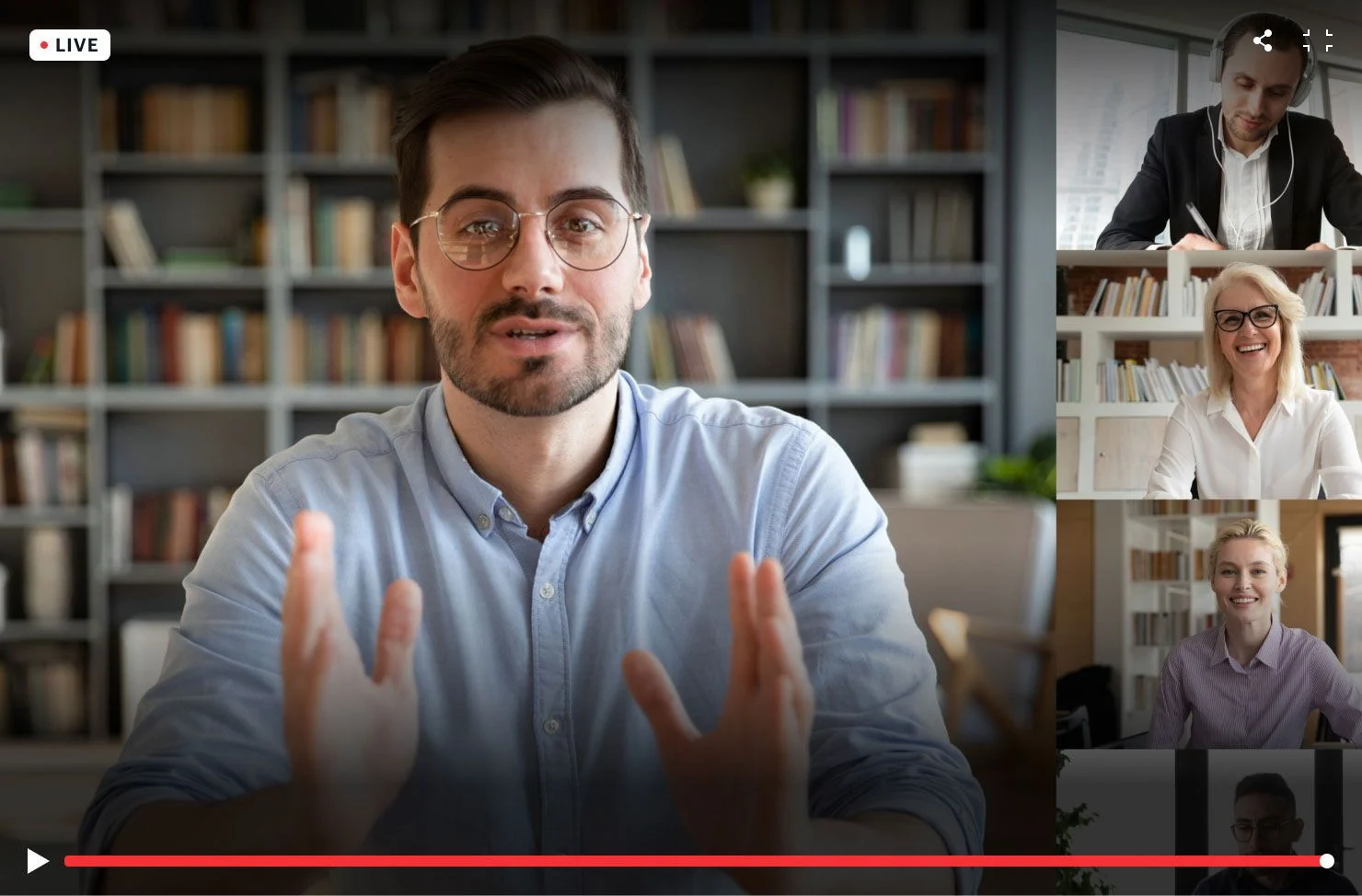 [Daily live streaming](https://www.daily.co/livestreaming) lets you broadcast a real-time, multi-participant video call to the streaming platform of your choice.
Live streaming sends [RTMP streams](https://developer.mozilla.org/en-US/docs/Web/Guide/Audio_and_video_delivery/Live_streaming_web_audio_and_video#rtmp), real-time data like call participants' video and audio, to a specific location over the internet where interested people can tune into the broadcast.
Webinars, conference panels, classes, concerts, all-hands meetings, and many other live events are all good candidates for live streaming.
**Receive a \$15 credit for free**
New accounts have a \$15 credit automatically applied when you add a credit card. See our [pricing page](https://www.daily.co/pricing) for details.
## Key terms
**Encoder** — software (or hardware) that compresses the stream. Daily is the encoder.
**Transcoder** — software that ingests the RTMP stream and transcodes it into an HLS stream. Examples: YouTube Live, Mux, AWS IVS.
**HLS stream** — [HTTP Live Streaming](https://en.wikipedia.org/wiki/HTTP_Live_Streaming), an HTTP-based adaptive bitrate streaming protocol.
## Daily live streaming
Daily manages audio, video, and screen share streams for calls of up to 100,000 participants. (Read our [interactive live streaming guide](/docs/guides/scaling-calls/interactive-live-streaming-rtmp-output#interactive-live-streaming-up-to-100000-participants) for more information.) Daily live streaming encodes the collective call stream to a transcoder of your choice, and provides options to [customize the stream layout](#live-streaming-layout-options). No external dependencies or multimedia streaming libraries are required.
By default, Daily live streaming outputs video at 1920x1080, 30 fps encoded as H.264 at 5 Mbps. The currently set maximum is 3840x2160 (4K UHD), but please [reach out](https://www.daily.co/contact) if you have other requirements.
Daily live streaming outputs audio encoded as AAC at 96 Kbps. [Contact us](https://www.daily.co/contact) if you have additional needs.
All live streams must occur over an [SFU network connection](/docs/guides/architecture-and-monitoring/intro-to-video-arch#the-architecture-of-a-room-p2p-vs-sfu-calls).
There are two parts to using Daily live streaming: [setting up prerequisite accounts and values](#prerequisites), and using those values in an application to [create a Daily live stream](#how-to-create-a-daily-live-streaming-app).
## Prerequisites
1. **Pay-as-you-go Daily account** — add a credit card in the [dashboard](https://dashboard.daily.co/billing).
2. **A Daily room** — create via the [dashboard](https://dashboard.daily.co/rooms) or [REST API](/reference/rest-api/rooms/create-room).
3. **An owner or streaming admin meeting token** — only meeting owners or streaming admins can start a live stream:
```bash theme={null}
curl --request POST \
--url https://api.daily.co/v1/meeting-tokens \
--header 'Authorization: Bearer DAILY_API_KEY' \
--header 'Content-Type: application/json' \
--data '{"properties": {"room_name": "DAILY_ROOM_NAME", "is_owner": true}}'
```
Or, for a streaming admin only:
```bash theme={null}
curl --request POST \
--url https://api.daily.co/v1/meeting-tokens \
--header 'Authorization: Bearer DAILY_API_KEY' \
--header 'Content-Type: application/json' \
--data '{"properties": {"room_name": "DAILY_ROOM_NAME", "permissions": {"canAdmin": ["streaming"]}}}'
```
4. **A transcoding provider account** — popular options: [Amazon IVS](https://aws.amazon.com/ivs/), [Mux](https://mux.com/), [YouTube Live](https://www.youtube.com/howyoutubeworks/product-features/live/), [Cloudflare Stream](https://www.cloudflare.com/products/cloudflare-stream/).
5. **An `rtmpUrl`** — combine your transcoder's ingest URL and stream key.
### RTMP URL templates by provider
| Provider | Template `rtmpUrl` |
| --------------------------------------------------------------------------------------------------- | ---------------------------------------------------------------------------------------------------------------------------------------- |
| [Amazon IVS](https://aws.amazon.com/ivs/) | `rtmp(s)://DOMAIN.global-contribute.live-video.net:443/app/STREAM_KEY` |
| [Mux](https://mux.com/) | `rtmp(s)://global-live.mux.com:443/app/STREAM_KEY` |
| [YouTube Live](https://www.youtube.com/howyoutubeworks/product-features/live/) | `rtmp://DOMAIN.rtmp.youtube.com/live2/STREAM_KEY` |
| [LivePeer](https://livepeer.org/) | `rtmp://mdw-rtmp.livepeer.com/live/STREAM_KEY` |
| [Azure](https://docs.microsoft.com/en-us/azure/media-services/latest/stream-live-streaming-concept) | `rtmps://DOMAIN.channel.media.azure.net:2935/live/DOMAIN/foo` *(Azure doesn't provide a stream key — use an arbitrary value like `foo`)* |
| [Cloudflare](https://www.cloudflare.com/products/cloudflare-stream/) | `rtmps://live.cloudflare.com:443/live/STREAM_KEY` |
Generic template: `rtmp(s)://DOMAIN/BASE_INGEST_URL/STREAM_KEY`
## How to create a Daily live streaming app
**1. Initialize a Daily call:**
```javascript theme={null}
// Daily Prebuilt
call = await window.Daily.createFrame(document.getElementById('callframe'), {
iframeStyle: { /* ... */ },
});
// Custom call object
call = await window.Daily.createCallObject();
```
**2. Join with an owner or streaming admin token:**
```javascript theme={null}
await call.join({ url: 'DAILY_ROOM_URL', token: 'DAILY_MEETING_TOKEN' });
```
**3. Start the live stream:**
```javascript theme={null}
call.startLiveStreaming({ rtmpUrl: 'RTMP_URL' });
```
**4. Stop the live stream:**
```javascript theme={null}
call.stopLiveStreaming();
```
**Sample code:**
* [Daily Prebuilt live streaming demo](https://github.com/daily-demos/prebuilt-ui/tree/live-streaming-demo)
* [Custom call object live streaming demo](https://github.com/daily-demos/examples/tree/main/custom/live-streaming)
* [Live streaming with react-native-daily-js](https://github.com/daily-demos/react-native-live-streaming)
## Listening for live streaming events
* [`"live-streaming-started"`](/reference/daily-js/events/live-streaming-events#live-streaming-started)
* [`"live-streaming-updated"`](/reference/daily-js/events/live-streaming-events#live-streaming-updated)
* [`"live-streaming-stopped"`](/reference/daily-js/events/live-streaming-events#live-streaming-stopped)
* [`"live-streaming-error"`](/reference/daily-js/events/live-streaming-events#live-streaming-error)
```javascript theme={null}
call.on('live-streaming-started', (e) => console.log('live stream started', e));
```
## Live streaming layout options
Pass layout configuration to [`startLiveStreaming()`](/reference/daily-js/instance-methods/start-live-streaming) or [`updateLiveStreaming()`](/reference/daily-js/instance-methods/update-live-streaming):
```javascript theme={null}
await call.startLiveStreaming({
width: 1280,
height: 720,
layout: { preset: 'default', max_cam_streams: 5 },
});
```
```javascript theme={null}
await call.updateLiveStreaming({
layout: { preset: 'single-participant', session_id: 'abcd123...' },
});
```
* `height`, `width` — controls output resolution (set once via `startLiveStreaming()`).
* `backgroundColor` — formatted as `#rrggbb` or `#aarrggbb`.This can only be set once via \`startLiveStreaming().
* `layout`: an object specifying the way participants' videos are laid out in the stream.
* `preset`: The layout preset to use. Options (see below for examples):
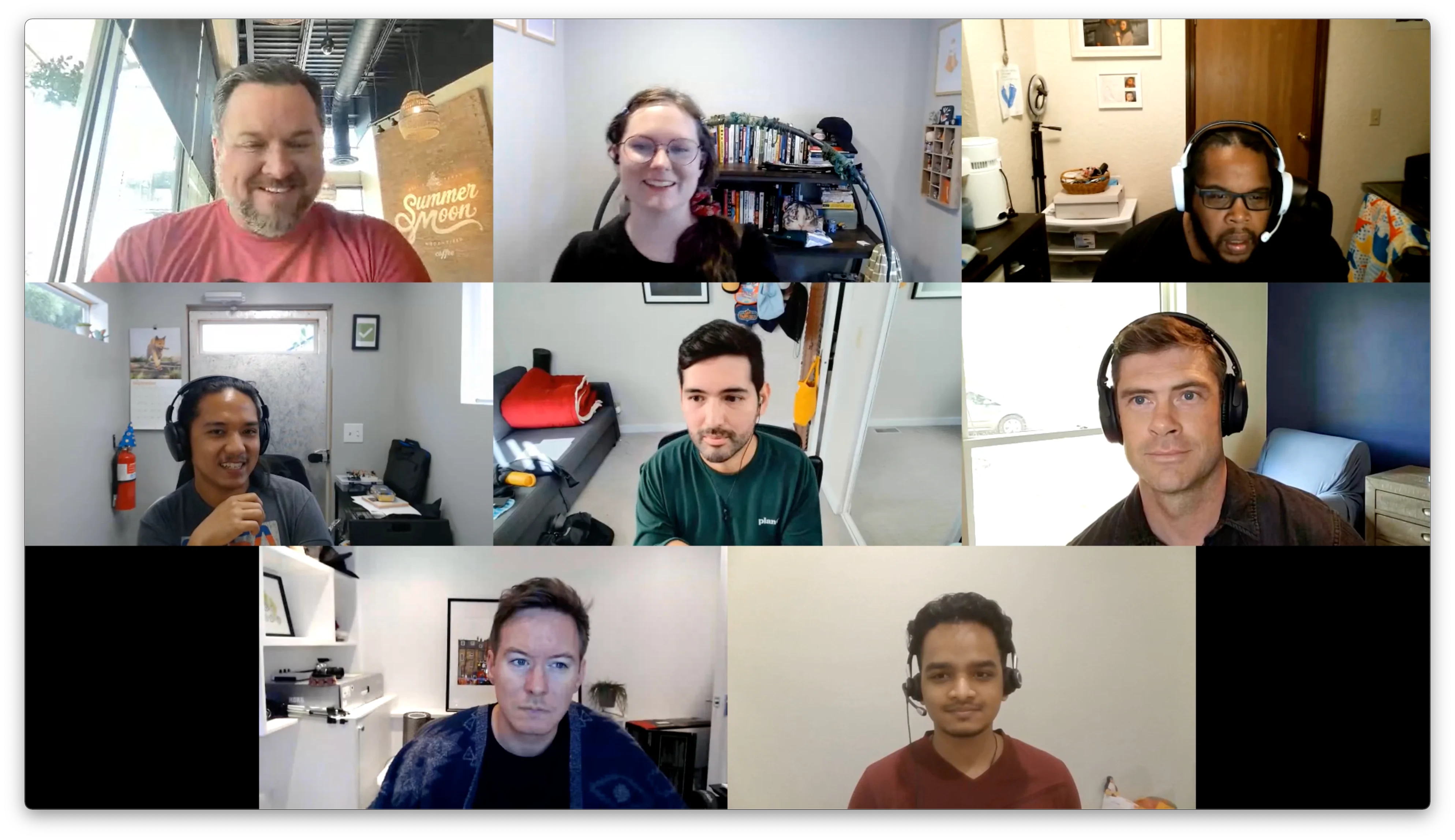
* `"default"` — grid layout; supports `max_cam_streams` (default 20, max 20).
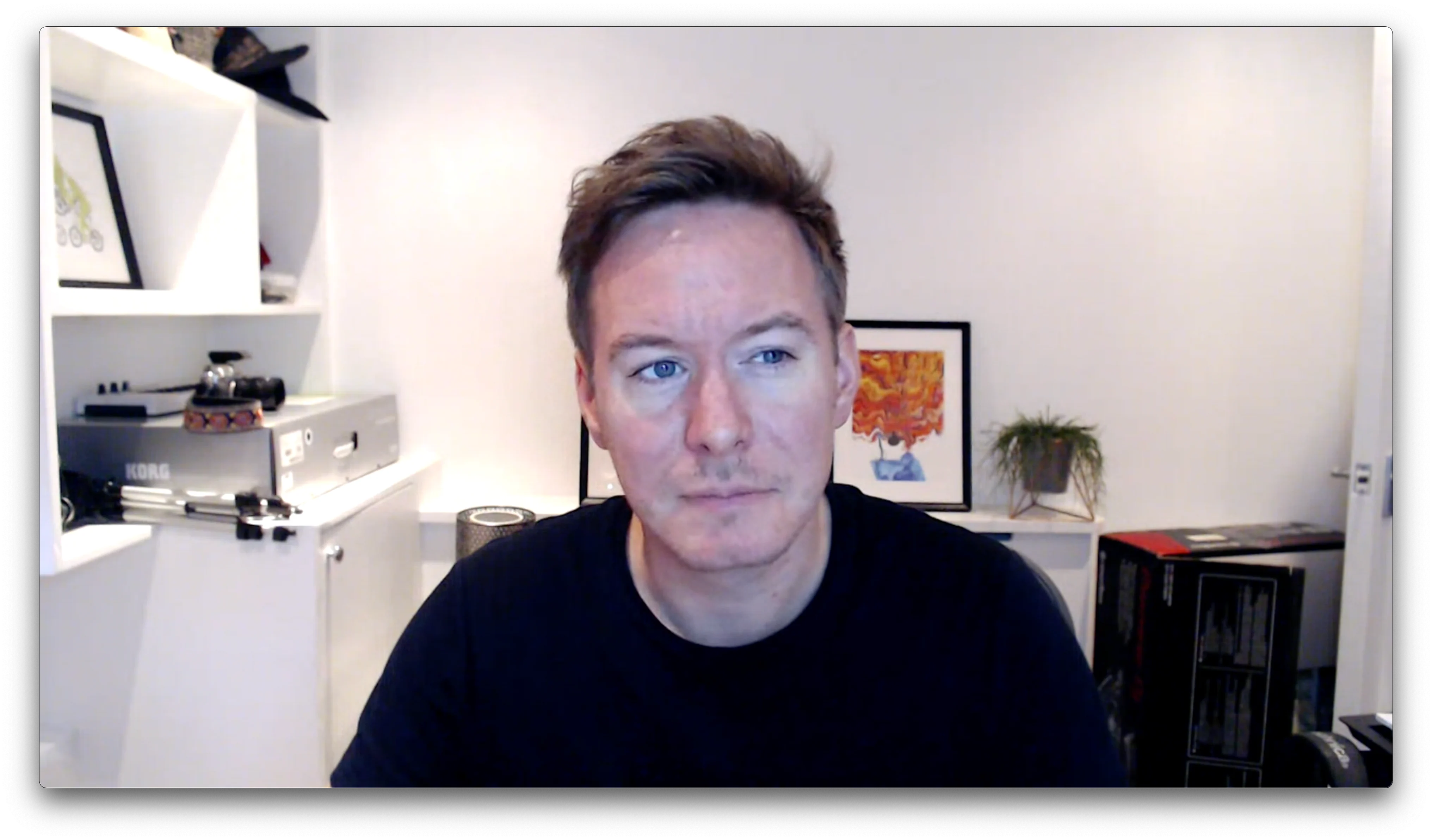
* `"single-participant"` — stream only a single participant's audio and video. The selected participant’s session ID must be specified via a `session_id` key.
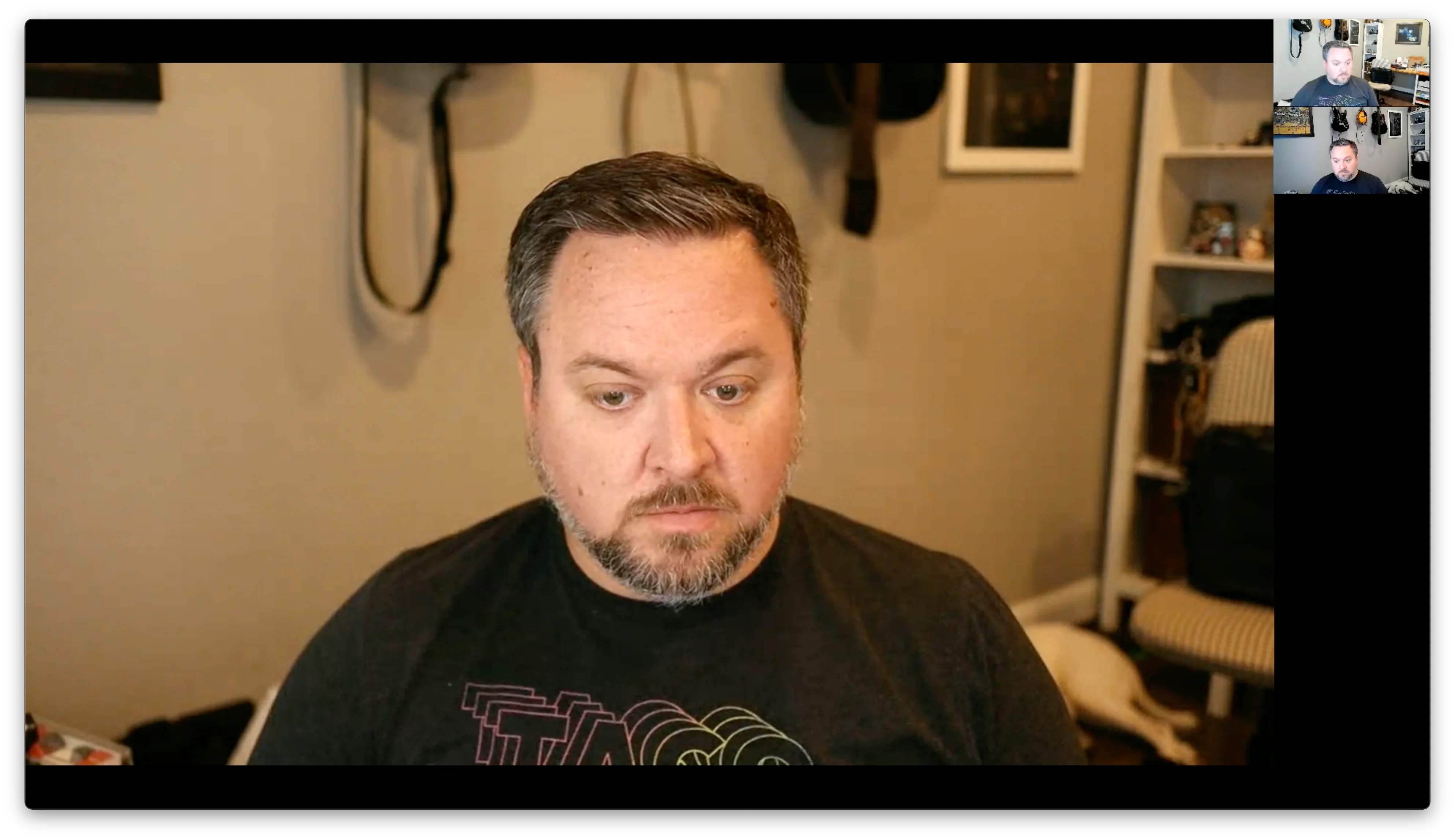
* `"active-participant"` — This layout focuses on the current speaker, and places up to 9 other cameras to the right in a single column vertical grid in the order in which they last spoke.
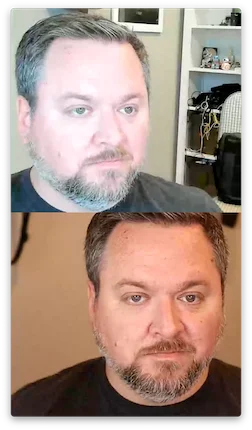
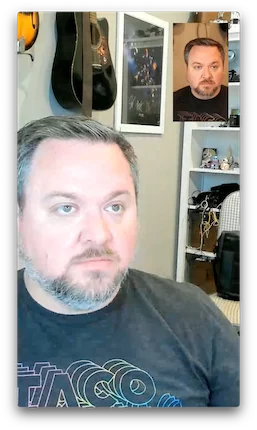
* `"portrait"` — mobile-friendly; `"vertical"` (default) or `"inset"` variant.
* `"vertical"`: up to two participants are shown in a vertical layout. Participants with the `is_owner` flag are shown lower in the grid.
* `"inset"`: one participant's video takes up the entire screen and the other is inset in a smaller rectangle. Participants' videos are scaled and cropped to fit the entire available space. Participants with the `is_owner` flag are shown full screen.
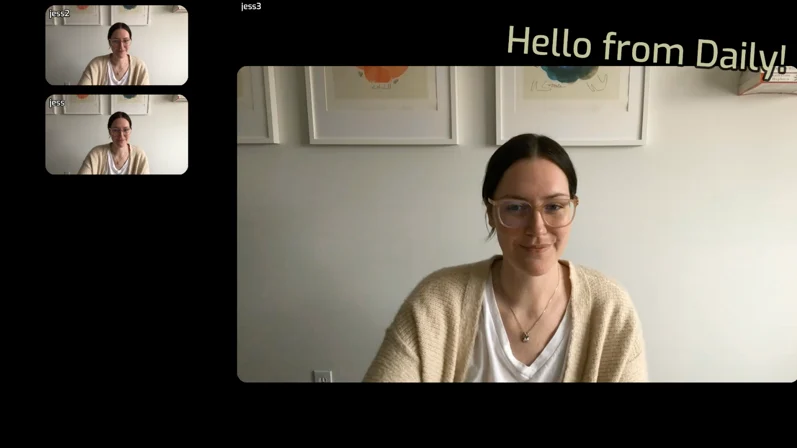
* `"custom"` — full custom layout via [VCS](/docs/guides/features/live-streaming/vcs), with `composition_params` and optional `session_assets`. A full list of available parameters is available in the [reference docs](/reference/daily-js/types/daily-streaming-layout-config#vcs-baseline-composition). You can also test available options with the [VCS Simulator](https://www.daily.co/tools/vcs-simulator/daily_baseline.html).
*Example `"default"` layout*:
[Daily live streaming](https://www.daily.co/livestreaming) lets you broadcast a real-time, multi-participant video call to the streaming platform of your choice.
Live streaming sends [RTMP streams](https://developer.mozilla.org/en-US/docs/Web/Guide/Audio_and_video_delivery/Live_streaming_web_audio_and_video#rtmp), real-time data like call participants' video and audio, to a specific location over the internet where interested people can tune into the broadcast.
Webinars, conference panels, classes, concerts, all-hands meetings, and many other live events are all good candidates for live streaming.
**Receive a \$15 credit for free**
New accounts have a \$15 credit automatically applied when you add a credit card. See our [pricing page](https://www.daily.co/pricing) for details.
## Key terms
**Encoder** — software (or hardware) that compresses the stream. Daily is the encoder.
**Transcoder** — software that ingests the RTMP stream and transcodes it into an HLS stream. Examples: YouTube Live, Mux, AWS IVS.
**HLS stream** — [HTTP Live Streaming](https://en.wikipedia.org/wiki/HTTP_Live_Streaming), an HTTP-based adaptive bitrate streaming protocol.
## Daily live streaming
Daily manages audio, video, and screen share streams for calls of up to 100,000 participants. (Read our [interactive live streaming guide](/docs/guides/scaling-calls/interactive-live-streaming-rtmp-output#interactive-live-streaming-up-to-100000-participants) for more information.) Daily live streaming encodes the collective call stream to a transcoder of your choice, and provides options to [customize the stream layout](#live-streaming-layout-options). No external dependencies or multimedia streaming libraries are required.
By default, Daily live streaming outputs video at 1920x1080, 30 fps encoded as H.264 at 5 Mbps. The currently set maximum is 3840x2160 (4K UHD), but please [reach out](https://www.daily.co/contact) if you have other requirements.
Daily live streaming outputs audio encoded as AAC at 96 Kbps. [Contact us](https://www.daily.co/contact) if you have additional needs.
All live streams must occur over an [SFU network connection](/docs/guides/architecture-and-monitoring/intro-to-video-arch#the-architecture-of-a-room-p2p-vs-sfu-calls).
There are two parts to using Daily live streaming: [setting up prerequisite accounts and values](#prerequisites), and using those values in an application to [create a Daily live stream](#how-to-create-a-daily-live-streaming-app).
## Prerequisites
1. **Pay-as-you-go Daily account** — add a credit card in the [dashboard](https://dashboard.daily.co/billing).
2. **A Daily room** — create via the [dashboard](https://dashboard.daily.co/rooms) or [REST API](/reference/rest-api/rooms/create-room).
3. **An owner or streaming admin meeting token** — only meeting owners or streaming admins can start a live stream:
```bash theme={null}
curl --request POST \
--url https://api.daily.co/v1/meeting-tokens \
--header 'Authorization: Bearer DAILY_API_KEY' \
--header 'Content-Type: application/json' \
--data '{"properties": {"room_name": "DAILY_ROOM_NAME", "is_owner": true}}'
```
Or, for a streaming admin only:
```bash theme={null}
curl --request POST \
--url https://api.daily.co/v1/meeting-tokens \
--header 'Authorization: Bearer DAILY_API_KEY' \
--header 'Content-Type: application/json' \
--data '{"properties": {"room_name": "DAILY_ROOM_NAME", "permissions": {"canAdmin": ["streaming"]}}}'
```
4. **A transcoding provider account** — popular options: [Amazon IVS](https://aws.amazon.com/ivs/), [Mux](https://mux.com/), [YouTube Live](https://www.youtube.com/howyoutubeworks/product-features/live/), [Cloudflare Stream](https://www.cloudflare.com/products/cloudflare-stream/).
5. **An `rtmpUrl`** — combine your transcoder's ingest URL and stream key.
### RTMP URL templates by provider
| Provider | Template `rtmpUrl` |
| --------------------------------------------------------------------------------------------------- | ---------------------------------------------------------------------------------------------------------------------------------------- |
| [Amazon IVS](https://aws.amazon.com/ivs/) | `rtmp(s)://DOMAIN.global-contribute.live-video.net:443/app/STREAM_KEY` |
| [Mux](https://mux.com/) | `rtmp(s)://global-live.mux.com:443/app/STREAM_KEY` |
| [YouTube Live](https://www.youtube.com/howyoutubeworks/product-features/live/) | `rtmp://DOMAIN.rtmp.youtube.com/live2/STREAM_KEY` |
| [LivePeer](https://livepeer.org/) | `rtmp://mdw-rtmp.livepeer.com/live/STREAM_KEY` |
| [Azure](https://docs.microsoft.com/en-us/azure/media-services/latest/stream-live-streaming-concept) | `rtmps://DOMAIN.channel.media.azure.net:2935/live/DOMAIN/foo` *(Azure doesn't provide a stream key — use an arbitrary value like `foo`)* |
| [Cloudflare](https://www.cloudflare.com/products/cloudflare-stream/) | `rtmps://live.cloudflare.com:443/live/STREAM_KEY` |
Generic template: `rtmp(s)://DOMAIN/BASE_INGEST_URL/STREAM_KEY`
## How to create a Daily live streaming app
**1. Initialize a Daily call:**
```javascript theme={null}
// Daily Prebuilt
call = await window.Daily.createFrame(document.getElementById('callframe'), {
iframeStyle: { /* ... */ },
});
// Custom call object
call = await window.Daily.createCallObject();
```
**2. Join with an owner or streaming admin token:**
```javascript theme={null}
await call.join({ url: 'DAILY_ROOM_URL', token: 'DAILY_MEETING_TOKEN' });
```
**3. Start the live stream:**
```javascript theme={null}
call.startLiveStreaming({ rtmpUrl: 'RTMP_URL' });
```
**4. Stop the live stream:**
```javascript theme={null}
call.stopLiveStreaming();
```
**Sample code:**
* [Daily Prebuilt live streaming demo](https://github.com/daily-demos/prebuilt-ui/tree/live-streaming-demo)
* [Custom call object live streaming demo](https://github.com/daily-demos/examples/tree/main/custom/live-streaming)
* [Live streaming with react-native-daily-js](https://github.com/daily-demos/react-native-live-streaming)
## Listening for live streaming events
* [`"live-streaming-started"`](/reference/daily-js/events/live-streaming-events#live-streaming-started)
* [`"live-streaming-updated"`](/reference/daily-js/events/live-streaming-events#live-streaming-updated)
* [`"live-streaming-stopped"`](/reference/daily-js/events/live-streaming-events#live-streaming-stopped)
* [`"live-streaming-error"`](/reference/daily-js/events/live-streaming-events#live-streaming-error)
```javascript theme={null}
call.on('live-streaming-started', (e) => console.log('live stream started', e));
```
## Live streaming layout options
Pass layout configuration to [`startLiveStreaming()`](/reference/daily-js/instance-methods/start-live-streaming) or [`updateLiveStreaming()`](/reference/daily-js/instance-methods/update-live-streaming):
```javascript theme={null}
await call.startLiveStreaming({
width: 1280,
height: 720,
layout: { preset: 'default', max_cam_streams: 5 },
});
```
```javascript theme={null}
await call.updateLiveStreaming({
layout: { preset: 'single-participant', session_id: 'abcd123...' },
});
```
* `height`, `width` — controls output resolution (set once via `startLiveStreaming()`).
* `backgroundColor` — formatted as `#rrggbb` or `#aarrggbb`.This can only be set once via \`startLiveStreaming().
* `layout`: an object specifying the way participants' videos are laid out in the stream.
* `preset`: The layout preset to use. Options (see below for examples):
* `"default"` — grid layout; supports `max_cam_streams` (default 20, max 20).
* `"single-participant"` — stream only a single participant's audio and video. The selected participant’s session ID must be specified via a `session_id` key.
* `"active-participant"` — This layout focuses on the current speaker, and places up to 9 other cameras to the right in a single column vertical grid in the order in which they last spoke.
* `"portrait"` — mobile-friendly; `"vertical"` (default) or `"inset"` variant.
* `"vertical"`: up to two participants are shown in a vertical layout. Participants with the `is_owner` flag are shown lower in the grid.
* `"inset"`: one participant's video takes up the entire screen and the other is inset in a smaller rectangle. Participants' videos are scaled and cropped to fit the entire available space. Participants with the `is_owner` flag are shown full screen.
* `"custom"` — full custom layout via [VCS](/docs/guides/features/live-streaming/vcs), with `composition_params` and optional `session_assets`. A full list of available parameters is available in the [reference docs](/reference/daily-js/types/daily-streaming-layout-config#vcs-baseline-composition). You can also test available options with the [VCS Simulator](https://www.daily.co/tools/vcs-simulator/daily_baseline.html).
*Example `"default"` layout*:
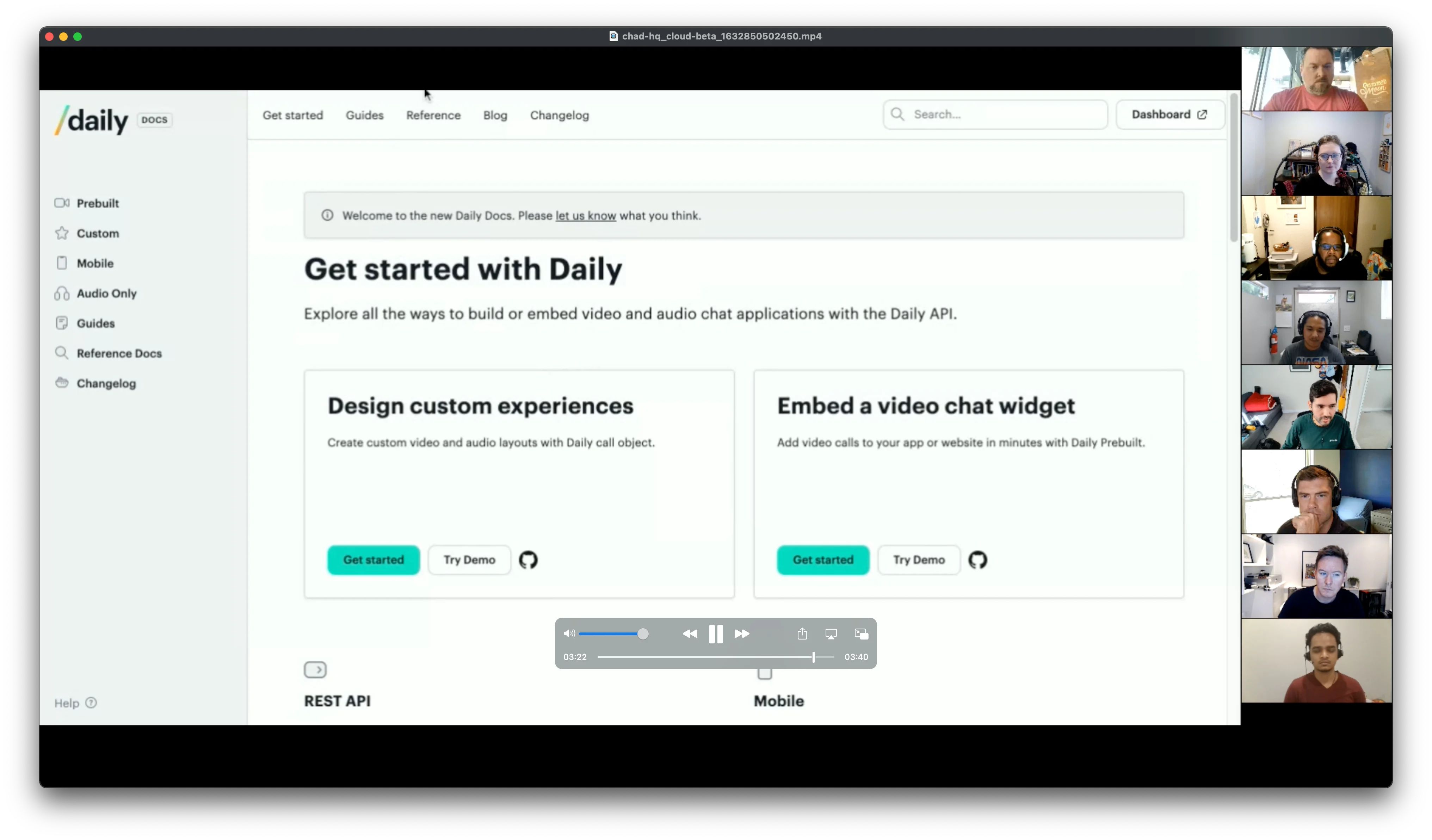
 *Example screenshare `"default"` layout*:
 *Example `"single-participant"` layout*:
 *Example `"active-participant"` layout*:
 *Example `"portrait"` layout with `"vertical"` variant*:
 *Example `"portrait"` layout with `"inset"` variant*:
 *Example `"custom"` layout with a text overlay:*
 ## Multiple live streaming instances
Daily supports multiple live streaming and recording instances per room — useful for generating independent layouts for different audiences (e.g. portrait for mobile, landscape for desktop).
Pass a unique `instanceId` to [`startLiveStreaming()`](/reference/daily-js/instance-methods/start-live-streaming) or [`startRecording()`](/reference/daily-js/instance-methods/start-recording) to start independent instances. Each is independently controllable via [`updateLiveStreaming()`](/reference/daily-js/instance-methods/update-live-streaming)/[`updateRecording()`](/reference/daily-js/instance-methods/update-recording) and [`stopLiveStreaming()`](/reference/daily-js/instance-methods/stop-live-streaming)/[`stopRecording()`](/reference/daily-js/instance-methods/stop-recording), and all events include an `instanceId` to distinguish them.
For full details, see the [multi-instance guide](/docs/guides/features/live-streaming/multi-instance).
The number of allowed instances per room is controlled by the `max_streaming_instances_per_room` domain property. [Contact us](https://www.daily.co/contact/support) to configure this.
## Multiple live streaming instances
Daily supports multiple live streaming and recording instances per room — useful for generating independent layouts for different audiences (e.g. portrait for mobile, landscape for desktop).
Pass a unique `instanceId` to [`startLiveStreaming()`](/reference/daily-js/instance-methods/start-live-streaming) or [`startRecording()`](/reference/daily-js/instance-methods/start-recording) to start independent instances. Each is independently controllable via [`updateLiveStreaming()`](/reference/daily-js/instance-methods/update-live-streaming)/[`updateRecording()`](/reference/daily-js/instance-methods/update-recording) and [`stopLiveStreaming()`](/reference/daily-js/instance-methods/stop-live-streaming)/[`stopRecording()`](/reference/daily-js/instance-methods/stop-recording), and all events include an `instanceId` to distinguish them.
For full details, see the [multi-instance guide](/docs/guides/features/live-streaming/multi-instance).
The number of allowed instances per room is controlled by the `max_streaming_instances_per_room` domain property. [Contact us](https://www.daily.co/contact/support) to configure this.