> ## Documentation Index
> Fetch the complete documentation index at: https://docs.daily.co/llms.txt
> Use this file to discover all available pages before exploring further.
# Streaming HLS with Daily
> Learn how to configure HTTP Live Streaming (HLS) with Daily, including S3 storage and multi-bitrate output.
Paid plans only
**Receive a \$15 credit for free**
New accounts have a \$15 credit automatically applied when you add a credit card. See our [pricing page](https://www.daily.co/pricing) for details.
Daily supports HLS ([HTTP Live Streaming](https://www.streamingmedia.com/Articles/Editorial/What-Is-.../What-is-HLS-\(HTTP-Live-Streaming\)-78221.aspx)), a multi-bitrate adaptive streaming protocol. HLS allows viewers on cellular connections to receive a lower bitrate while viewers on high-speed connections receive higher quality.
The tradeoff is latency — expect roughly 12–20 seconds of delay vs. live. HLS is best when you want to host your own stream and control where the output is stored. If you want your audience to watch on YouTube, Twitch, or similar platforms, use Daily's [RTMP streaming](/docs/guides/features/live-streaming) instead.
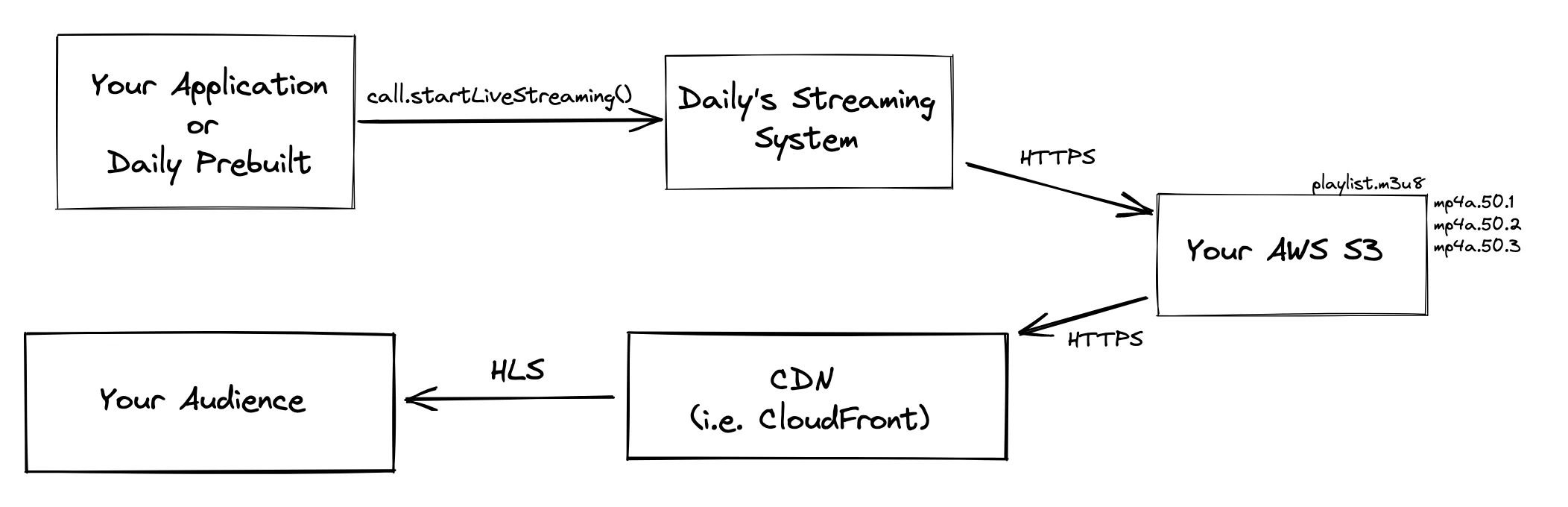
## The HLS architecture at Daily
 ## Configure HLS
HLS is configured via the [`streaming_endpoints`](/reference/rest-api/rooms/update-room) room property. Here is an example of creating an HLS live stream configuration named `hls_s3`:
```json theme={null}
{
"properties": {
"streaming_endpoints": [
{
"name": "hls_s3",
"type": "hls",
"hls_config": {
"save_hls_recording": true,
"storage": {
"bucket_name": "daily-hls-streams",
"bucket_region": "us-west-2",
"assume_role_arn": "arn:aws:iam::999999999999:role/DailyS3AccessRole",
"path": "path-to/recordings"
}
}
}
]
}
}
```
**Properties:**
* `name`: the label that will be used in `daily-js` to reference a specific configuration
* `type`: either `rtmp` or `hls` for an RTMP and HLS configuration
* `rtmp_config`: the RTMP configuration details (when `type` is `rtmp`)
* `url`: the RTMP url
* `hls_config`: the HLS configuration details (when `type` is `hls`)
* `save_hls_recording`: `true` when you want to save the output of the live stream once the stream is finished; otherwise, `false`. This can be used as a replacement for cloud recording.
* `variants`: specifies all the HLS variants to generate. Specified as array with following properties.
* `width`: output width.
* `height`: output height.
* `fps`: output FPS.
* `bitrate`: output bitrate in kilobits per second (kbps).
* `iframe_only`: whether this is iframe-only variant.
* `storage`: the storage details when `save_hls_recording` is set to `true`
* `bucket_name`: the name of the S3 bucket where the HLS output will be stored
* `bucket_region`: the AWS region of the S3 bucket (this is an S3 bucket that you own)
* `assume_role_arn`: The Amazon Resource Name to assume in order to write to the S3 bucket
* `path`: (deprecated, use path\_template) the S3 key path prefix for where to store the output HLS. The final master.m3u8 path template is `///master.m3u8`.
* `path_template`: define the template to derive the S3 key path prefix where HLS is stored.
For a complete list of the properties available on `streaming_endpoints`, check out the \[rooms configuration]\[http\://localhost:3000/reference/rest-api/rooms/update-room#body-properties-streaming-endpoints].
Daily only supports sending HLS output to your AWS S3 bucket. There is no support for storing HLS video within the Daily infrastructure. Check out our guide on [storing call recordings in a custom Amazon S3 bucket](/docs/guides/features/recording/custom-s3-storage).
Use the [rooms API](/reference/rest-api/rooms/create-room) to set `streaming_endpoints` on your room:
```bash theme={null}
curl --request POST \
--url https://api.daily.co/v1/rooms/my-room \
--header 'Authorization: Bearer $DAILY_API_KEY' \
--header 'Content-Type: application/json' \
--data '{
"properties": {
"streaming_endpoints": [
{
"name": "hls_s3",
"type": "hls",
"hls_config": {
"save_hls_recording": true,
"variants": [
{ "width": 1920, "height": 1080, "fps": 30, "bitrate": 2500, "iframe_only": false },
{ "width": 1280, "height": 720, "fps": 30, "bitrate": 1500, "iframe_only": false },
{ "width": 640, "height": 360, "fps": 24, "bitrate": 700, "iframe_only": true }
],
"storage": {
"bucket_name": "daily-hls-streams",
"bucket_region": "us-west-2",
"assume_role_arn": "arn:aws:iam::999999999999:role/DailyS3AccessRole",
"path": "path-to/recordings"
}
}
}
]
}
}'
```
## The `save_hls_recording` parameter
HLS is a livestream, i.e. it is available for consumption soon after \[`startLiveStreaming()`]\[/reference/daily-js/instance-methods/start-live-streaming] call. This livestream can also be saved for later viewing with `save_hls_recording`.
* `true`: During the livestream, the m3u8 playlist is `[EVENT type playlist]` and segments are not deleted. At the end of streaming, the playlist is converted to `[VOD type playlist]`.
* `false`: During the livestream, new segments are appended to the m3u8 playlist and old segments are deleted from the playlist (as well as from S3). This keeps only the most recent 5 segments in the playlist at any point of time.
## Start an HLS stream
After configuring `streaming_endpoints`, start the stream with [`startLiveStreaming()`](/reference/daily-js/instance-methods/start-live-streaming):
```javascript theme={null}
await call.startLiveStreaming({
endpoints: [{ endpoint: 'hls_s3' }],
});
```
`hls_s3` refers to the `name` of the endpoint defined in `streaming_endpoints`.
If you need HLS and cloud recording, or HLS and RTMP, in the same session, use [multiple instances](/docs/guides/features/live-streaming/multi-instance) with unique `instanceId` values. HLS cannot share an `instanceId` with RTMP or cloud recording.
## Serve HLS to your audience
Daily writes HLS output to your S3 bucket. Serve it to viewers through a CDN (such as [Amazon CloudFront](https://aws.amazon.com/cloudfront/)) rather than directly from S3. This reduces security risk and ensures content is served from the closest edge location to each viewer. In order to reduce security risk, your S3 resources should implement a "\[least privilege access]\[[https://docs.aws.amazon.com/AmazonS3/latest/userguide/security-best-practices.html](https://docs.aws.amazon.com/AmazonS3/latest/userguide/security-best-practices.html)]" model.
CDN setup is outside the scope of this guide. Daily has an [example project](https://github.com/daily-co/daily-cloudfront-hls-example) that creates the AWS infrastructure to serve HLS through CloudFront.
## Limitations
**Daily does not store HLS output**
Output is stored in one of your AWS S3 buckets.
This allows you to have more control over your data and its storage and access.
**Daily supports 4 bitrates out-of-the-box**
| Width | Height | FPS | Bitrate (kbps) |
| ----- | ------ | --- | -------------- |
| 1920 | 1080 | 30 | 2500 |
| 1280 | 720 | 30 | 1500 |
| 640 | 360 | 24 | 700 |
| 320 | 180 | 24 | 200 |
Daily also generates an [i-frames-only stream](https://datatracker.ietf.org/doc/html/rfc8216#section-4.3.3.6) at 640×480 for trick play. Default bitrates can be overridden via the `streaming_endpoints` configuration.
**HLS configuration is only available as a room property**
`streaming_endpoints` is a room property and cannot be set at the domain level.
**There is a maximum of 20 `streaming_endpoints`**
You can store up to 20 `streaming_endpoints` configuration objects per room.
## Configure HLS
HLS is configured via the [`streaming_endpoints`](/reference/rest-api/rooms/update-room) room property. Here is an example of creating an HLS live stream configuration named `hls_s3`:
```json theme={null}
{
"properties": {
"streaming_endpoints": [
{
"name": "hls_s3",
"type": "hls",
"hls_config": {
"save_hls_recording": true,
"storage": {
"bucket_name": "daily-hls-streams",
"bucket_region": "us-west-2",
"assume_role_arn": "arn:aws:iam::999999999999:role/DailyS3AccessRole",
"path": "path-to/recordings"
}
}
}
]
}
}
```
**Properties:**
* `name`: the label that will be used in `daily-js` to reference a specific configuration
* `type`: either `rtmp` or `hls` for an RTMP and HLS configuration
* `rtmp_config`: the RTMP configuration details (when `type` is `rtmp`)
* `url`: the RTMP url
* `hls_config`: the HLS configuration details (when `type` is `hls`)
* `save_hls_recording`: `true` when you want to save the output of the live stream once the stream is finished; otherwise, `false`. This can be used as a replacement for cloud recording.
* `variants`: specifies all the HLS variants to generate. Specified as array with following properties.
* `width`: output width.
* `height`: output height.
* `fps`: output FPS.
* `bitrate`: output bitrate in kilobits per second (kbps).
* `iframe_only`: whether this is iframe-only variant.
* `storage`: the storage details when `save_hls_recording` is set to `true`
* `bucket_name`: the name of the S3 bucket where the HLS output will be stored
* `bucket_region`: the AWS region of the S3 bucket (this is an S3 bucket that you own)
* `assume_role_arn`: The Amazon Resource Name to assume in order to write to the S3 bucket
* `path`: (deprecated, use path\_template) the S3 key path prefix for where to store the output HLS. The final master.m3u8 path template is `///master.m3u8`.
* `path_template`: define the template to derive the S3 key path prefix where HLS is stored.
For a complete list of the properties available on `streaming_endpoints`, check out the \[rooms configuration]\[http\://localhost:3000/reference/rest-api/rooms/update-room#body-properties-streaming-endpoints].
Daily only supports sending HLS output to your AWS S3 bucket. There is no support for storing HLS video within the Daily infrastructure. Check out our guide on [storing call recordings in a custom Amazon S3 bucket](/docs/guides/features/recording/custom-s3-storage).
Use the [rooms API](/reference/rest-api/rooms/create-room) to set `streaming_endpoints` on your room:
```bash theme={null}
curl --request POST \
--url https://api.daily.co/v1/rooms/my-room \
--header 'Authorization: Bearer $DAILY_API_KEY' \
--header 'Content-Type: application/json' \
--data '{
"properties": {
"streaming_endpoints": [
{
"name": "hls_s3",
"type": "hls",
"hls_config": {
"save_hls_recording": true,
"variants": [
{ "width": 1920, "height": 1080, "fps": 30, "bitrate": 2500, "iframe_only": false },
{ "width": 1280, "height": 720, "fps": 30, "bitrate": 1500, "iframe_only": false },
{ "width": 640, "height": 360, "fps": 24, "bitrate": 700, "iframe_only": true }
],
"storage": {
"bucket_name": "daily-hls-streams",
"bucket_region": "us-west-2",
"assume_role_arn": "arn:aws:iam::999999999999:role/DailyS3AccessRole",
"path": "path-to/recordings"
}
}
}
]
}
}'
```
## The `save_hls_recording` parameter
HLS is a livestream, i.e. it is available for consumption soon after \[`startLiveStreaming()`]\[/reference/daily-js/instance-methods/start-live-streaming] call. This livestream can also be saved for later viewing with `save_hls_recording`.
* `true`: During the livestream, the m3u8 playlist is `[EVENT type playlist]` and segments are not deleted. At the end of streaming, the playlist is converted to `[VOD type playlist]`.
* `false`: During the livestream, new segments are appended to the m3u8 playlist and old segments are deleted from the playlist (as well as from S3). This keeps only the most recent 5 segments in the playlist at any point of time.
## Start an HLS stream
After configuring `streaming_endpoints`, start the stream with [`startLiveStreaming()`](/reference/daily-js/instance-methods/start-live-streaming):
```javascript theme={null}
await call.startLiveStreaming({
endpoints: [{ endpoint: 'hls_s3' }],
});
```
`hls_s3` refers to the `name` of the endpoint defined in `streaming_endpoints`.
If you need HLS and cloud recording, or HLS and RTMP, in the same session, use [multiple instances](/docs/guides/features/live-streaming/multi-instance) with unique `instanceId` values. HLS cannot share an `instanceId` with RTMP or cloud recording.
## Serve HLS to your audience
Daily writes HLS output to your S3 bucket. Serve it to viewers through a CDN (such as [Amazon CloudFront](https://aws.amazon.com/cloudfront/)) rather than directly from S3. This reduces security risk and ensures content is served from the closest edge location to each viewer. In order to reduce security risk, your S3 resources should implement a "\[least privilege access]\[[https://docs.aws.amazon.com/AmazonS3/latest/userguide/security-best-practices.html](https://docs.aws.amazon.com/AmazonS3/latest/userguide/security-best-practices.html)]" model.
CDN setup is outside the scope of this guide. Daily has an [example project](https://github.com/daily-co/daily-cloudfront-hls-example) that creates the AWS infrastructure to serve HLS through CloudFront.
## Limitations
**Daily does not store HLS output**
Output is stored in one of your AWS S3 buckets.
This allows you to have more control over your data and its storage and access.
**Daily supports 4 bitrates out-of-the-box**
| Width | Height | FPS | Bitrate (kbps) |
| ----- | ------ | --- | -------------- |
| 1920 | 1080 | 30 | 2500 |
| 1280 | 720 | 30 | 1500 |
| 640 | 360 | 24 | 700 |
| 320 | 180 | 24 | 200 |
Daily also generates an [i-frames-only stream](https://datatracker.ietf.org/doc/html/rfc8216#section-4.3.3.6) at 640×480 for trick play. Default bitrates can be overridden via the `streaming_endpoints` configuration.
**HLS configuration is only available as a room property**
`streaming_endpoints` is a room property and cannot be set at the domain level.
**There is a maximum of 20 `streaming_endpoints`**
You can store up to 20 `streaming_endpoints` configuration objects per room.