> ## Documentation Index
> Fetch the complete documentation index at: https://docs.daily.co/llms.txt
> Use this file to discover all available pages before exploring further.
# Multi-instance live streaming and recording
> Run independent live streaming and recording instances in a single Daily room, each with its own layout.
Daily allows multiple live streaming and recording instances to run simultaneously within a single room. Each instance is independently controllable with its own layout.
Multi-instance is not the same as sending one stream to multiple destinations. A single live streaming instance already supports sending to multiple RTMP endpoints simultaneously. Multi-instance is for generating independent *compositions* — for example, a portrait layout for mobile and a landscape layout for desktop.
## Use cases
* Generating a portrait layout for mobile viewers and a landscape layout for desktop viewers
* Presenting an enhanced layout to users with more features enabled (such as premium features or moderation views)
* Defining separate layouts for a live stream and a recording of the same event
## Architecture
Daily uses the same underlying infrastructure for recording and live streaming. Recording and live streaming instances that share an `instanceId` are linked — updating the layout of one updates the other.
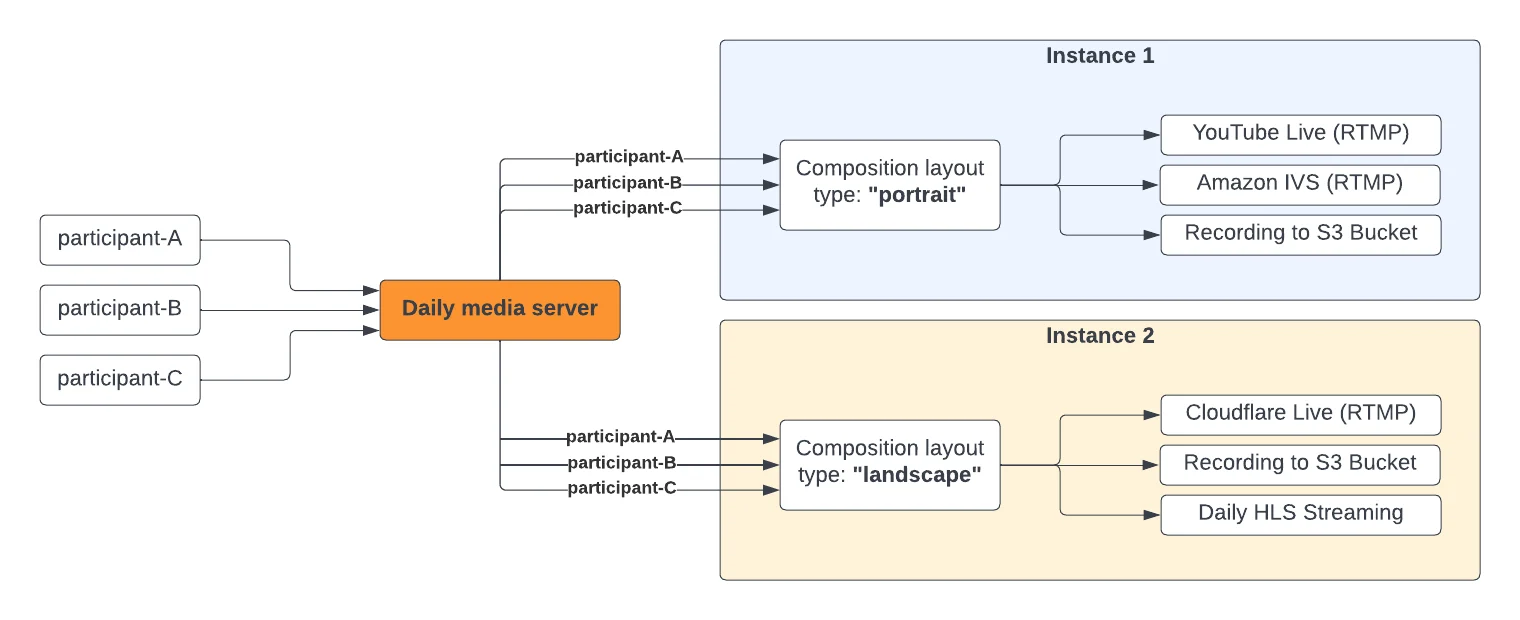 Recording and live streaming with the same `instanceId` are interlinked. [Updating](/reference/daily-js/instance-methods/update-live-streaming) the layout of a live streaming instance will also affect the recording instance (if any) of that ID.
## Setting up multi-instance
First, contact [Daily support](https://www.daily.co/contact/support) to configure `max_streaming_instances_per_room` for your domain.
Then pass a unique `instanceId` (a valid UUID) to [`startLiveStreaming()`](/reference/daily-js/instance-methods/start-live-streaming) or [`startRecording()`](/reference/daily-js/instance-methods/start-recording):
```javascript theme={null}
await call.startLiveStreaming({
rtmpUrl: ['your_rtmp_url'],
instanceId: 'YOUR_UUID',
width: 1280,
height: 720,
});
```
To update the layout for an existing live stream, use the [`updateLiveStreaming()`](/reference/daily-js/instance-methods/update-live-streaming) or [`updateRecording()`](/reference/daily-js/instance-methods/update-recording) call object instance methods:
```javascript theme={null}
await call.updateLiveStreaming({
instanceId: 'YOUR_UUID',
layout: { preset: 'active-participant' },
});
```
To stop a specific live streaming or recording instance, pass its `instanceId` to the [`stopLiveStreaming()`](/reference/daily-js/instance-methods/stop-live-streaming) or [`stopRecording()`](/reference/daily-js/instance-methods/stop-recording) call object instance method:
```javascript theme={null}
await call.stopLiveStreaming({
instanceId: 'YOUR_UUID',
});
```
When `instanceId` is provided, all subsequent calls to `updateLiveStreaming()`, `stopLiveStreaming()`, `updateRecording()`, and `stopRecording()` must include the same `instanceId`.
If no `instanceId` is provided, Daily assigns the reserved default ID `'c3df927c-f738-4471-a2b7-066fa7e95a6b'`.
All [live streaming](/reference/daily-js/events/live-streaming-events#live-streaming-started) and [recording](/reference/daily-js/events/recording-events#recording-started) events include an `instanceId` field so your app can distinguish between running instances.
## Using multi-instance with daily-react
**Per-instance state**
The [`useRecording`](/reference/daily-react/use-recording) and [`useLiveStreaming`](/reference/daily-react/use-live-streaming) hooks accept an optional `instanceId` for per-instance state:
```jsx theme={null}
import { useRecording, useLiveStreaming } from '@daily-co/daily-react';
// instanceId must be a valid UUID
const PORTRAIT_INSTANCE = 'a1b2c3d4-5678-9abc-def0-1234567890ab';
const MOBILE_INSTANCE = 'c3d4e5f6-789a-bcde-f012-3456789abcde';
// State for a specific recording instance
const portraitRecording = useRecording({
instanceId: PORTRAIT_INSTANCE,
});
// State for a specific live streaming instance
const mobileStream = useLiveStreaming({
instanceId: MOBILE_INSTANCE,
});
```
When `instanceId` is provided, event callbacks are also filtered to only fire for that instance:
```jsx theme={null}
const { isRecording } = useRecording({
instanceId: PORTRAIT_INSTANCE,
onRecordingStarted: (ev) => {
// Only fires when this instance starts
console.log('Portrait recording started');
},
});
```
**Aggregate state**
Without `instanceId`, hooks return aggregate state across all instances — `isRecording` and `isLiveStreaming` are `true` if any instance is active:
```jsx theme={null}
const { isRecording } = useRecording();
// true if ANY recording instance is active
```
**Listing all instances**
To get an array of all instance states, use `useRecordingInstances` and `useLiveStreamingInstances`:
```jsx theme={null}
import {
useRecordingInstances,
useLiveStreamingInstances,
} from '@daily-co/daily-react';
const recordingInstances = useRecordingInstances();
const streamingInstances = useLiveStreamingInstances();
// Each instance has its own state (isRecording, layout, instanceId, etc.)
recordingInstances.forEach((instance) => {
console.log(`${instance.instanceId}: ${instance.isRecording}`);
});
```
## Billing
Each instance is billed separately. Two instances running for 60 minutes = 120 streaming minutes billed.
Recording and live streaming with the same `instanceId` are interlinked. [Updating](/reference/daily-js/instance-methods/update-live-streaming) the layout of a live streaming instance will also affect the recording instance (if any) of that ID.
## Setting up multi-instance
First, contact [Daily support](https://www.daily.co/contact/support) to configure `max_streaming_instances_per_room` for your domain.
Then pass a unique `instanceId` (a valid UUID) to [`startLiveStreaming()`](/reference/daily-js/instance-methods/start-live-streaming) or [`startRecording()`](/reference/daily-js/instance-methods/start-recording):
```javascript theme={null}
await call.startLiveStreaming({
rtmpUrl: ['your_rtmp_url'],
instanceId: 'YOUR_UUID',
width: 1280,
height: 720,
});
```
To update the layout for an existing live stream, use the [`updateLiveStreaming()`](/reference/daily-js/instance-methods/update-live-streaming) or [`updateRecording()`](/reference/daily-js/instance-methods/update-recording) call object instance methods:
```javascript theme={null}
await call.updateLiveStreaming({
instanceId: 'YOUR_UUID',
layout: { preset: 'active-participant' },
});
```
To stop a specific live streaming or recording instance, pass its `instanceId` to the [`stopLiveStreaming()`](/reference/daily-js/instance-methods/stop-live-streaming) or [`stopRecording()`](/reference/daily-js/instance-methods/stop-recording) call object instance method:
```javascript theme={null}
await call.stopLiveStreaming({
instanceId: 'YOUR_UUID',
});
```
When `instanceId` is provided, all subsequent calls to `updateLiveStreaming()`, `stopLiveStreaming()`, `updateRecording()`, and `stopRecording()` must include the same `instanceId`.
If no `instanceId` is provided, Daily assigns the reserved default ID `'c3df927c-f738-4471-a2b7-066fa7e95a6b'`.
All [live streaming](/reference/daily-js/events/live-streaming-events#live-streaming-started) and [recording](/reference/daily-js/events/recording-events#recording-started) events include an `instanceId` field so your app can distinguish between running instances.
## Using multi-instance with daily-react
**Per-instance state**
The [`useRecording`](/reference/daily-react/use-recording) and [`useLiveStreaming`](/reference/daily-react/use-live-streaming) hooks accept an optional `instanceId` for per-instance state:
```jsx theme={null}
import { useRecording, useLiveStreaming } from '@daily-co/daily-react';
// instanceId must be a valid UUID
const PORTRAIT_INSTANCE = 'a1b2c3d4-5678-9abc-def0-1234567890ab';
const MOBILE_INSTANCE = 'c3d4e5f6-789a-bcde-f012-3456789abcde';
// State for a specific recording instance
const portraitRecording = useRecording({
instanceId: PORTRAIT_INSTANCE,
});
// State for a specific live streaming instance
const mobileStream = useLiveStreaming({
instanceId: MOBILE_INSTANCE,
});
```
When `instanceId` is provided, event callbacks are also filtered to only fire for that instance:
```jsx theme={null}
const { isRecording } = useRecording({
instanceId: PORTRAIT_INSTANCE,
onRecordingStarted: (ev) => {
// Only fires when this instance starts
console.log('Portrait recording started');
},
});
```
**Aggregate state**
Without `instanceId`, hooks return aggregate state across all instances — `isRecording` and `isLiveStreaming` are `true` if any instance is active:
```jsx theme={null}
const { isRecording } = useRecording();
// true if ANY recording instance is active
```
**Listing all instances**
To get an array of all instance states, use `useRecordingInstances` and `useLiveStreamingInstances`:
```jsx theme={null}
import {
useRecordingInstances,
useLiveStreamingInstances,
} from '@daily-co/daily-react';
const recordingInstances = useRecordingInstances();
const streamingInstances = useLiveStreamingInstances();
// Each instance has its own state (isRecording, layout, instanceId, etc.)
recordingInstances.forEach((instance) => {
console.log(`${instance.instanceId}: ${instance.isRecording}`);
});
```
## Billing
Each instance is billed separately. Two instances running for 60 minutes = 120 streaming minutes billed.