

WebRTC: real-time media in the browser
WebRTC is a collection of standards, protocols, and APIs built into every modern browser. It handles several hard problems for you:- No plugins or installs required. WebRTC is native to Chrome, Firefox, Safari, and Edge.
- Encryption by default. All WebRTC media is encrypted in transit using DTLS and SRTP.
- Adaptive to network conditions. WebRTC continuously probes available bandwidth and adjusts bitrates, frame rates, and resolutions to maintain the best possible quality.
- Signaling. WebRTC defines how to send media once a connection exists, but not how two peers find each other or negotiate that connection in the first place. You need to build and operate a signaling layer.
- NAT traversal and TURN servers. Most devices are behind NATs or firewalls that block direct peer connections. WebRTC uses ICE, STUN, and TURN protocols to work around this — but you need to run TURN server infrastructure, which relays media when direct connections fail. Without it, calls fail for a significant portion of real-world users.
- SFU infrastructure. Direct P2P connections don’t scale. To support calls with more than a couple of participants, you need to build, operate, and maintain SFU media servers — globally distributed if you want low latency for users in different regions.
- Device and track management. Handling camera and microphone permissions, device switching mid-call, dealing with browser inconsistencies, managing track lifecycle across join/leave events — all of this falls on you.
- Call quality. Detecting and adapting to degraded network conditions, implementing simulcast, managing receive-side quality — these require deep, ongoing work to get right across the range of real-world devices and networks.
- Cross-browser and cross-platform differences. Every browser implements WebRTC and media APIs slightly differently, with different constraints, quirks, and bugs — and they keep changing. Safari handles audio contexts differently than Chrome. Mobile browsers impose their own restrictions. New browser releases routinely introduce regressions. Staying on top of this is a continuous maintenance burden.
Rooms and participants
The core building block in Daily is a room — a virtual space where participants meet to exchange audio and video in real-time. Rooms are configurable: you can set privacy rules, recording preferences, permissions, and more via the REST API. A room persists over time and can host many sessions — individual calls — one at a time. When the last participant leaves, the session ends, but the room remains available for future calls.The architecture of a room: P2P vs. SFU calls
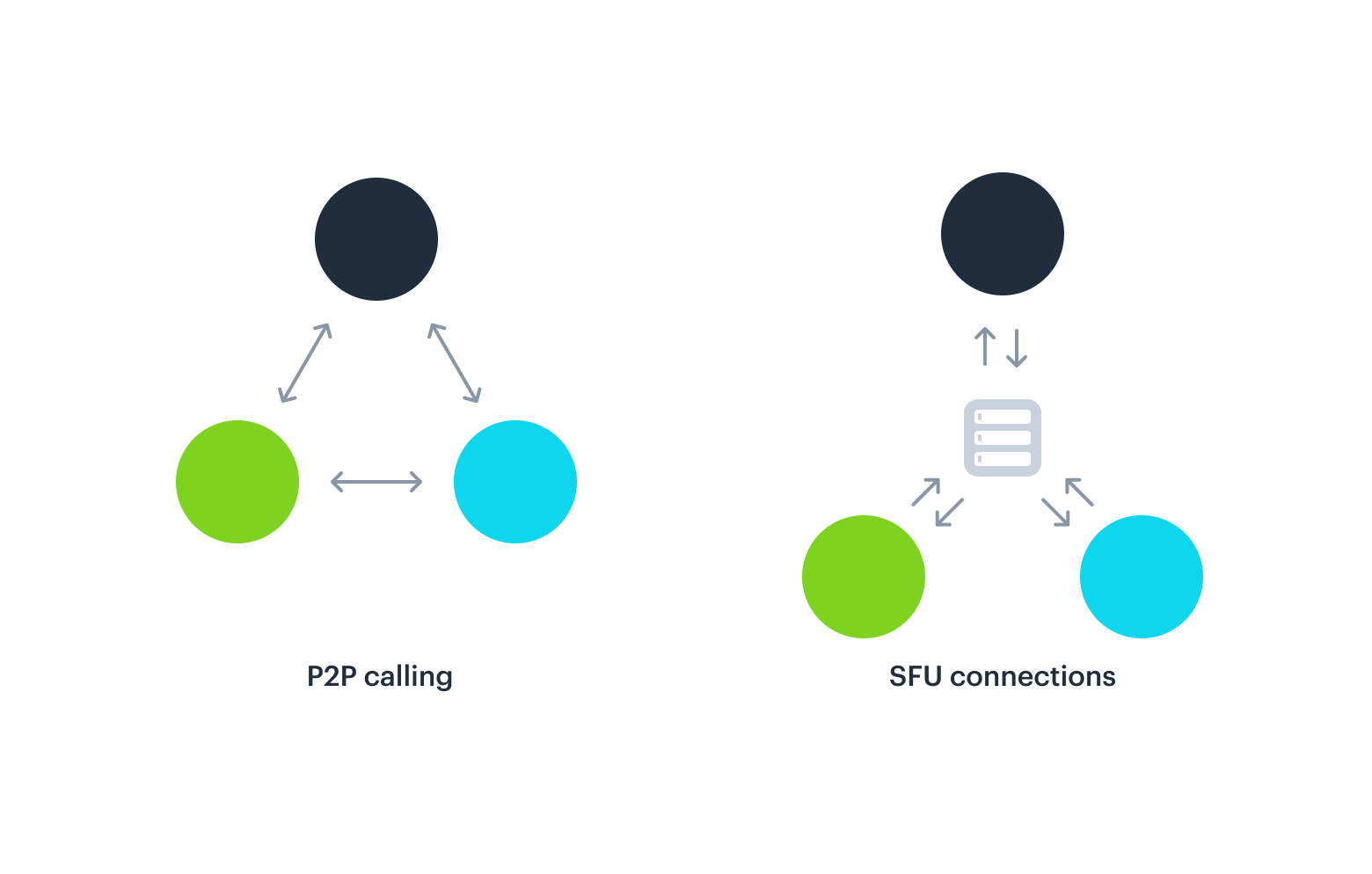
How media actually travels between participants depends on the call’s network topology. Daily supports two models. In a peer-to-peer (P2P) call, each participant’s device connects directly to every other participant’s device. Media flows directly between peers with no central server involved. Because each participant must upload a separate stream to every other participant, upstream bandwidth scales asn-1 where n is the number of participants — making P2P hard to scale beyond very small calls.
In a Selective Forwarding Unit (SFU) call, participants send their media to a central media server instead. The SFU processes, re-encrypts, and routes each track to the correct recipients. Because each participant uploads only once — to the SFU — a call routed this way can use as little as 200 kbps upstream regardless of how many people are on the call.
- More reliable connections
- More control over send and receive settings (including track subscriptions)
sfu_switchover room property to a value at or above the number of participants you want to stay on P2P (for a 1:1 call, set it to 2) via the REST API, or call setNetworkTopology({ topology: 'peer' }) from the Daily JS SDK.
Track subscriptions
Video rooms are based on a publish/subscribe model: participants publish audio and video tracks from their mic and camera, and subscribe to tracks published by others. By default, Daily subscribes each participant to every other participant’s tracks automatically. This works well for small calls, but in large calls — a webinar with hundreds of attendees, for example — most participants don’t need to receive every other participant’s video. Subscribing to tracks you’re not displaying wastes bandwidth and CPU. Daily track subscriptions let you control this precisely: subscribe to the tracks you’re displaying, stage nearby pages, and unsubscribe from the rest. This is the foundation of features like pagination, breakout rooms, and large-scale broadcasts.Track subscriptions are only available on SFU calls.
Call quality and bandwidth
The biggest factor affecting call quality is the number of active video streams. Each video stream a participant receives requires bandwidth to download and CPU to decode. As a rough guide:- Each incoming video stream requires approximately 75 kbps downstream
- A participant’s total upstream is only ~200 kbps, regardless of how many others are on the call (thanks to the SFU)
- So a 10-person call needs roughly 200 kbps up and 750 kbps down per participant
- Most modern laptops handle 30 simultaneous streams; older devices and mobile clients start to struggle around 12
Summary
- WebRTC handles encryption, adaptive bitrate, and real-time media transport — Daily builds on it so you don’t have to.
- Daily defaults to SFU for all calls. The mesh SFU connects participants to nearby servers and routes traffic over backbone networks, giving better latency than P2P for most real-world calls.
- P2P is an option for 1:1 calls where participants are geographically close and E2E encryption is needed.
- Track subscriptions let you control exactly which streams each participant receives — essential for calls with more than a handful of participants.
- Bandwidth and CPU are finite. The fewer streams a participant has to decode, the better their experience. Design your UI with this in mind.