

Prerequisites
- A Daily SIP trunk — note its
sip_urifrom the create call, for examplesip:examplecorp-supportvonage.siptrunk.sip-us.daily.co. - A Vonage account with a voice-enabled number.
Configure the trunk
1
Create a SIP trunk
In the Vonage dashboard, open Voice → SIP Trunks and click Create New. Give the trunk a name and a
domain name; the trunk is where you configure inbound routing and link your numbers.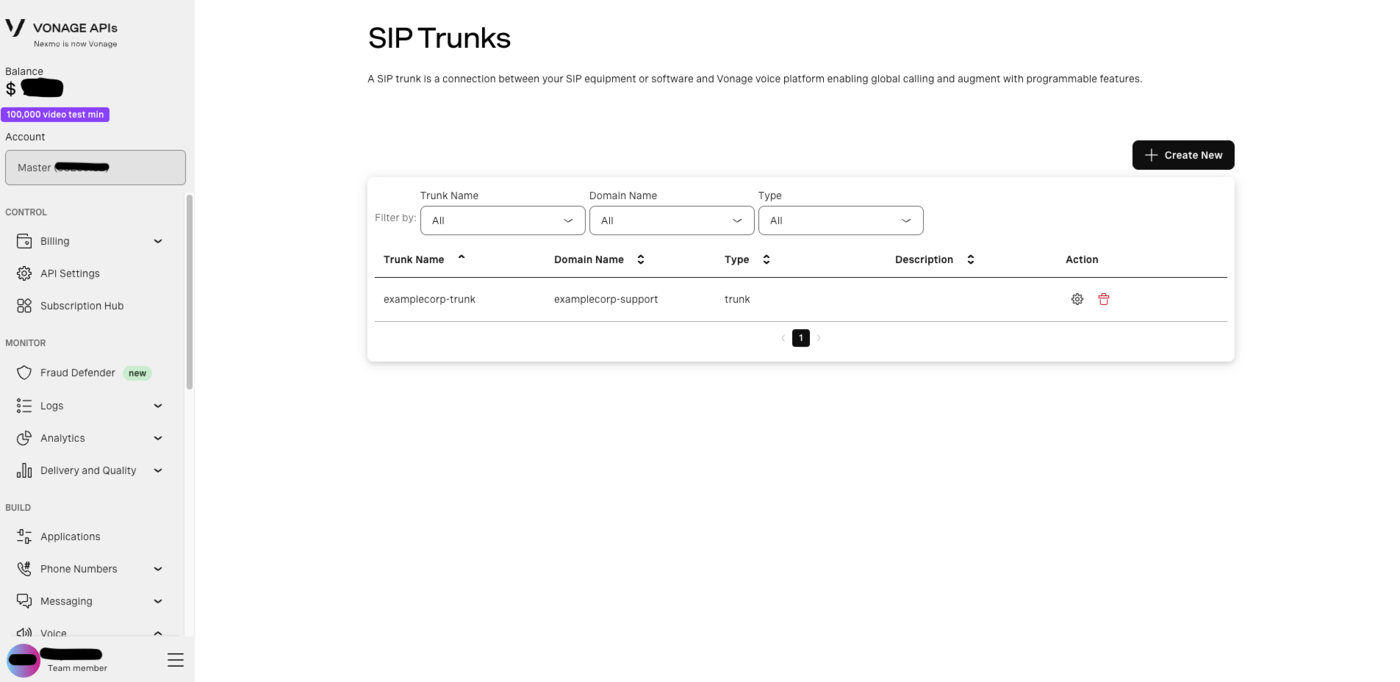
2
Point the trunk's SIP URI at Daily
Open the trunk’s Inbound Calling section.First, under Select Region, choose the region where all inbound PSTN calls to numbers linked to this trunk
will be handled. Pick a US region — Daily’s trunk host is 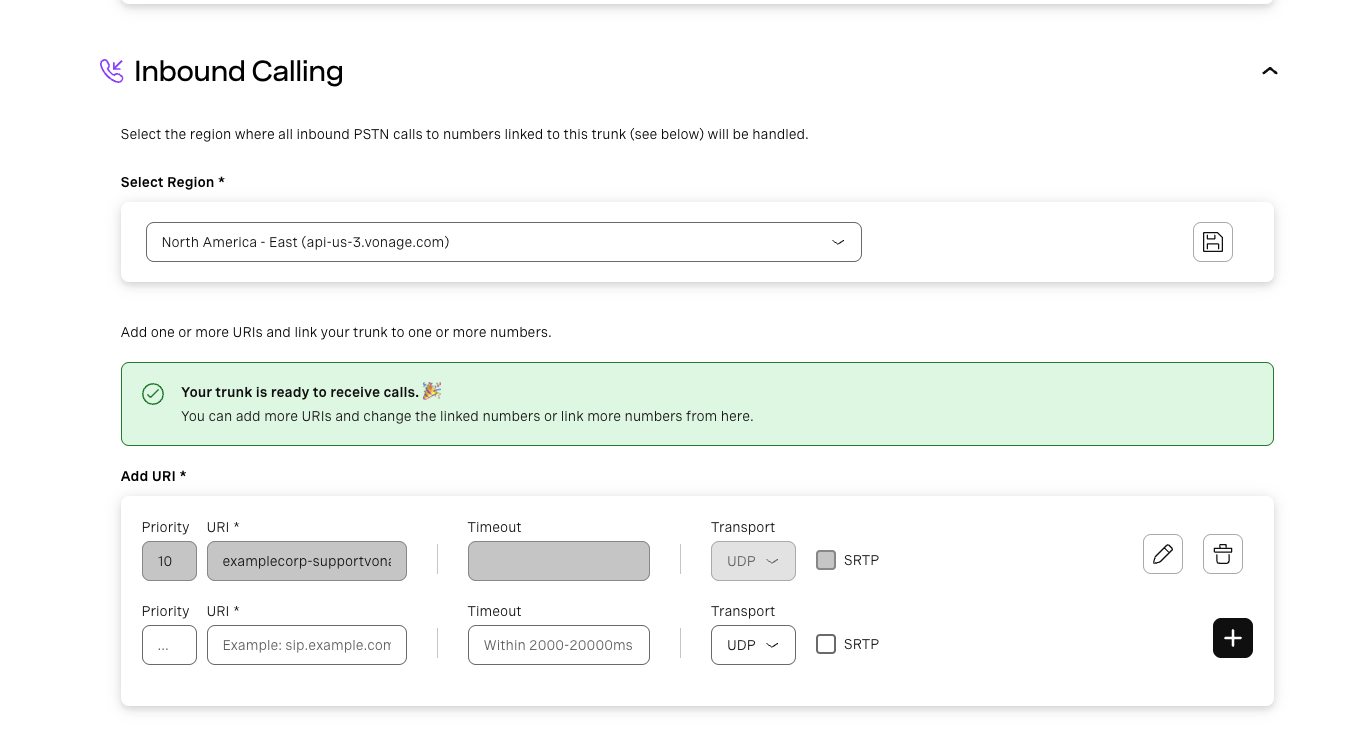
sip-us, so a US region keeps the call on the
shortest path. Save the region before adding URIs.Then, under Add URI, add a row pointing at your Daily trunk host:- URI —
examplecorp-supportvonage.siptrunk.sip-us.daily.co. Host only, nosip:scheme and no user part. Vonage places the dialed number in the user part of the request URI; Daily routes on the host label and ignores it, so nothing on your side depends on its format. - Priority —
10is fine for a single destination. Lower is tried first when you have several. - Timeout — optional, in milliseconds (2000–20000). The default is fine: Daily answers with
180 Ringingalmost immediately, so no generous timeout is needed. - Transport —
UDPon port 5060, orTCP/TLS(TLS on port 5061). Daily accepts all three, so prefer TLS for production signaling. - SRTP — tick it if you want encrypted media. Vonage offers
AES_CM_128_HMAC_SHA1_80, which Daily negotiates. Vonage exposes this independently of the transport, so set Transport toTLSwhen you tick it — SDES sends the media key in the SDP, and over UDP that key is in the clear. Left unticked, media is plain RTP.
3
Add your number
Under Link numbers, find the Vonage number that should route to Daily and click Link. Its status
changes from Not linked, and inbound calls on that number now go to the SIP URI you configured.Use Buy more numbers if you don’t have a voice-enabled number yet, or Link all numbers to attach every
number on the account to this trunk.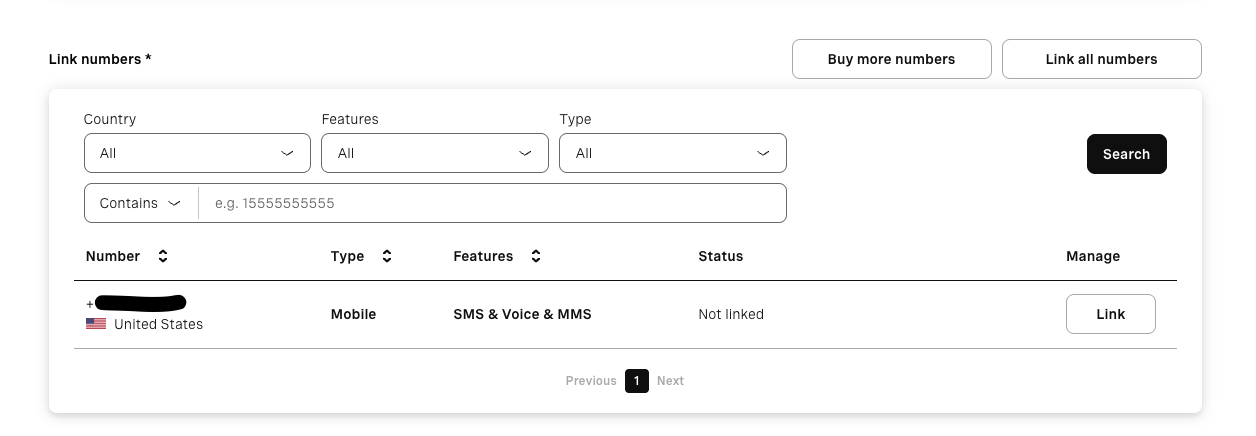
4
Secure the trunk
Add Vonage’s published SIP signaling subnets to the Daily trunk’s
trunk_config.allowed_ips so it accepts
calls from Vonage and nobody else — see Securing the trunk below.Securing the trunk
Vonage signals from a pair of Primary Subnets. Allowlist those rather than individual addresses, so you don’t have to revisit the configuration when Vonage’s infrastructure changes:216.147.0.0/18, not
216.147.5.0/18.
Vonage’s ranges change from time to time, so confirm them against Vonage’s
IP allowlist guide
before you go live.
Codecs
Vonage offers PCMA (G711a), PCMU (G711u), G722, iLBC, G729, and Speex16. By default a trunk room answers with one codec — PCMU unless the trunk’sroom_template.sip.codecs.audio names PCMA or G722 — so keep
that codec enabled on the Vonage side; an INVITE that omits it is rejected with 488 unless Daily has enabled
multi-codec negotiation for your domain. See the guide’s
Codecs section.
Pass caller context (optional)
CustomX-* headers on the INVITE come through verbatim in the notification’s call.sipHeaders (up to 32
headers), so you can map the call to your business context:
Test
Call your Vonage number. Your backend receives thesip_trunk.incoming webhook while you hear ringback; once it
responds 2xx you are connected to the Daily room. A real notification from a Vonage-originated call looks like
this:
sourceIpfalls inside216.147.0.0/18, one of the Primary Subnets from the allowlist above — a quick way to confirm the call arrived from Vonage’s SIP infrastructure.sipCallIdHeaderandfromDomaincarrysip.nexmo.com— Vonage’s SIP infrastructure still signs its signaling as Nexmo. UsefromDomainif you want to branch on carrier.pAssertedIdentitykeeps the quoting from the SIP header, so it arrives as"EXAMPLE CALLER CA" <sip:…>including the quote characters — it is the raw header value.fromDisplayNameis unquoted, so you can show it to a user as-is.sipHeadersis empty unless your upstream attachesX-*headers to the INVITE.
Troubleshooting
- Call fails immediately, nothing reaches your webhook — the source IP isn’t in
allowed_ips. Compare the signaling IP Vonage used against the Primary Subnets you configured. 404from Daily — the SIP URI host doesn’t match a trunk. Re-copy the host from thesip_uriin the API response rather than typing it.- Call is rejected with
488— Vonage did not offer a codec the trunk room can negotiate (by default only PCMU, or the oneroom_template.sip.codecs.audionames). - Call connects but there’s no audio — if the URI has SRTP ticked, check that its transport is
TLSon 5061.