

Multi-instance is not the same as sending one stream to multiple destinations. A single live streaming instance already supports sending to multiple RTMP endpoints simultaneously. Multi-instance is for generating independent compositions — for example, a portrait layout for mobile and a landscape layout for desktop.
Use cases
- Generating a portrait layout for mobile viewers and a landscape layout for desktop viewers
- Presenting an enhanced layout to users with more features enabled (such as premium features or moderation views)
- Defining separate layouts for a live stream and a recording of the same event
Architecture
Daily uses the same underlying infrastructure for recording and live streaming. Recording and live streaming instances that share aninstanceId are linked — updating the layout of one updates the other.
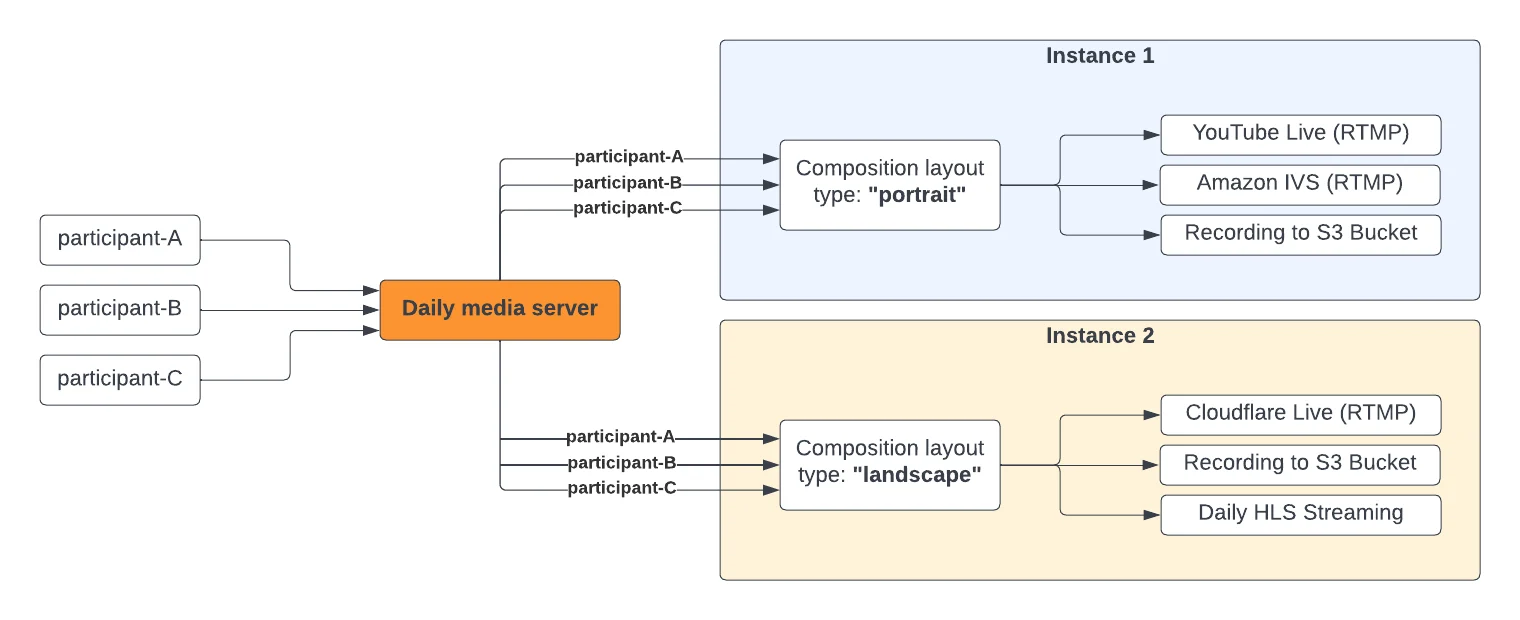
Recording and live streaming with the same
instanceId are interlinked. Updating the layout of a live streaming instance will also affect the recording instance (if any) of that ID.Setting up multi-instance
First, contact Daily support to configuremax_streaming_instances_per_room for your domain.
Then pass a unique instanceId (a valid UUID) to startLiveStreaming() or startRecording():
updateLiveStreaming() or updateRecording() call object instance methods:
instanceId to the stopLiveStreaming() or stopRecording() call object instance method:
instanceId is provided, all subsequent calls to updateLiveStreaming(), stopLiveStreaming(), updateRecording(), and stopRecording() must include the same instanceId.
If no instanceId is provided, Daily assigns the reserved default ID 'c3df927c-f738-4471-a2b7-066fa7e95a6b'.
All live streaming and recording events include an instanceId field so your app can distinguish between running instances.
Using multi-instance with daily-react
Per-instance state TheuseRecording and useLiveStreaming hooks accept an optional instanceId for per-instance state:
instanceId is provided, event callbacks are also filtered to only fire for that instance:
instanceId, hooks return aggregate state across all instances — isRecording and isLiveStreaming are true if any instance is active:
useRecordingInstances and useLiveStreamingInstances: