

The latest updates to the Daily real-time audio and video API.
Dec 23, 2022
In this release, we’ve made a number of performance and bug fixes across our products. Happy holidays!daily-js
0.36.1
- Improved logging to include prejoin logs. Additionally, added new logs for identifying when multiple daily instances are connected simultaneously (multiple daily instances is unsupported and leads to unexpected issues).
- Added server-side support for detecting and warning clients when they are using a
daily-jsversion that is nearing end of support, unsupported, or nearing end of life. Additionally, added a means to reject a client from joining if using a version that is past end of life. - Improved screen-share error handling. Screen-share errors now include more detailed information about how and why the error occurred.
- Fixed background-blur bug where a failure caused the processor to get stuck in a busy state.
- Fixed for slower background-blur frame rate.
- Added better logging around fatal errors and ejections.
- Improved the error messaging in streaming/recording API to clarify the UUID requirement when an invalid ID is provided.
- Turned off debug level logging in large calls.
- Added back the logging for Highest-videoFrameSize.
- Improved logging for debugging cases where users are ejected.
react-native-daily-js
0.34.0
- Improved logging to include prejoin logs. Additionally, added new logs for identifying when multiple daily instances are connected simultaneously (multiple daily instances is unsupported and leads to unexpected issues).
- Added server-side support for detecting and warning clients when they are using a
daily-jsversion that is nearing end of support, unsupported, or nearing end of life. Additionally, added a means to reject a client from joining if using a version that is past end of life. - Bumped the version of
react-native-webrtcto get various fixes for Samsung devices.
Daily Prebuilt
- Improved the robustness of receiving and playing audio tracks in large meetings with many speakers.
- Improved the visibility of the notification snackbar by ensuring that it always appears over the main call area.
- Added a number of performance improvements that result in less CPU use and smoother scrolling through the participant bar when in Speaker View.
- Fixed an issue where Safari on macOS would crash due to overscrolling the participant bar when in Speaker View.
- Improved error handling for screen-share errors.
REST API
- Added documentation about our API rate limiting policy.
Live streaming & recording
- Improved stability of live streams and recordings by borrowing resources across regions if the current region is saturated.
- Fixed a number of bugs including one where our HLS pipeline would hang when using a portrait layout.
VCS
- Added the
omitAudioOnlyparameter that allows one to omit audio-only participants from the composition. Similar to what is possible withomitPausedVideo(omit participants that have their video paused).
Additional
- Fixed an issue where turning on a virtual background would drop the frame rate to 11fps.
The latest updates to the Daily real-time audio and video API, including the ability to add custom tracks to your Daily call.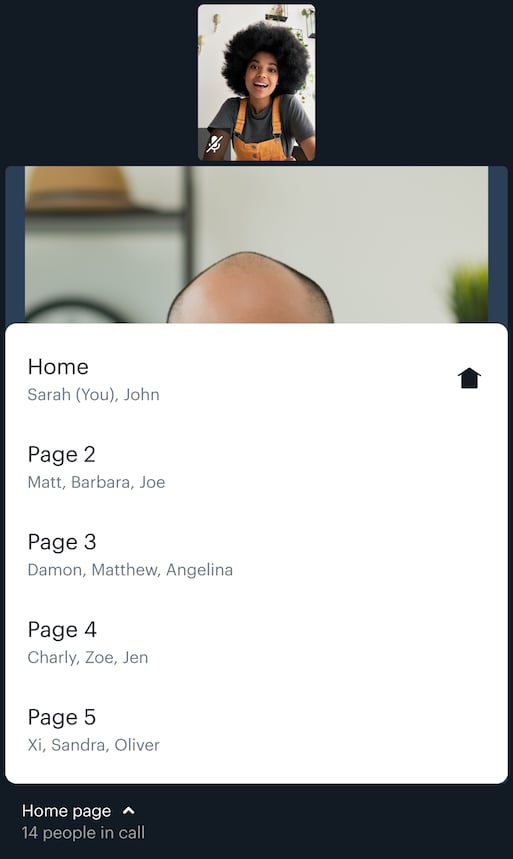
Dec 6, 2022
In this release, we’ve added official support for custom tracks todaily-js. You can now add multiple cameras and/or microphones to your Daily call through supported APIs.daily-js
0.34.0
- Added support for sending custom tracks in addition to camera, mic, and screen tracks. If you were previously using beta methods to do this, you can migrate your code to use the new methods, which support sending custom tracks in peer-to-peer mode.
- Added a
showUserNameChangeUIcall option for controlling whether to display the user name change UI in embedded Daily Prebuilt (trueby default). When set tofalse, you should use tokens to assign participantsuser_names. - Added a
maxDurationoption when starting a recording. The max recording duration is 3 hours if not specified. It is recommended you not touch this setting unless you’re planning on particularly long recorded meetings. - Fixed erroneously-reported track states for
rmpAudioandrmpVideotracks when a remote media player was paused.
0.34.1
- Fixed an issue where custom tracks would not start as expected and would throw an error.
- Fixed an issue where the call state would not be correctly set to
left-meetingupon leaving the call.
0.35.0
- Added detection of playback interruptions in remote media.
- Cleaned up debug logging to reduce log noise.
0.35.1
- Fix a case where a warning log may throw an exception.
react-native-daily-js
0.32.0
- Added a
maxDurationoption when starting a recording. The max recording duration is 3 hours if not specified. It is recommended you not touch this setting unless you’re planning on particularly long recorded meetings. - Fixed a bug where, on iOS 16 or later, selecting a non-bluetooth audio device (using
setAudioDevice()) would erroneously cause the bluetooth audio device to disappear from subsequent calls toenumerateDevices(). - Fixed erroneously-reported track states for
rmpAudioandrmpVideotracks when a remote media player was paused.
0.33.0
- Added detection of playback interruptions in remote media.
- Fixed an issue where changing a device while the media type published by that device is disabled would not take effect. For example, changing from user to environment-facing camera while the camera is off.
- Cleaned up debug logging to reduce log noise.
0.33.1
- Fix a case where a warning log may throw an exception.
Daily Prebuilt
- Revamped the mobile web client’s paging controller. Now you can expand a menu to see the available grid pages, see which participants on each page, and jump directly to a page. You can still swipe through pages, but this allows for faster navigation in larger calls.
- Made a number of performance improvements that reduce the CPU impact, especially in larger calls.
- Show or hide the user name entry UI in the People panel using the
showUserNameChangeUIdaily-jsproperty. - Improved error handling for cloud recordings, so that hosts are always notified when a recording encounters an issue.
Daily React
0.6.1
DailyProvidernow acceptsrecoilRootPropsto control the behavior of its internalRecoilRoot. You can passrecoilRootProps={{ override: false }}to letdaily-reactstore its state in your application’s ownRecoilRoot.- Hooks with event callbacks no longer wrap calling the passed callback in
setTimeout(() => onX.?(ev), 0)to reduce fragmentation of stack traces.
0.6.2
- Prefixed recoil atom keys with
daily-react-to avoid naming conflicts when integrating Daily React with an application based on Recoil itself. - Added
filteroption touseActiveSpeakerIdto allow limiting active speakers to subgroups. - Fixed an issue where
DailyDevicescould throw an error due to a non-existentlocalparticipant object. - Fixed
DailyAudioto only consider subscribed audio tracks.
Additional
- Fixed an issue where the video track’s frame rate would drop when background effects were applied.
The latest updates to the Daily real-time audio and video API, including a new Daily React library to build custom video and audio experiences.
Nov 14, 2022
In this release, we’re excited to announce support for 1,000 participant real-time calls and 100,000 participant Interactive Live Streams.- Large real-time calls where everyone (up to 1,000 participants) is active, meaning anyone in the call can turn on their devices. This is possible in custom Daily apps and apps using Daily Prebuilt.
- Interactive live streaming of up to 100,000 participants: Up to 25 active participants can join with their devices on in a call, and up to 100,000 participants can join the call in real-time. This is a type of “few-to-many” call setting available through Daily, which supports a group of speakers in a call and a large group of participants.
daily-js
0.32.0
- 🔇 Added support for specifying
startVideoOffandstartAudioOffas part of your DailyCallOptions (you could previously only do this by way of a token or room settings). This gives you another way of controlling whether your camera and mic turn on automatically when youjoin()a call. Specifically, this now allows you to usestartCamera()with one or both devices initially off without having topreAuth()first using a token or room with those settings. - 🐛 Fixed issue where
.destroy()would never resolve when called inside of a"left-meeting"event handler, originally reported via github. Thank you frankie567, for reporting the issue! - 🚰 Fixed a potentially leaked background worker.
0.33.0
- 🗣️ Added support for customizing the audio bitrate using the existing
micAudioModeproperty. For more information, see our audio mode config property docs. - 📝 Added support for more transcription parameters. We now support the
tier,detect_language,profanity_filter, andredactoptions. For more information, see our transcription docs. - ❤️🩹 Fixed an issue where a browser under high load may report a stale websocket when it is actually fine.
- 🗂️ Overhauled the handling and normalizing of
getUserMedia()errors to ensure"camera-error"events are sent consistently across browsers and OSs with more detailed information to help users know exactly what caused the device failure. See the"camera-error"docs for complete information on the new types of errors and information available.
react-native-daily-js
0.30.0
Seedaily-js 0.32.0 notes above PLUS various mobile audio fixes:- 📞 We now emit an audio focus loss event on Android if the user receives a phone call.
- 🔎 On Android versions below 12, we no longer receive an audio focus loss event in situations where the audio from multiple sources would actually be mixed. This issue previously led to remote participants being unnecessarily muted.
- 🦆 On iOS, we’ve replaced
AVAudioSessionCategoryOptionDuckOtherswithAVAudioSessionCategoryOptionMixWithOthersto improve volume of multiple simultaneous streams without the side effect of not being able to hear remote participants.
0.31.0
Seedaily-js 0.33.0 notes above.Daily Prebuilt
- Prebuilt now persists background effects from meeting to meeting.
- An active speaker’s video tile never crops, allowing you to always see their entire screen.
- On mobile devices, now preview your selected camera from the Settings menu.
- Fixed an issue on desktop Safari that prevented users from recovering from a device error in certain cases.
- Fixed an issue where a user’s video quality settings weren’t correctly applied to Grid View.
- Fixed an issue in Picture-in-Picture mode where participants would appear as a black box.
- Improved the UI copy throughout the app, including improved Swedish translations.
Daily React
- Daily React Hooks is now Daily React! 🚀
- Three React Components were added to the Daily React library: DailyAudio, DailyAudioTrack, DailyVideo.
- Added a new useActiveSpeakerId hook, which gives participants easy access to the active speaker’s ID.
- Added more options to the useTranscription hook.
Mobile SDKs
- iOS and Android SDKs now support using tokens in order to access private rooms.
REST API
- Multi-instance recording and live streaming is now available through the REST API (via the
instanceIdparameter). Multi-instance enables multiple layouts per recording or stream.
Streaming & Recording
- 🔮 Improved filters on Transcription support via Deepgram.
Additional
- 💳 Now unlock up to 100k programmatic rooms by adding a credit card to your Daily account.
The latest updates to the Daily real-time audio and video API, including the ability to record individual media tracks to your own AWS S3 bucket.
October 17th, 2022
Dashboard
- 🐛 Made a few bug fixes like adjusting the tooltip focus handler.
Daily Prebuilt
- Added more adjustments to ensure that the active speaker and screen share render properly in picture-in-picture mode.
- Fixed an issue where iOS users would lose audio when accessing the Settings menu.
- Improved the browser autoplay detection logic to only alert users when necessary.
Live Streaming & Recording
- 📣 You can now record each individual media track into your AWS S3 bucket via
raw-tracks.
Security
- 🔐 Single sign-on (SSO) is now available for all accounts with the Premium Support add-on. To get SSO turned on for your account, please reach out to support at help@daily.co.
The latest updates to the Daily real-time audio and video API, including new live streaming, recording, and a new REST API endpoint to send app messages.
October 4th, 2022
Daily Prebuilt
- 🐛 Made a few bug fixes and optimizations, like making sure the the prominent speaker doesn’t change too frequently when many people join a call at once. This makes call joining feel less chaotic.
Dashboard
- 💅 Lots of UI polish, as usual, like simplifying the focus/hover styles.
-
🧱 Audience reactions can be enabled (via
enable_emoji_reactions) for rooms and domains.
REST API
- 📣 Live streaming, recordings, and send-app-message REST API endpoints are now available in beta.
VCS
- 🎥 Added
videoSettings.maxCamStreamswhich limits the number of non-screenshare streams that are included in the output.
The latest updates to the Daily real-time audio and video API, including bugfixes and VCS improvements.
September 26th, 2022
Daily Prebuilt
- 💅 Lots of UI polish, as usual, like a scrollable tab list for the sidebar.
- 💬 Incorporate feedback to audience reactions, like keeping the reactions tray open to allow multiple reactions in a short time.
- ✋ Enable hosts to lower a participant’s hand.
- 🎼 We’ve updated the join, error, and knocking sounds.
- 🎨 Call participants now see both the active speaker and the active screen share in PiP (Picture-in-Picture) mode.
Live streaming & recording
- 🐛 We fixed a bug that removed panning when mixing stereo channels.
VCS
- Allow active speaker highlight to be disabled in grid mode.
-
🐛 We fixed a bug where
cornerRadiuswas not applied properly.
The latest updates to the Daily real-time audio and video API, including a new permissions system and bugfixes.
September 15th, 2022
daily-js 0.31.0
-
🔐 A new permissions system allows you to specify a couple of different permissions for each participant:
canSend, which specifies which kinds of media the participant is allowed to send ('video','audio','screenVideo','screenAudio').hasPresence, which specifies whether the participant appears as “present” (as opposed to “hidden”) in the meeting, i.e. whether they are listed in everyone’sparticipants().
- Initial default permissions for new participants in your domain, room, or meeting token configurations
- A meeting owner can change other participants’ permissions at runtime with a call to
updateParticipant()orupdateParticipants(), e.g.updateParticipant('<participant-id>', { updatePermissions: { canSend: new Set(['video', 'audio']), hasPresence: true } })
-
📌 The code that
daily-jsdownloads before you join a call is now “pinned” to this version ofdaily-js. That means you will no longer get (in many cases, unwanted) updates to Daily client-side code without updating yourdaily-jsdependency. Read more about this change in the last version’s release notes. -
🐛 We fixed a bug where if you attempted to update your desired max spatial layer for some subscribed media (for example, via
updateReceiveSettings({ '<participant-id>': { video: { layer: } } })) while the subscription was still being established, the updated layer would never take effect. -
🏔
getNetworkTopology()will now return the currently-chosen topology as soon as we know it, not after a delay. - 🪵 We’ve stopped polluting your Sentry logs with our noisy breadcrumbs.
-
👤 If you invoke
setUserData(null), other participants will see youruserDatachange tonull, notundefined.
react-native-daily-js 0.29.0
- 💪 Includes all of the above changes, except the fix for
getNetworkTopology(), which doesn’t apply to SFU-mode-only React Native.
The latest updates to the Daily real-time audio and video API, including bugfixes and streaming improvements.Dynamic updates to previous
Today, if you’re using
August 22nd, 2022
daily-js 0.30.0
⚠ Notice: May require action
Dynamic updates to previous daily-js versions will end
Today, if you’re using daily-js in call object mode, you may have noticed that certain bug fixes and updates are applied automatically to your client code, regardless of the version of daily-js you’re using. Sometimes, these dynamic updates can introduce slight changes to the behavior of the API.We’ve received feedback from developers who are looking for more stability and want more control over when these fixes and updates end up in their client implementations.So, starting in an upcoming version of daily-js, bug fixes and updates will no longer be automatically applied to previous versions of daily-js, reducing unexpected changes for users of our library.Going forward, if you’re using a numbered version of daily-js in call object mode, you will need to periodically update to the latest version in order to receive any of the latest fixes or improvements*.If you’re using daily-js to embed Daily Prebuilt, there’s no change; you’ll continue to get the latest embedded Daily Prebuilt experience (though you might choose to regularly update daily-js to take advantage of its latest API improvements*).*Note: Daily commits to supporting previous daily-js versions released up to 6 months ago, so you’ll want to at least update to stay within that support window.Features
-
🚀 Allow setting an idle timeout for streaming
When a user switches to another tab, some browsers throttle the CPU and cause their stream to pause. Idle timeout logic on our worker will stop livestreams or recordings automatically in this scenario, so we now allow users to override this behaviour and let streams run on for a configurable time before timing out as idle.
Control this behaviour by setting the new key
minIdleTimeOutto a number of seconds in the DailyStreamingOptions object supplied to either thestartRecordingorstartLivestreamingdaily-js methods. For example: -
💻 Update streaming/recording APIs to allow specifying an
instanceId. This lays the groundwork for supporting multiple active recording and/or livestream instances per call. [Coming soon] -
📷 Add new
selected-devices-updatedevent which will fire whensetOutputDeviceAsyncis called, to allow applications to respond to output device changes. -
🐛 Bugfix: Allow
joined_atto be undefined, and prevent it from being set before it has a reasonable value. (Fixes Github issue #191).
react-native-daily-js 0.28.0
- 💪 Includes all of the above changes!
The latest updates to the Daily real-time audio and video API, including performance and security improvements.
July 29, 2022
In this latest release, we’ve included several quality-of-life and security improvements. These include new React hooks to retrieve data more efficiently, performance optimizations, and more!daily-js 0.29.0
- 🙈 Bugfix: Removed the need for a Babel-specific workaround to avoid
unsafe-evalin the Content Security Policy. For more information, check out our Content Security Policy guide
react-native-daily-js 0.27.0
- 🚀 We’ve added support for React Native 0.69 and up.
Daily Prebuilt
- 🗣️ Speaker view received some performance optimizations by reducing the number of speaker “swaps”.
- 💅 Lots of UI polish, as usual, like making sure those extra long names truncate when they should.
- 🐛 Bugfix: Daily Prebuilt on iOS wasn’t always resuming your video after switching apps. We fixed this to make sure you can always check other apps without worrying about your video call getting interrupted.
daily-react-hooks 0.3.0
- 🪝 Get the local user’s session ID without triggering unnecessary app re-renders using our new custom hook:
useLocalSessionId - 🙋♀️ Another new custom hook to help reduce re-renders:
useParticipantProperty: The participant object contains a lot of information, so you can use this hook if you only want to watch for changes on a specific property.
The latest updates to the Daily real-time audio and video API, including improvements to device management methods.
July 7th, 2022
daily-js 0.28.0
- Avoid camera “blips” by only updating video or audio with
setInputDevicesAsync(). You can now passnullas a device ID if you only want to update your microphone or camera and not affect the other device.
- Out with the old and in with the async!
setOutputDevice()is now deprecated.setOutputDeviceAsync()can (and should) be used in its place starting with this release.
Daily Prebuilt
- HIPAA-enabled domains can use Daily Prebuilt’s UI to start recordings that will specifically be stored in a custom AWS S3 bucket. Read our guide on how to get set up with custom S3 buckets, as well as more information on our HIPAA setting.
Dashboard
- Configure default chat settings at the domain level through the dashboard.
- Enable chat for HIPAA-enabled domains through the dashboard. (And, yes, Daily Prebuilt chat is HIPAA-compliant. 🤗)
VCS
- The VCS SDK is officially live! 🎉 Read our VCS SDK docs and announcement post to learn more.
The latest updates to the Daily real-time audio and video API, including a new pricing structure and improved large meeting support.
June 16, 2022
In this release, we’ve added a ton of support related to two big product announcements:- A massive increase for the meeting sizes Daily now supports (15,000 participants for real-time interactive live streaming and 300 participants when all devices are on).
- A new pay-as-you-go approach to our pricing structure, which helps ensure developers only ever have to pay for their actual usage (plus extra free minutes, automatic volume discounts, and more).
daily-js 0.27.0
- 🗣️
startTranscription()now accepts alanguageandmodelproperty so you can specify which language and/or model you want Deepgram to use for a specific transcript. Who are we to assume?- The transcription events also include some new information related to these updated methods, including
model,language,startedBy, andupdatedByvalues.
- The transcription events also include some new information related to these updated methods, including
- 👩👩👦 Multiple RTMP URLs can now be provided for a live stream via the
startLiveStreaming(),addLiveStreamingEndpoints(), andremoveLiveStreamingEndpoints()methods. - 🎼 We added new DailyIframe properties to support the high quality audio use case:
micAudioModeanduserMediaAudioConstraints. - ☢️ You can opt in to making
daily-jsbehave in a CSP-friendly way by specifyingdailyConfig: { avoidEval: true }wherever you provide your call options (i.e. in yourDailyIframeproperties). If you do so, usingdaily-jswill no longer require you to use'unsafe-eval'in yourscript-srcdirective. IMPORTANT: you will, however, have to specify'https://\*.daily.co'in its place.
react-native-daily-js 0.25.0
- 🗣️ Transcription improvements: As mentioned above in
daily-js,languageandmodelcan now be set when you callstartTranscription(). - 🤳 Newer versions of React Native are now supported (≥ 0.67)
- 🧅
camSimulcastEncodingsis not just fordaily-jsanymore. It’s now available inreact-native-daily-js, too! - 🎼 The high quality audio properties (
micAudioMode) mentioned above have landed inreact-native-daily-js, too.
Daily Prebuilt
- 🧑🤝🧑 People panel UI improvements have been added to support interactive live stream settings. Interactive live streaming accommodates larger call sizes by making some participants “passive” viewers, so we’ve made sure the participant count now includes passive participants, too.
- 👵 The
enable_new_call_uiandautojoinproperties are now deprecated. Story time: a long time ago (about a year ago) we completely redesigned and upgraded Daily Prebuilt’s UI. We gave ample time for existing customers to switch over to our new UI and now the day we’ve been waiting for has finally come! We’re officially sunsetting our old Daily Prebuilt UI. - 💻 We’ve updated the picture-in-picture (PiP) mode to better handle the screen share use case. You’ll now see the screen sharer in the PiP window, and screen sharers will see the grid of remote participants. (Want to try our beta PiP mode? Use the
enable_pipproperty.) - ⏺️ In HIPAA mode, we’ve added an extra check to make sure cloud recordings can never be enabled as an additional security measure.
- 🙅 Meeting owners can now stop active screen shares. Perfect for when the answer to the common question “Can you see my screen?” is: “Yes, but we’d rather not!”
- 💬 Lots of chat UI improvements to keep even the longest chat threads performant and looking great.
Dashboard
- 💰 Updates to the
/billingpage to support the new pricing structure for new customers. (Existing customers — you’ll be seeing these updates in your Daily dashboard very soon!) Learn more about the new pricing structure in our announcement post. Tl;dr: Daily has dropped pricing plans in favor of pay-as-you-go features.
REST API
- 📣 Support for 15k real-time interactive live streaming went live earlier this month! This launch includes introducing new room and domain properties:
enable_mesh_sfuenable_terse_loggingenable_hidden_participantsexperimental_optimize_large_calls- Read our guide on interactive live streaming to learn more about how and when to use these settings.
- Support for S3 storage for Daily recordings. See our guide on how to get started.
VCS
- 📐 We’re moving over to grid-base units instead of the mix of other relative and absolute units we were using for the baseline composition properties. Previous properties (like
videoSettings.margin.left_vw) will still work for now but are considered deprecated. One unit to rule them all! - 🐛 Bugfix: The aspect ratio of image assets looked a little funky in some cases. We’ve fixed this so your images always look as intended.
- 📖 Spoiler alert: The baseline composition is being open sourced soon to help our customers customize their live streams and cloud recordings even more. We’ve added lots of tweaks to our VCS library to help get it ready for all the customization that’s about to happen.
Launches
- 💰 Introducing new pay-as-you-go pricing with even more free minutes, automatic volume discounts, and more. Learn more in our announcement post.
- 📣 Daily calls just got a whole lot bigger.
- As mentioned above, Daily now supports 15,000 participants in real-time interactive live streams. This means you can have 15,000 participants in a real-time call and up to 10 participants who have their devices on.
- Daily calls now support 300 active participants who can all turn their devices on. This is more than any other WebRTC video API, so we’ll just be over here patting ourselves on the back.
- Read all about both call size increases in our announcement post and interactive live streaming guide.
The latest updates to the Daily real-time audio and video API, including new react-native-daily-js support.
May 17, 2022
In this latest release,react-native-daily-js device support has increased profoundly. You can now retrieve valuable information about local devices, as well as update your local video and audio devices with just a couple lines of code. Additionally, we’ve provided a new participant event so you can be alerted anytime device availability updates. These new additions get react-native-daily-js support even closer to feature parity with daily-js. (If this were a race, it’d be pretty close! 🏃)daily-js is introducing some exciting changes as well that will help developers manage their video calls more easily. We’ve added a new method and event to help keep track of call size changes, and now let you specify your preferred fps for live streams and recordings.Read on for the complete list of updates landing in this release.daily-js 0.26.0
- 📹 New video frame rate configuration:
fps(frames per second). This can be set in the live streaming options, as well as with call recordings. - 🛑 New warning and error messages when clients are using
daily-jsversions that are nearing their end of support or no longer supported. We know it can be easy to put it off so we’ll remind you when it really is time to update your version! - ⛰️ Virtual backgrounds now accept data URL types, in addition to HTTP URLs for the source image, via the
updateInputSettings()method. - 🧮 New instance method:
participantCounts(). Get the total participant count for your current call (and a spoiler for an upcoming feature, while you’re at it!)- New participant-related event:
participant-counts-updated. Listen for changes to your participant counts to keep track of when your call size changes.
- New participant-related event:
react-native-daily-js 0.24.0
- 📝 New instance method:
enumerateDevices(). Retrieve a list of available local video input devices, as well as the input and output audio devices. If it looks familiar, this was already supported indaily-js. React Native developers, we’ve got you covered now! - 👀 New instance method:
getInputDevices(). Similar toenumerateDevices(),getInputDevices()will return device information of the video and audio devices currently in use in a call. - 📹 New instance method:
setCamera(). Update your current camera in use by passing thedeviceIdfound in the return value fromenumerateDevices(). - 📣 New instance method:
setAudioDevice(). Update your current audio input or output devices by passing thedeviceIdfound in the return value fromenumerateDevices(). - New event:
available-devices-updated. Get notified whenever your local devices change, whether you have a new one or lost a connection. - ✔️ Added support for Android 12
Daily Prebuilt
- 🐛 Bugfix: gUM (
getUserMedia()) errors — i.e. device permissions — were sometimes unmuting the local microphone when permissions were provided. We’ve fixed this so you can stay muted until you’re ready to talk.
Dashboard
- 🌈 Lots of UI improvements to keep the dashboard easy to use and nice to look at!
Daily React Hooks
- 👋 The
useRoom()hook no longer has aincludeRoomConfigDefaultsparameter. useParticipantIds()has a new'screen'filter to get participants with active screen shares.- 💫 Lots of improvements related to reducing re-render cycles to improve app performance.
- 🏠 The
useRoom()hook has been updated to make room information available sooner in the lifecycle of the call. - 🐛 Bugfix: the
useRoom()return type was updated toDailyRoomInfo | null.
REST API
- 🌎 New room configuration:
rtmp_geo. Choose where your RTMP stream should originate.
VCS
- 🌐 The VCS baseline composition and VCS Simulator now have two new properties to help customize your video feed:
image.enableFadeandvideoSettings.preferScreenshare
The latest updates to the Daily real-time audio and video API, including several bugfixes.
April 14, 2022
daily-js 0.25.0
- 🐛 Bugfix: In iframe mode, the
leave()Promise resolved a bit earlier than it should have, but we promise it will wait until the participant has completely left the call now. - 🐛 Bugfix: Participant usernames were not always available in the
participant-joinedorjoined-meetingevents. We updated it so you always know who each participant is as soon as they join. - 💀 The
publishflag has been deprecated inupdateInputSettings(). - New types have been added to the
getNetworkStats()response:totalSendPacketLossandtotalRecvPacketLoss
react-native-daily-js 0.23.0
- New types have been added to the
getNetworkStats()response:totalSendPacketLossandtotalRecvPacketLoss
Daily React Hooks
- 🐛 Bugfix:
useLocalParticipantwas hitting a race condition when the local participant was initialized. We made sure you always get the correct response every time.
Additional
- 🐛 Bugfix for Chrome:
setBandwidth()settings were getting lost after stopping a screen share. What was once lost is now found — we’ve made sure this doesn’t happen anymore.
Introducing Daily Prebuilt’s (beta) Picture in Picture controls! Plus, lots of configuration and API improvements.
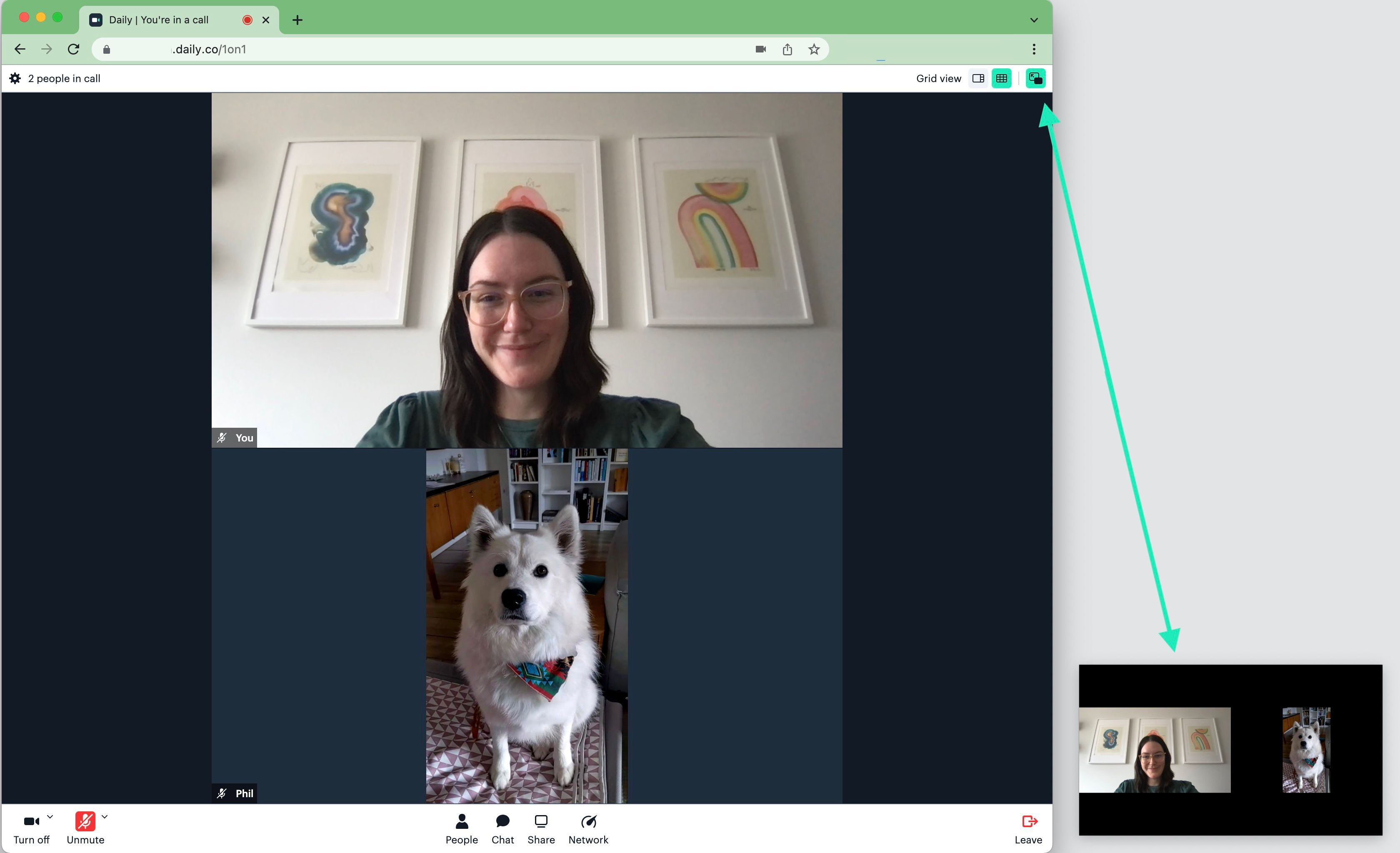
enable_pip_ui configuration turned on either as a domain level property or for specific Daily rooms. It can be used on both desktop and mobile devices in Daily Prebuilt. If you tend to keep lots of apps open or have a hard time focusing during video calls, you will love this feature! 💪In addition to PiP, we’re releasing a bunch of useful API improvements to existing Daily methods and configurations. Our goal is to always make our APIs more flexible so please be sure to let us know if there are specific updates you would be interested in.daily-js 0.24.0
- ✨ Beta ✨ New
enable_pip_uiroom and domain configuration property to enable Daily Prebuilt’s Picture in Picture controls. When PiP is enabled, the video tile will show the active speaker or a grid view, depending on your current Daily Prebuilt settings.
-
🪞 Our
enable_prejoin_uiproperty is now available as a meeting token configuration, in addition to its existing room and domain configuration properties. This new token property will override the room and domain values for the same property. - 🌊 Live streaming improvement: Automatically retry RTMP connections if there is an error unless the URLs have all failed.
-
📦 Advanced: Override default video constraints that Daily uses when it calls
getUserMedia()by providing a new DailyIframe property:userMediaVideoConstraints
userMediaVideoConstraints can be a MediaTrackConstraints object or true when used with react-native-daily-js.-
▶️
persistentTrackis now officially in Daily’s TypeScript definitions! 🎉 Using this track in your app can help avoid browser bugs related to auto-playing media tracks. -
🔀
startCamera()can now be used without aurlparameter, in case you want to change the Daily room in between callingstartCamera()and pre-authenticating or joining the room.
react-native-daily-js 0.22.0
- Advanced: Override default video constraints that Daily uses when it calls
getUserMedia()by providing a new DailyIframe property:userMediaVideoConstraints- See the
daily-jsbullet above foruserMediaVideoConstraintsusage details.
- See the
Daily Prebuilt
- Daily Prebuilt’s new Picture in Picture feature is now in beta! Keep track of the current speaker (or grid) in Daily calls by having their video tile open outside of the browser window.
- 💅 Configure the prejoin UI settings for a participant using a meeting token. This configuration can turn the prejoin UI on or off for a specific participant using a token without affecting the room or domain’s default setting for everyone else.
- The show/hide self view UI logic got an upgrade to accommodate more Daily Prebuilt configurations.
- 🐛 Bugfix: With new browser updates come new bugs. We fixed one related to auto-playing audio in a call for Chromium and Firefox browsers.
REST API
- The
/logsendpoint now has additional entries in themetricsfield:inbound-cam-audiohas four new entries:inbound-cam-videohas five new entries:
Additional
- Daily has a new SFU cluster in
eu-central-1, which helps make server responses even faster regardless of where you’re located. - 🔒 Some extra security improvements.
- 🐛 Bugfix: Device selection issue fixed when using Daily Prebuilt inside an Android WebView.
- 🐛 Bugfix: Prevent browsers from being wrongly detected as “Plan B”.
Introducing server-side recordings in React Native Daily JS, and virtual backgrounds in Daily JS.This release introduces some highly-anticipated new features! Firstly, virtual backgrounds: our Virtual Backgrounds API (currently in beta) allows you to set your video background with the image of your choice. This is an extension of our existing background blur feature from a few releases ago.Virtual backgrounds can be used in desktop Daily Prebuilt calls or in your custom Daily apps to give you a little more privacy in calls regardless of where you’re working. We appreciate any feedback or comments you have on it, especially during this beta period!
daily-js 0.23.0
- ✨ Beta ✨ Virtual backgrounds: Replacing your video background with an image is now supported in Daily Prebuilt and custom Daily apps using the
updateInputSettings()method:
-
🐛 Bug fix: If you set an input device (e.g.
videoSource,audioSource) tofalseat the beginning of a call or during a call (e.g.createCallObject(),join(),setInputDevicesAsync()), the corresponding track state will now be reported asoff. This behavior now matches how muting devices works (e.g. usingsetLocalAudio(false)), which — let’s be honest — just makes more sense. -
☁️ The
cloudrecording type has officially been replaced by what we were previously referring to ascloud-beta. Our newcloudrecording type gives you a lot more control over your recordings while still providing a server-side recording option.
react-native-daily-js 0.21.0
- ⏺️ Server-side recording is now supported! Use
startRecording(),updateRecording(), andstopRecording()to managecloudandrtp-tracksrecordings. Similar to with Daily JS, you can control the recording layout forcloudrecordings on our React Native library, too. Learn more about Daily recordings in our recording guide.
The latest updates to the Daily real-time audio and video API, including gifs in Daily Prebuilt chat and a new daily-js error type.
daily-js 0.22.0
- 🖥 Added a new
nonfatal-errorevent type to report screen share issues. Now if there is an error when a participant starts screen sharing, you can catch it with the following:
- 💬 Updated
app-messageevent to support strictly typed custom payloads. - 🍽 Added ability to serve up
daily-jsusing webpack-dev-server. - 🐛 Other bug fixes and improvements.
react-native-daily-js 0.20.0
- ✅ Check out the release notes.
Daily Prebuilt
- ✨ Launched
/giphyshortcut in text chat for sending gifs. - 👨👩👧👦 Introduced an
enable_people_uiroom and domain property that configures whether the People panel displays in Daily Prebuilt. - 🎥 Implemented confirmation menu when a participant starts or stops a recording.
- 🖥 Improved error handling for screen sharing.
- 🐞 Other bug fixes and improvements.
Daily Dashboard
- 🚪 Added
enable_people_uiproperty option to the Create room page. - 🚦 Streamlined onboarding process when opening a Daily account.
- 🪲 Other bug fixes and improvements.